page 2 Installation and Operation Guide TesiraCONNECT TC-5D
Product Installation
The TC-5D may be installed in almost any location that is convenient for
room design, requirements, etc. Be sure to allow for adequate airflow over
the ventilation grilles.
• On a rack shelf
• In a plenum/air-handling space
• In a cabinet/credenza
Optional Mounting Bracket Kit
An optional mounting bracket may be ordered separately which allows
greater flexibility in mounting options, such as directly under a table, on a
wall, behind a display or any other flat surface that requires secure mounting.
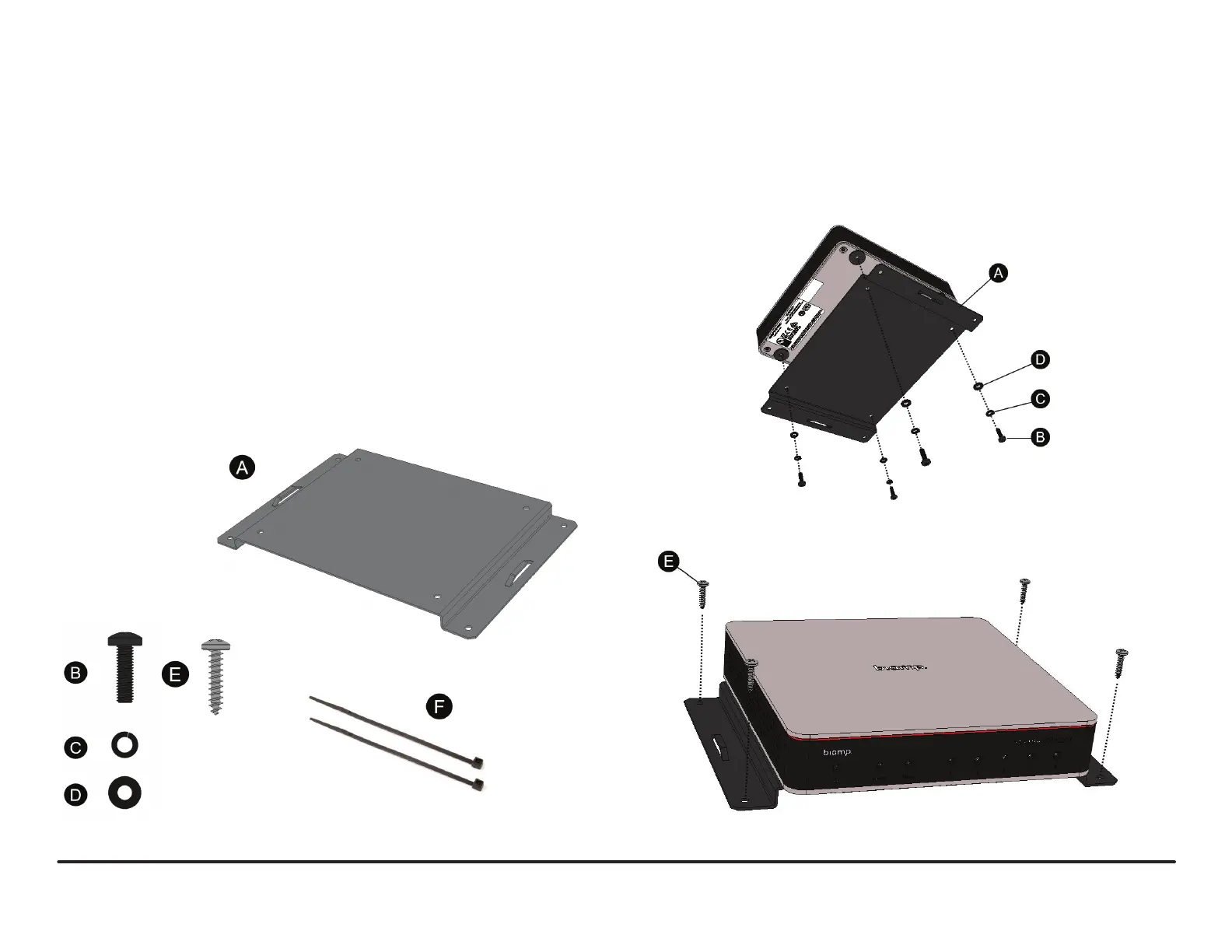
The mounting bracket kit contains the following:
A) Mounting Bracket
B) Screw (x4)
C) Lock Washer (x4)
D) Washer (x4)
E) Screw (x4)
F) Zip Ties (x25)
1. Determine the location where the TC-5D is to be located.
2. Install the bracket onto the TC-5D with hardware as shown in Figure 1.
3. Install the bracket and attached TC-5D at the desired location with the
hardware provided as shown in Figure 2.
4. Use the included zip ties to secure the power supply and cables as
required (not shown).
Figure 1 - Mounting Bracket Installation
Figure 2 - TC-5D Installation


 To Next Page