This document serves as the user manual for the CN505 614Wh Portable Power Station, a device designed to provide power for various mobile and outdoor applications. It aims to ensure safe and efficient use, offering guidance for setting up a power system for mobile homes, camping, hunting, and keeping essential electric devices charged.
Function Description
The CN505 is a 614Wh portable power station, capable of supplying power for a range of devices such as ceiling fans, RV lighting, laptops, and phones. It features multiple output ports including AC, DC, USB, and Type-C PD, allowing for versatile connectivity. The device is designed to be a reliable power source in situations where grid power is unavailable. It incorporates a built-in lithium-ion battery and is equipped with various safety features to protect against electric shock, overheating, and other potential hazards. The power station also includes an LCD screen that displays important information such as battery capacity, remaining time, input/output power, and indicators for over-temperature and fan operation.
Usage Features
Charging the Power Station:
The CN505 can be charged using three primary methods:
- AC Adapter Charger: Connect the product to a socket using the provided AC charger. A full charge typically takes 7-8 hours with a 19V/4.75A 90W AC adapter. It is crucial to use the original adapter to prevent defects. The product may get warm during charging, which is normal. Ensure good contact for wiring to avoid melting or ignition at high temperatures.
- Car Charger: Connect the power station to the car's cigarette lighter socket using the included cable. Charging should commence after starting the car. Similar to AC charging, proper wiring contact is essential. If the car battery is 12V, the product may not fully charge; a 24V car battery allows for a full charge.
- Solar Panel: Solar panel cables must be purchased separately as they are not included. To charge, select a suitable solar panel (DC5521 charging cable 12-24V / Max. 100W) and position it perpendicularly to the sun for optimal exposure. Connect the solar panel to the product. Charging will automatically stop once the product is fully charged. It is important to ensure correct and stable cable connections to avoid high temperatures or sparking. The product should be charged within a temperature range of 32-113°F. Charging time varies with light intensity. If using an MC4 connector solar panel, verify that the positive and negative poles are connected correctly.
Operating Output Ports:
The power station features several output options:
- USB Output Port: Designed to intelligently charge smartphones, MP3 players, digital cameras, electronic readers, and tablet computers. A single USB port offers a maximum output of 12V/1.5A (18W) and supports Quick Charge technology.
- Type-C PD Output Port: Suitable for smart phones and tablets, with a maximum output of 20V/3.0A (60W).
- DC 12V 5521 Output Port: Primarily used for LED light bulb lighting, with a single DC output port providing a maximum of 12V/4A (48W).
- DC12V Cigarette Lighter Output Port: Used for vehicle refrigerators and other 12V equipment, offering a maximum power output of 12V/10A (120W).
- AC Output Port: Intended for notebook computers, cameras, display devices, and other AC-powered equipment. A single AC port provides a maximum power output of 110V (500W). It is important to use electrical products with power below 500W for AC output.
Button Operations:
- Main Power Button: Long press to turn on the LCD screen. Long press for over 3 seconds to turn off the LCD screen.
- DC Power Button: Short press to turn DC power on or off, indicated by "DC" on the LCD.
- AC Power Button: Short press to turn AC power on or off, indicated by "AC" on the LCD.
- USB Power Button: Short press to turn USB power on or off, indicated by "USB" and "type-c" on the LCD.
- LED Light Button: Press to cycle through three brightness levels (Micro bright, half bright, full bright) and turn off. Long press to turn off the LED lights. Double-press to activate or deactivate the SOS light.
- Display Background Brightness: Turn on the power button, then double press it to dim the backlight. Double press again to restore full brightness.
Important Usage Notes:
- Always charge the product to 100% before initial use.
- The battery capacity display icon on the LCD will be dynamic during charging and static when fully charged.
- The over-temperature protection indicator will display for 5 seconds if the discharge temperature exceeds 149°F.
- The fan will activate when the power supply temperature reaches 45 degrees.
- Turn off unused buttons to conserve power.
- If no other operations occur, the AC Port/USB Port will automatically close after 4 hours.
- If the power output is less than 1W when DC5521 or cigarette lighter output ports are on, the power station will automatically shut down after 4 hours.
- Ensure connected electrical products function properly before use. The output will stop automatically under overload protection. If output stops repeatedly, cease use immediately and resolve the issue before resuming. Contact maintenance if needed.
- Noise may occur when connected to broadcast, video players, or TVs.
- The product is designed to retain 80% of its original capacity after 2000 complete charge cycles.
Maintenance Features
Storage:
- Fully charge the device before storage.
- Switch off all power buttons before storage.
- Store in a dry and less dusty place, away from direct sunlight. The recommended storage temperature is between 14°F and 149°F.
- Avoid storing the product in a car, trunk, or other hot places under direct sunlight, as this can lead to product failure, degradation, or thermal issues.
- Fully charge the product at least once every six months to maintain battery health.
Cleaning:
- If the product becomes dirty, use a dry, wrung-out cloth to wipe it clean.
- Do not use gasoline, volatile oil, thinner, kerosene, or other solvents that could dissolve the surface resin.
Troubleshooting:
If the product fails to charge or power other devices, follow these steps:
- Ensure the main power button is turned on.
- Verify that the AC and DC power buttons are on.
- Check the battery capacity; if below 10%, recharge immediately.
- Confirm that the connected load power does not exceed the limit for each port.
If these steps do not resolve the issue, contact the seller for further assistance.
General Safety Guidelines:
- Do not disassemble, repair, or modify the product.
- Keep the product away from fire sources or excessive heat.
- Avoid charging or using the product in wet environments (dew, bathhouse, rain) and do not use water for cleaning.
- Do not touch the product or connector plugs with wet hands.
- Avoid using metal objects to contact the AC output interface.
- If liquid from the product gets into the eye, wash immediately with clean water and seek medical attention.
- Do not dispose of the product as general waste.
- Use only specified AC connections and adhere to connection interface specifications.
- Avoid strong impacts, drops, or hammer strikes to the product.
- Do not place, store, or use the product where it could easily fall.
- Do not move the product while it is charging or in use, as vibration or shock could cause damage or hazards.
- Keep the use and storage area clean to prevent short circuits from powder or small metal contacts.
- Inspect for abnormalities (breakage, crack, leakage, fever, AC line breakage) before use; stop using immediately if found.
- Handle damaged AC wires with care; do not move or unplug them from the input port. Keep AC wires away from heat sources and avoid trampling or pulling them.
- Keep children away from the product.
- Ensure interfaces are fully plugged in to prevent electric shock, heat, or fire.
- Avoid using the product on beaches or dusty places.
- If internal liquid contacts skin or clothes, wash immediately with water.
- Remove the AC cable from the socket during lightning strikes.
- Charge within the specified voltage range (AC 100-240V).
- Do not store or use the product in reverse or sideways positions.
- Stop using immediately if any abnormality (rusting, peculiar smell, heating) occurs.
- Transportation of the product must comply with dangerous goods regulations, especially for air or ship transport due to the lithium-ion battery capacity exceeding 100Wh. Consult the shipping company for details.
- Secure the product during car transport to prevent movement.
- Do not allow the product or AC cable to get wet.
- Use and store the product under specified temperature ranges (use under 113°F, storage under 149°F).
- In case of accidental fall or impact, stop using immediately and contact designated maintenance personnel.
- Read operating instructions for connected electrical products carefully.
- Ensure electrical products are powered off before connecting them.
- Turn off the main power button during storage to prevent discharge and electric shock.
Battery Life:
The battery is not replaceable by customers. The power station is designed to retain up to 80% of its original capacity after 2000 complete charge cycles under normal conditions.
Frequency Switching:
The factory setting for frequency is 60Hz. To switch between 50Hz and 60Hz, long press the power button to turn on the product, then press and hold the power button or AC button simultaneously. The LCD will display the changed frequency.
System Reset:
To restore factory settings (reboot system), insert a toothpick into the reset hole.

 Need help?
 General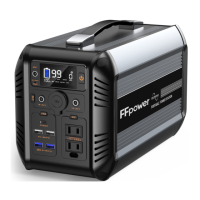

 To Next Page