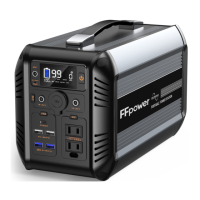
4. Operation Instruction
4.1 Buttons Operation
① .Main Power Button
Power on
: Long press the main power button,and the LCD
screen lights up.
Power off
: Press and hold the main power button over 3
seconds, the LCD screen will be off.
② .DC Power Button
DC power on
: Short press the DC button, the LCD will
display “ DC”.
DC power off
: Short press the DC button, and the LCD will
disappear “ DC”.
③ .AC Power Button
AC power on
: Short press the AC button, the LCD will
display “ AC”.
AC power off
: Short press the AC button,the LCD will
disappear “ AC”.
④ .USB Button
USB power on
:
Short press the USB button, the LCD will
display “ ”.
USB power off
: Short press the USB button,the LCD will
disappear “ ”.
⑤ .LED Button
LED power on
: Press the LED button, there are three scale
of led brightness: Micro bright--half
bright--full bright-turn off, corresponding
to the times pressing LED button.
LED power off
: Long press the LED button,the LED lights will
be turned off.
SOS LED power on
: Double-Press the LED button and the
SOS light will be turned on.
SOS LED power off
: Press the LED button and the SOS light
will be turned off.
USB type-c
USB type-c
12


 To Next Page
 Loading...