• Once you are happy with your
choice, touch
to save.
• Touch
to return to the
Power settings.
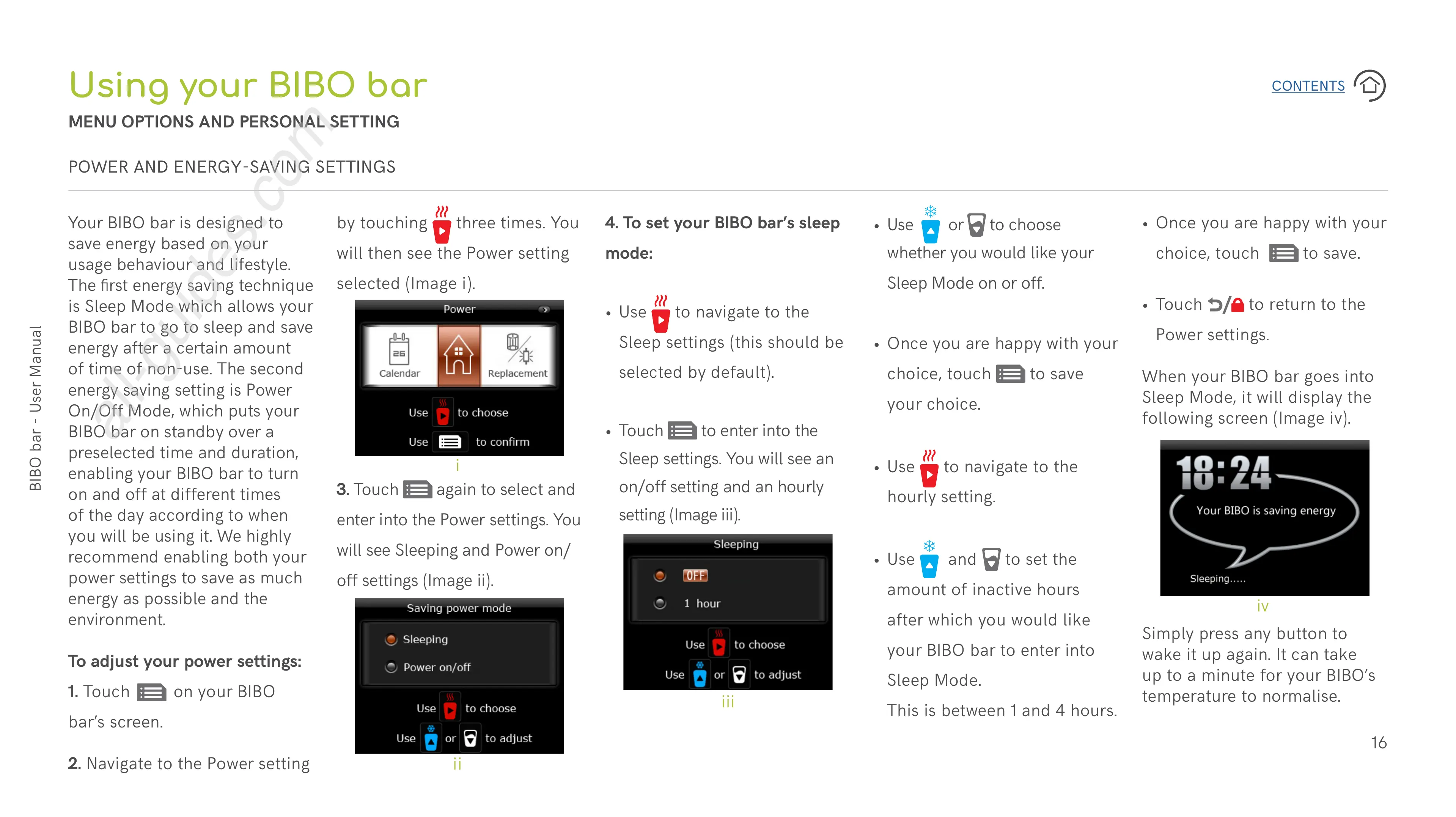
When your BIBO bar goes into
Sleep Mode, it will display the
following screen (Image iv).
4. To set your BIBO bar’s sleep
mode:
• Use
to navigate to the
Sleep settings (this should be
selected by default).
• Touch
to enter into the
Sleep settings. You will see an
on/off setting and an hourly
setting (Image iii).
Simply press any button to
wake it up again. It can take
up to a minute for your BIBO’s
temperature to normalise.
• Use
or to choose
whether you would like your
Sleep Mode on or off.
• Once you are happy with your
choice, touch
to save
your choice.
• Use
to navigate to the
hourly setting.
• Use
and to set the
amount of inactive hours
after which you would like
your BIBO bar to enter into
Sleep Mode.
This is between 1 and 4 hours.
3. Touch
again to select and
enter into the Power settings. You
will see Sleeping and Power on/
off settings (Image ii).
by touching
three times. You
will then see the Power setting
selected (Image i).
Your BIBO bar is designed to
save energy based on your
usage behaviour and lifestyle.
The first energy saving technique
is Sleep Mode which allows your
BIBO bar to go to sleep and save
energy after a certain amount
of time of non-use. The second
energy saving setting is Power
On/Off Mode, which puts your
BIBO bar on standby over a
preselected time and duration,
enabling your BIBO bar to turn
on and off at different times
of the day according to when
you will be using it. We highly
recommend enabling both your
power settings to save as much
energy as possible and the
environment.
To adjust your power settings:
1. Touch on your BIBO
bar’s screen.
2. Navigate to the Power setting
Using your BIBO bar
MENU OPTIONS AND PERSONAL SETTING
POWER AND ENERGY-SAVING SETTINGS
i
ii
iii
iv


 To Next Page
 Loading...