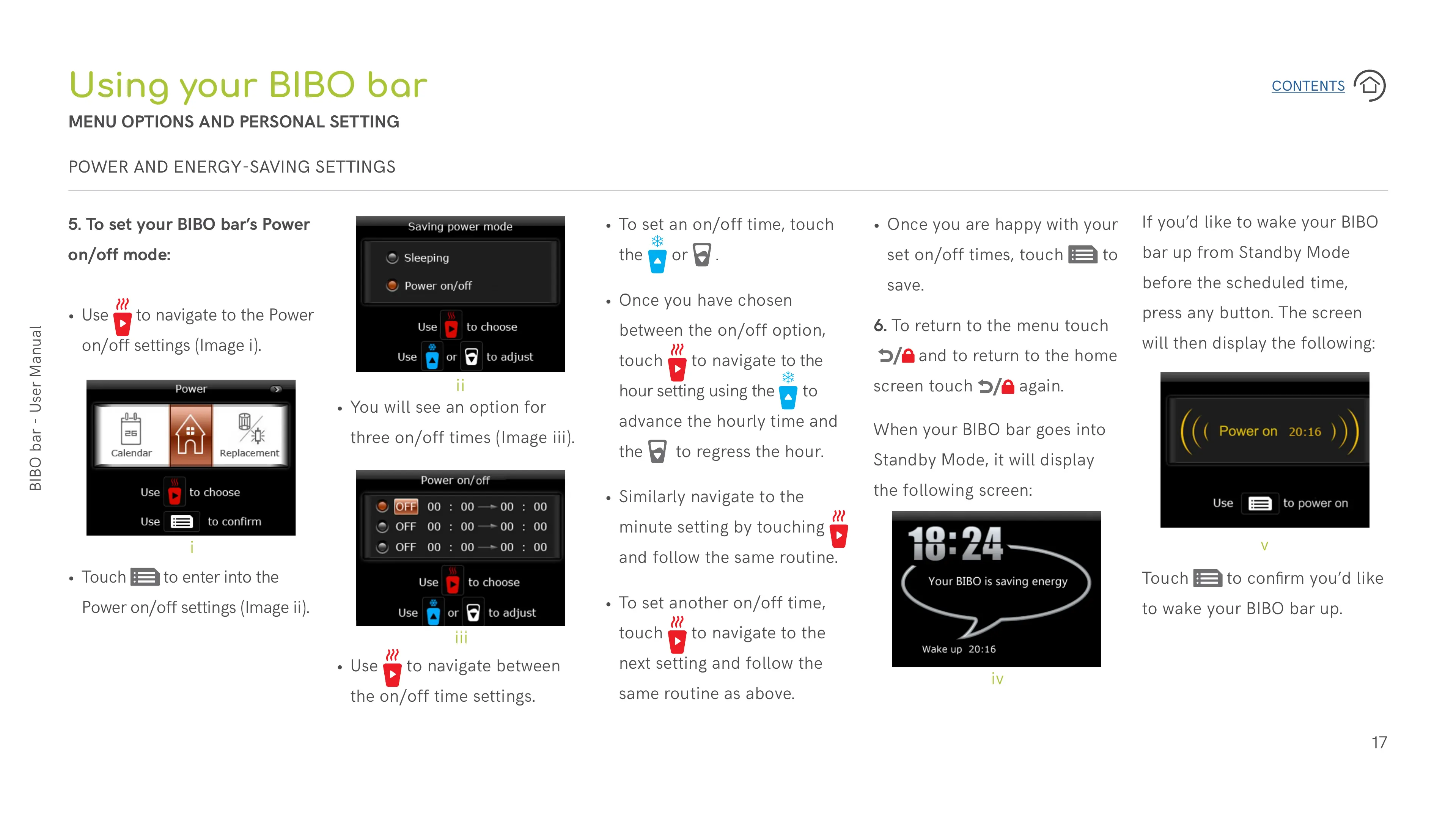
When your BIBO bar goes into
Standby Mode, it will display
the following screen:
If you’d like to wake your BIBO
bar up from Standby Mode
before the scheduled time,
press any button. The screen
will then display the following:
• To set an on/off time, touch
the
or .
• Once you have chosen
between the on/off option,
touch
to navigate to the
hour setting using the
to
advance the hourly time and
the
to regress the hour.
• Similarly navigate to the
minute setting by touching
and follow the same routine.
• To set another on/off time,
touch
to navigate to the
next setting and follow the
same routine as above.
5. To set your BIBO bar’s Power
on/off mode:
• Use
to navigate to the Power
on/off settings (Image i).
• Use
to navigate between
the on/off time settings.
• You will see an option for
three on/off times (Image iii).
• Touch
to enter into the
Power on/off settings (Image ii).
Using your BIBO bar
MENU OPTIONS AND PERSONAL SETTING
• Once you are happy with your
set on/off times, touch
to
save.
i
ii
iii
iv
6. To return to the menu touch
and to return to the home
screen touch
again.
Touch
to confirm you’d like
to wake your BIBO bar up.
v
POWER AND ENERGY-SAVING SETTINGS


 To Next Page
 Loading...