EasyManua.ls Logo

BIC 940 - Trouble Shooting Hints; Unit and Speed Issues; Audio and Tonearm Problems; Automatic Playback Malfunctions

BIC 940
16 pages
Print Icon
To Next Page IconTo Next Page
To Previous Page IconTo Previous Page
Loading...
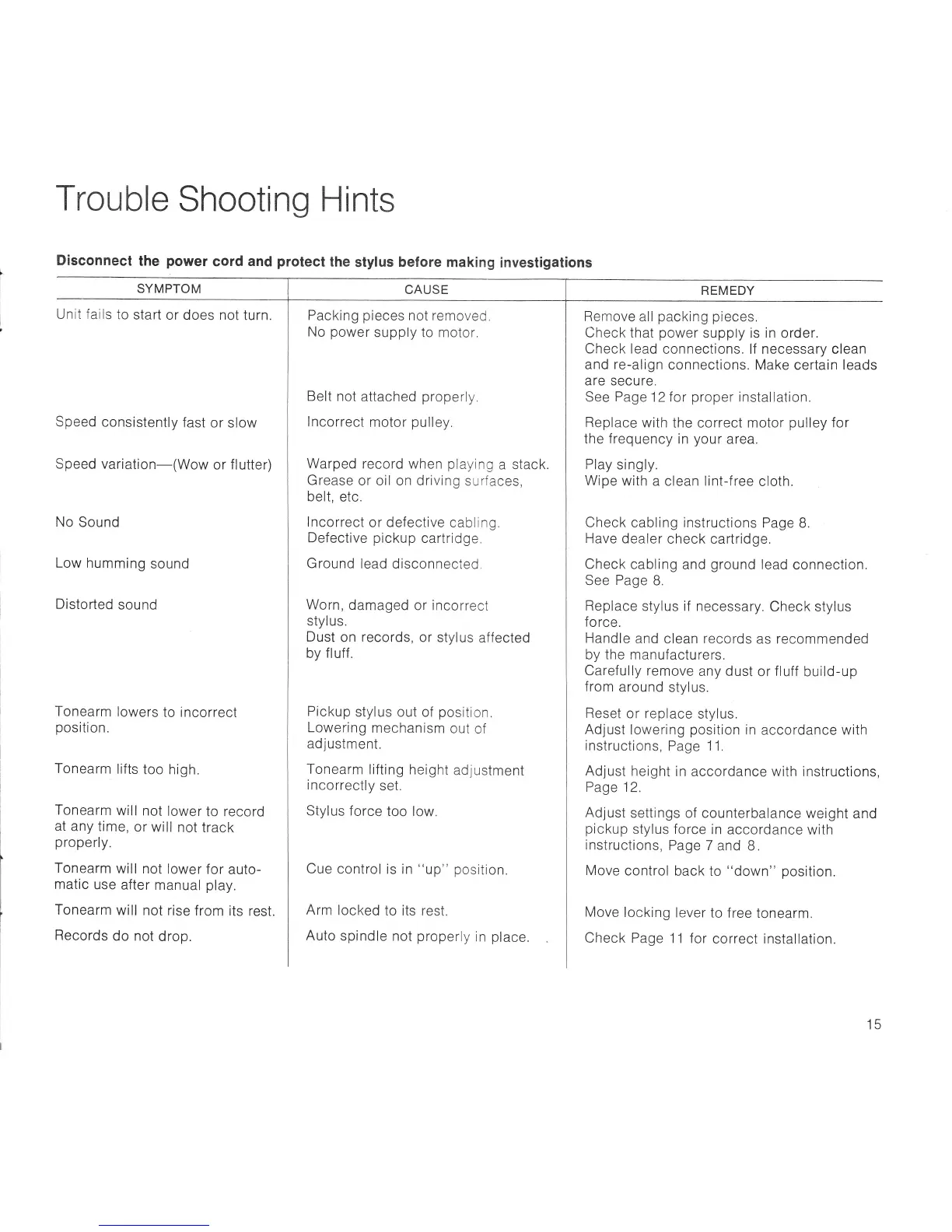
Trouble
Shooting Hints
Disconnect
the
power
cord
and
protect
the
stylus before making
investigalions
SYMPTOM
Unit fails
to
start
or
does not turn.
Speed
consistently
fast
or slow
Speed
variation-(Wow
or
flutter)
No
Sound
Low
humming
sound
Disto
rted
sou nd
Tonearm
lowers
to incorrect
position.
Tonearm
lifts
too
high.
Tonearm
will
not
lower
to
record
at any
time,
or
will
not
track
properly.
Tonearm
will
not
lower
for
auto-
matic
use
after
manual
play.
Tonearm
will
not rise
from
its
rest.
Records
do not
drop.
Packing
pieces
not
removed,
No
power
supply to
motor,
Belt
not
attached
properly.
lncorrect
motor
pulley.
Warped
record when
playing
a
stack.
Grease
or oil on
driving
surfaces,
belt,
etc.
lncorrect
or defective
cabling.
Defective
pickup
cartridge.
Ground
lead
disconnected,
Worn,
damaged or incorrect
stylus.
Dust
on records,
or
stylus
affected
by
f
luff
Pickup
stylus out of
position.
Lowering
mechanism
out
of
ad
justm
ent.
Tonearm
lifting height
adjustment
incorrectly
set.
Stylus force
too low.
Cue
control
is in
"up"
position.
Arm
locked
to
its
rest.
Auto
spindle
not
properly
in
place
REMEDY
Remove
all
packing
pieces.
Check
that
power
supply is
in
order.
Check lead
connections. lf
necessary clean
and
re-align
connections.
Make
certain
leads
are secure.
See
Pag
e
12
for
proper
installation.
Replace
with
the correct motor
pulley
for
the
f
req
uency
in
you
r
area.
Play
singly.
Wipe
with
a clean lint-f ree
cloth.
Check
cabling instructions
Page
B.
Have
dealer
check cartridge.
Check
cabling
and
ground
lead
connection.
See Page
B.
Replace
stylus if
necessary.
Check stylus
fo
rce.
Handle
and
clean
records
as recommended
by the manufacturers.
Carefully
remove
any
dust
or
fluff
build-up
from
around
stylus.
Reset
or
replace
stylus.
Adjust
lowering
position
in
accordance with
instructions,
Page
1
1.
Adjust
height
in
accordance with instructions,
Page
12.
Adjust
settings of counterbalance
weight
and
pickup
stylus force
in
accordance
with
instructions,
Page
7
and B .
Move
control
back
to
"down"
position.
Move
locking
lever
to f ree
tonearm.
Check Page
11 for
correct installation.
CAUSE
15

Related product manuals