EasyManua.ls Logo

BIC 940 - Counterweight and Anti-Skate Setup

BIC 940
16 pages
Print Icon
To Next Page IconTo Next Page
To Previous Page IconTo Previous Page
Loading...
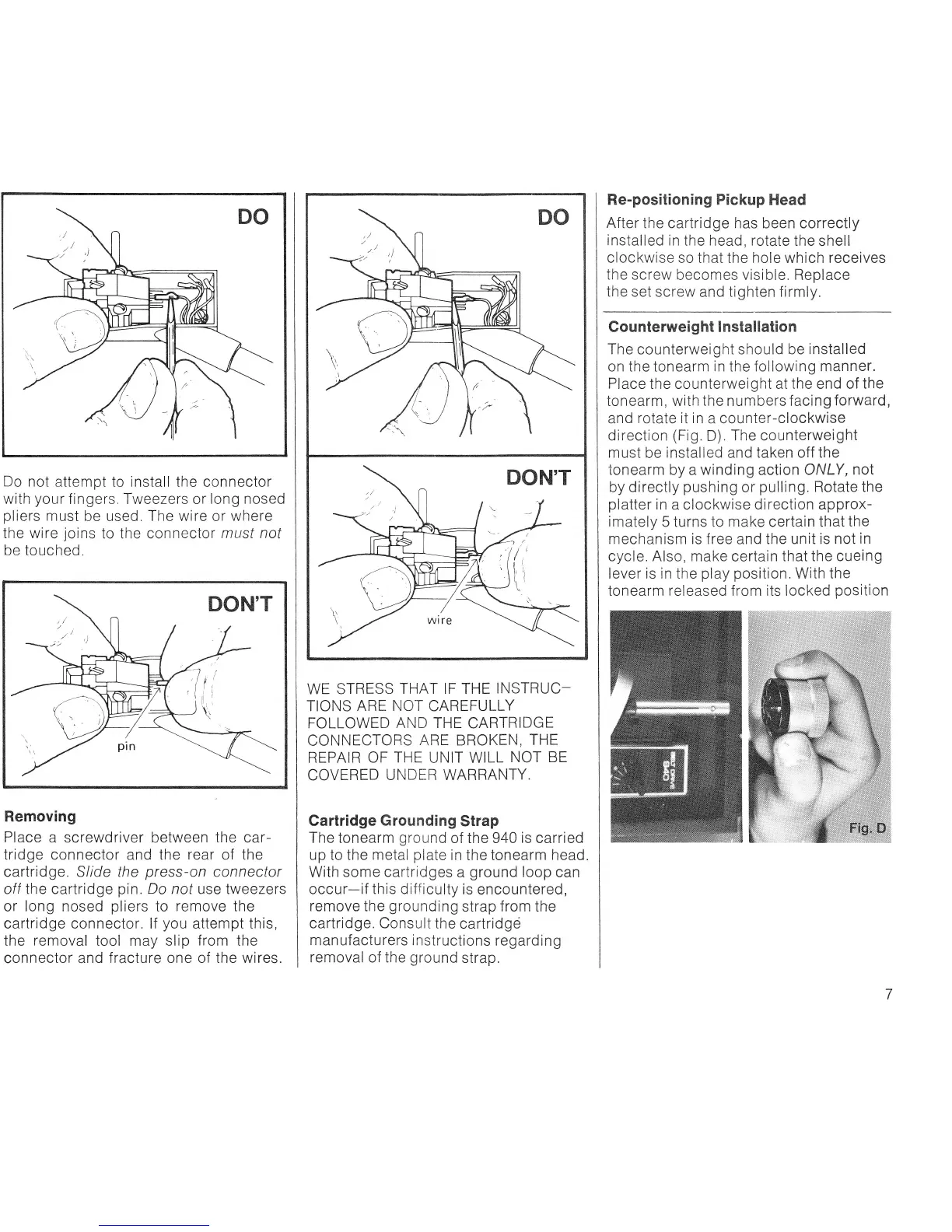
Do
not
attempt to
install
the
connector
with
your
fingers, Tweezers or
long nosed
pliers
must
be used. The
wire
or
where
the wire
joins
to the connector
must not
be touched.
Removing
Place
a screwdriver
between
the
car-
tridge connector
and
the rear of the
cartrldge. S/ide the
press-on
connector
off
the
cartridge
pin
Do not use
tweezers
or long nosed
pliers
to
remove
the
cartridge connector. lf
you
attempt this,
the
removal
tool may
slip
from
the
connector and f racture one of the wires.
WE STRESS
THAT
IF THE
INSTRUC_
TIONS ARE
NOT
CAREFULLY
FOLLOWED
AND THE
CARTRIDGE
CONNECTORS
ARE
BROKEN,
THE
REPAIR OF
THE
UNIT WILL
NOT
BE
COVERED
UNDER WARRANTY
Gartridge
G
rounding
Strap
The tonearm
ground
of the
940
is
carried
up to the
metal
plate
in
the tonearm
head.
With
some cartridges
a
ground
loop
can
occur-if this difficulty
is
encountered,
remove the
grounding
strap
f rom
the
cartridge. Consult
the
cartridgd
manufacturers instructions
regarding
removal
of the
ground
strap.
Re-positioning
Pickup
Head
After
the
cartridge
has been correctly
installed
in the head, rotate
the
shell
clockwise so
that the hole which receives
the
screw becomes visible. Replace
the
set
screw and tighten f
irmly.
Counterweight I nstallation
The counterweight should be
installed
on
the
tonearm
in
the following
manner.
Place
the counterweight at
the
end of
the
tonearm, with
the
numbers
facing
forward,
and
rotate it in
a
counter-clockwise
direction
(Fig
D).
The counterweight
must
be
installed
and taken off the
tonearm
by a
winding
action
ONLY, not
by directly
pushing
or
pulling.
Rotate
the
platter
in
a clockwise
direction
approx-
imately
5 turns to
make
certain that
the
mechanism is f ree
and
the unit
is not
in
cycle.
Also, make certain
that the cueing
lever is in
the
play position.
With the
tonearm
released from
its locked
position

Related product manuals