11
ADJUSTING VOLUME
1. Adjust the volume of Big Blue’s sound by its touch-
sensitive controls. They are located on the top of the
cabinet over the POWER BUTTON.
2. Tap the + or — icons to slowly increase/decrease the
volume or place your finger on the symbols continuously
to increase/decrease the volume at an accelerated rate.
The LED RING will flash during volume adjustment.
ADJUSTING BASS AND TREBLE
To fine-tune your audio depending on
what type of music you’re listening to
through Big Blue, you may adjust the
BASS or TREBLE by turning the knobs
on the back of the cabinet.
LED RING ON/OFF
To control the LED RING light, press the LED ON/OFF
BUTTON on the back of the cabinet.
Min.
Max.
8
733673_INS_Big Blue
Size:5”Wx4.75”H_Output:100%_Prints:1/1,Blk
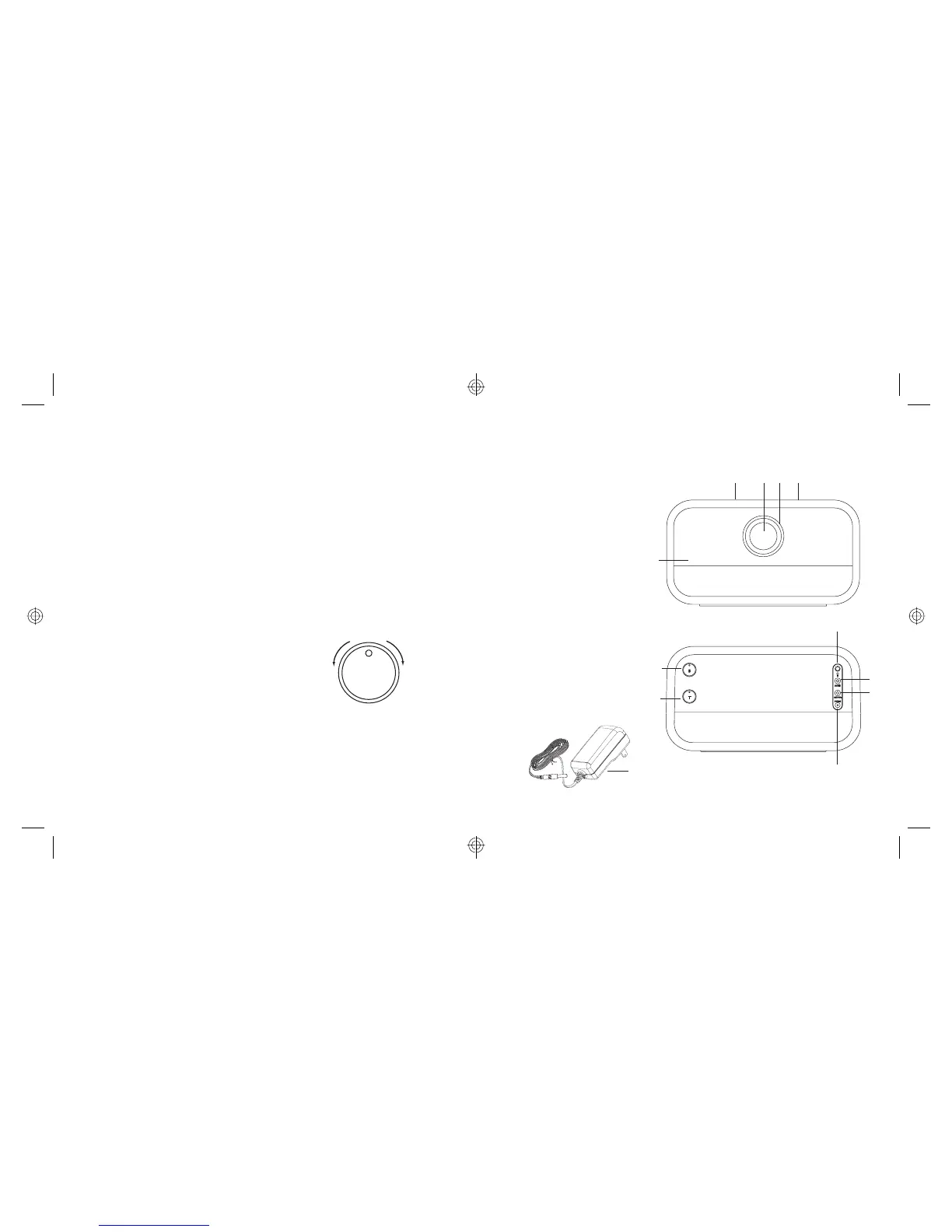
LOCATION OF PARTS AND CONTROLS
1. Power Button
2. LED Ring
3. Volume Up
4. LED Ring On/Off
5. AUX In Port
6. AUX Out Port
7. Power Port
8. Power Adapter
9. Treble Knob
10. Bass Knob
11. Speaker Grille
12. Volume Down
12 1 3
7
4
5
6
11
8
9
10
2



 To Next Page