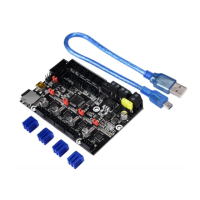
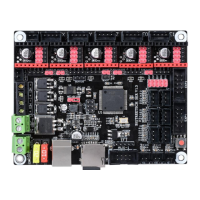
The BIGTREETECH SKR MINI E3 V1.2 is an ultra-quiet, low-power, high-quality 3D printing machine control board, specifically designed to replace the original Ender 3 printer motherboard. It is developed by Shenzhen BIGTREE technology co., LTD.
Function Description:
This motherboard serves as the central control unit for 3D printers, managing all aspects of the printing process. It integrates motor drivers, temperature sensors, display interfaces, and communication ports to facilitate precise control over the printer's movements, heating elements, and user interaction. The board is pre-installed with test firmware for the Ender 3, allowing for direct use or customization. It supports various advanced features such as Neopixel lights, printing after power failure, broken material detection, and automatic power-off after printing completion. The integrated UART mode for TMC2209 drivers simplifies debugging and integration.
Important Technical Specifications:
- Microprocessor: ARM Cortex-M3 series STM32F103RCT6 chip with a 32-bit CPU running at 72MHz.
- Power Voltage: Supports 12V/24V power input. A dedicated power chip is used, and 24V input reduces hot bed current to 1/4, addressing MOS tube heating issues.
- Motor Driver: Integrates TMC2209 drivers in UART mode.
- Motor Drive Interfaces: XM, YM, ZM, EM (for X, Y, Z axes and Extruder motor).
- Temperature Sensor Interfaces: TH0, THB (for hotend and hotbed), featuring 2 channels of 100K NTC (thermal resistance).
- Display Support: Compatible with 2.8-inch TFT, 3.5-inch TFT, and the original Ender 3 printer LCD12864 screen.
- PC Communication Interface: Mini-USB-type B, with a communication baud rate of 115200.
- Supported File Format: G-code.
- Recommended Software: Cura, Simplify3D, pronterface, Repetier-host, Makerware.
- Appearance Size: 100mm x 70.25mm.
- Installation Size: 100mm x 70.25mm, with specific mounting hole dimensions for direct replacement in Ender 3.
Usage Features:
- Open Source Firmware: Equipped with highly modular open-source Marlin2.0 firmware, making it convenient for users to DIY and develop secondary applications without needing to delve into core code.
- Development Environment: Supports powerful development tools like Visual Studio Code, offering integrated development environment features such as online debugging. This aids product development and performance optimization, using C language with a low development threshold.
- Firmware Update: Firmware can be easily updated via an SD card. Users copy the appropriate firmware.bin file (must be lowercase) to the root directory of the SD card, insert it into the main board's SD card slot, and then re-energize or press the reset key. The update completes in approximately 10 seconds.
- Driver Current Setting: Firmware allows setting the driving current mode, eliminating the need for manual current adjustment, which prevents burnout and enhances safety and reliability.
- Expansion Ports: Each driver has four pin expansion ports (DIAG, INDEK, CLK, VREF) for DIY functions, such as using DIAG as an ENDSTOP function.
- Indicator Lights:
- Red Light D3 (Power Indicator): Flashes to indicate normal power supply.
- Red Light D10 (Status Indicator): Flashes during firmware updates and turns off when the update is complete.
- Green Light D6 (Hot Bed HB Status): Always bright when the hot bed is heating, off when not heating.
- Green Light D4 (E0 State Indicator): Always on when the heating rod is heating, off when not heating.
- Green Light D5 (CNC Fan FAN0 Status): On when the fan is turned on, off when the fan is off.
- Computer Connectivity: Connects to a computer via the USB interface. After installing the necessary driver (mapleDrv, available on github.com/bigtreetech), the computer recognizes the port for data transmission.
- SpreadCycle/StealthChop Settings: The hardware selection terminal SPREAD is reserved on the motherboard, allowing users to set Low=StealthChop or High=SpreadCycle directly in the firmware without needing short-circuit caps.
Maintenance Features:
- PCB Design: Features rigorous and aesthetically pleasing PCB board wiring, with specialized optimization for heat dissipation to ensure stable operation.
- Safety Precautions: It is crucial to perform all wiring and driver plug-in processes with the power off. Power should only be turned on after verifying correct connections to prevent damage to the mainboard and drivers.
- Compatibility: While designed for the Ender 3, if used with other machines, users must ensure that the electrical parameters (e.g., hot bed power, heating rod power) do not exceed those of the Ender 3 to avoid damage, as the company will not compensate for losses due to exceeding these limits.
- Firmware File Naming: When updating firmware, the file name
firmware.bin must not be changed, and it must be in lowercase.
- Customer Support: BIGTREETECH encourages users to contact them for any problems encountered or to provide feedback and suggestions for their products.

 Need help?
 General

 To Next Page