5
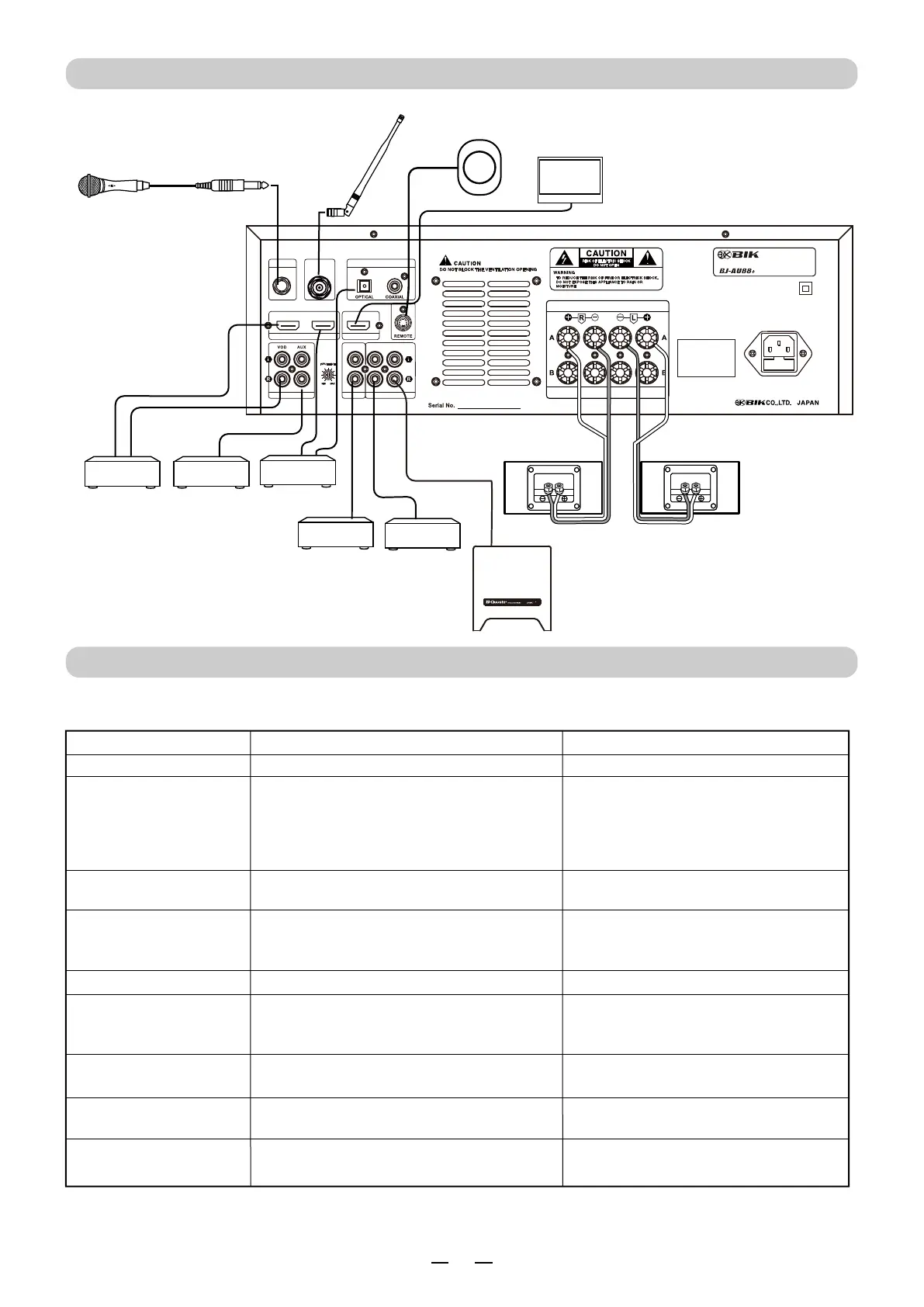
HOW TO CONNECT
● The power amplifier switch is not ON.
● Remote control batteries is not in.
● Batteries ran down.
● Echo volume is minimum.
Without echo.
Can not use remote control.
● Adjust the Echo volume.
● Turn ON the power amplifier.
● Check batteries.
● Change batteries to new ones.
Any troubles? please check the followings. Your careless mistakes may cause troubles.
Consult with your dealers in case any troubles can not be solved after checking the followings.
Can not power ON .
●
The power cord is not connected.
●
Connect the power cord to AC outlet.
Power ON, but no sound.
No sound at beginning of the
music when switched ON.
●
Music volume control or Mic. volume control
may be set to minimum position.
● Music signal choice is incorrect.
● The output cords is not connected correctly.
● The power amplifier switch is not ON.
● Output level of audio component is set to
minimum.
●
Microphone switch is to "OFF".
● The microphone cord broken.
● Microphone plug is not connected.
No microphone sound but
playback the music sound.
● Set it to "ON".
● Repair or replace it.
● Connect it correctly.
● Adjust it to suitable position.
● Adjust for proper sound position.
● Choose correct music signal input.
● Connect the output cord correctly.
● Turn ON the power amplifier.
Trouble
Cause
Remedy
ANY TROUBLES?
MIC A
MIC INPUT
DIGITAL AUDIO INPUT
AUDIO INPUT
MIC OUT
OUTPUT
AC IN
AC 220V-240V / 50Hz
FUSE 5A 250V AC
SPEAKER IMPEDANCE: A OR B: 4 - 8 OHMS
A + B: 8 - 16 OHMS
AC240V/50Hz 500W
QR CODE
WIRELESS KARAOKE AV AMPLIFIER
HDMI INPUT
HDMI OUTPUT
HDMI 2
LOW LEVEL
HI LEVEL
SUB WOOFER
PRE
SPEAKER OUTPUT
HDMI 1
WIRELESS MIC
ANT
Wireless microphone can
not switch ON.
●
Receiver volume is set “ Minimum ” position?
●
Obstacle wave is disturbing?
●
Turn up Receiver volume.
●
Set another channel.
● Connect it correctly once again.
● Change HDMI cord to new ones.
●
Is a battery included?
● Batteries ran down.
●
Please put a battery in.
● Change batteries to new ones.
Noize out of microphone
No sound and no video
at a HDMI connection.
● A connection of a HDMI cord is loose.
● The HDMI cord broken.
TV
Sensor of Remote Control
Microphone
Audio Player DVD
VOD
Recorder
Power Amplifier
Sub woofer
Right Speaker
Left
Speaker
Antenna


 To Next Page
 Loading...