

EasyManua.ls Logo

Billboard BB2714 - User Manual

Billboard BB2714
8 pages
Print Icon
To Next Page IconTo Next Page
Loading...
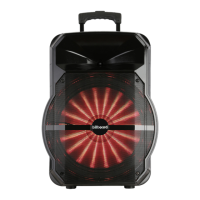
12” PORTABLE
PARTY SPEAKER
Model # BB2714
Instruction Manual
Instrucciones en español incluidas
Question and Answer IconNeed help?

Do you have a question about the Billboard BB2714 and is the answer not in the manual?

Overview

This document is an instruction manual for the Billboard 12" Portable Party Speaker, model # BB2714.

Function Description:

The Billboard 12" Portable Party Speaker is a wireless, portable audio device designed for party environments. It features a built-in amplifier and line mixer, eliminating the need for separate audio equipment. The speaker includes a lithium-ion or lead-acid battery, allowing for extended use without AC power. It supports various input methods for playing music from multiple devices. The speaker also incorporates LED light modes with adjustable brightness for visual effects.
Important Technical Specifications:

  • Model: BB2714
  • Charging Port: Micro USB (#16)
  • USB Output: USB Player/Power Bank 5V 1A output (#7)
  • External Input: DC 9V (#13)
  • FM Radio Frequency Range: 87.5MHz~108.0MHz
  • Bluetooth: Connects to devices via Bluetooth, identified as "RM-212". Compatible with the "Speaker Pro" app for enhanced control.
  • Battery Life: Varies from 2 to 60 hours depending on volume and device type.
  • LED Display: (#1) for status and mode indication.
  • Charging Indicator LED: (#17) Red for charging, Green for fully charged.
  • Sound Effects: EQ modes (Pop, Classical, Jazz, Rock) and adjustable Treble, Bass, and Microphone volume.
  • Light Modes: 12 different LED light modes with brightness adjustment.

Usage Features:

  • Power On/Off: Long press the POWER/INPUT button (#2) for approximately 3 seconds.
  • Mode Selection: Short press the POWER/INPUT button to cycle through modes: USB (if connected), FM, LINE, BT.
  • Volume Control: Use the VOLUME-/+&MENU PUSH knob (#5) to adjust volume from 0 to 30.
  • Menu Navigation: Push the VOLUME-/+&MENU knob to enter the menu, then turn left/right to adjust Treble, Bass, Microphone volume, and switch between 12 Light Modes.
  • Music Playback:
    • Play/Pause: Use the PLAY/PAUSE button (#10).
    • Previous/Next Track: Use the PREVIOUS (#9) and NEXT (#11) buttons.
    • USB Playback: Insert a USB device into the USB port (#7).
    • Line-In: Connect an audio device to the LINE IN port (#6).
  • FM Radio:
    • Switch to FM mode using the POWER/INPUT button.
    • Long press PLAY/PAUSE to automatically scan and save radio stations.
    • Use PREVIOUS/NEXT to switch stations.
    • Manual tuning is available via the "Speaker Pro" app.
  • Bluetooth Connectivity:
    • Switch to Bluetooth mode using the POWER/INPUT button.
    • Enable Bluetooth on your device (phone, tablet) and select "RM-212".
    • Download the "Speaker Pro" app for advanced control over Music, Light, USB Card, Bluetooth, and Equalizer modes.
  • Equalizer (EQ): Press the EQ button (#4) to select preset EQ modes (Pop, Classical, Jazz, Rock). Graphic equalizer settings are available via the "Speaker Pro" app.
  • LED Light Control: Press the LIGHT button (#3) to choose different LED light effects and adjust brightness.
  • Microphone Input: Connect a microphone to the MIC input (#8).

Maintenance Features:

  • Charging: Fully charge the battery prior to first use for maximum battery life. The Charging indicator LED (#17) will be RED during charging and turn GREEN when fully charged.
  • Cleaning: Clean the device only with a dry cloth.
  • Storage: Do not store or operate the product near liquids, heat sources (radiators, heat registers).
  • Safety:
    • Do not remove the cover; there are no user-serviceable parts inside. Refer all servicing to a qualified technician.
    • Do not expose the equipment to rain or moisture to prevent fire or electric shock.
    • Observe all precautions stated in the manual, especially when the warning symbol appears.
  • Warranty:
    • One-year warranty for the speaker, 90 days for the battery.
    • Contact customer service at (212) 883-8838 for troubleshooting and return authorization.
    • Returns require an authorization number, original proof of purchase, detailed problem description, contact information, and a check/money order for return freight payable to "ESI Cases & Accessories."
    • Pack the speaker in its original carton or equivalent, including all accessories, and ensure it is insured for shipping.
    • Warranty covers exchange or repair without charge for parts and labor at ESI Cases & Accessories' discretion.
  • FCC Information:
    • The device complies with Part 15 of the FCC rules, designed to prevent harmful interference in a residential installation.
    • Any changes or modifications not expressly approved by the party responsible for compliance could void the user's authority to operate the equipment.
    • The device complies with FCC RF radiation exposure limits for an uncontrolled environment and must not be co-located or operating with any other antenna or transmitter.
    • This equipment should be installed and operated with a minimum distance of 20cm between the radiator and your body.
  • Battery Recycling: The product contains a rechargeable Li-ion battery. Recycle battery according to local, state, and national regulations.
  • Hearing Safety: It may damage your hearing if you listen with high volume for a long time. It is recommended to use the lowest volume possible for listening to music.

Billboard BB2714 Specifications

General IconGeneral
BrandBillboard
ModelBB2714
CategorySpeakers
LanguageEnglish