7
REMOTE CONTROL
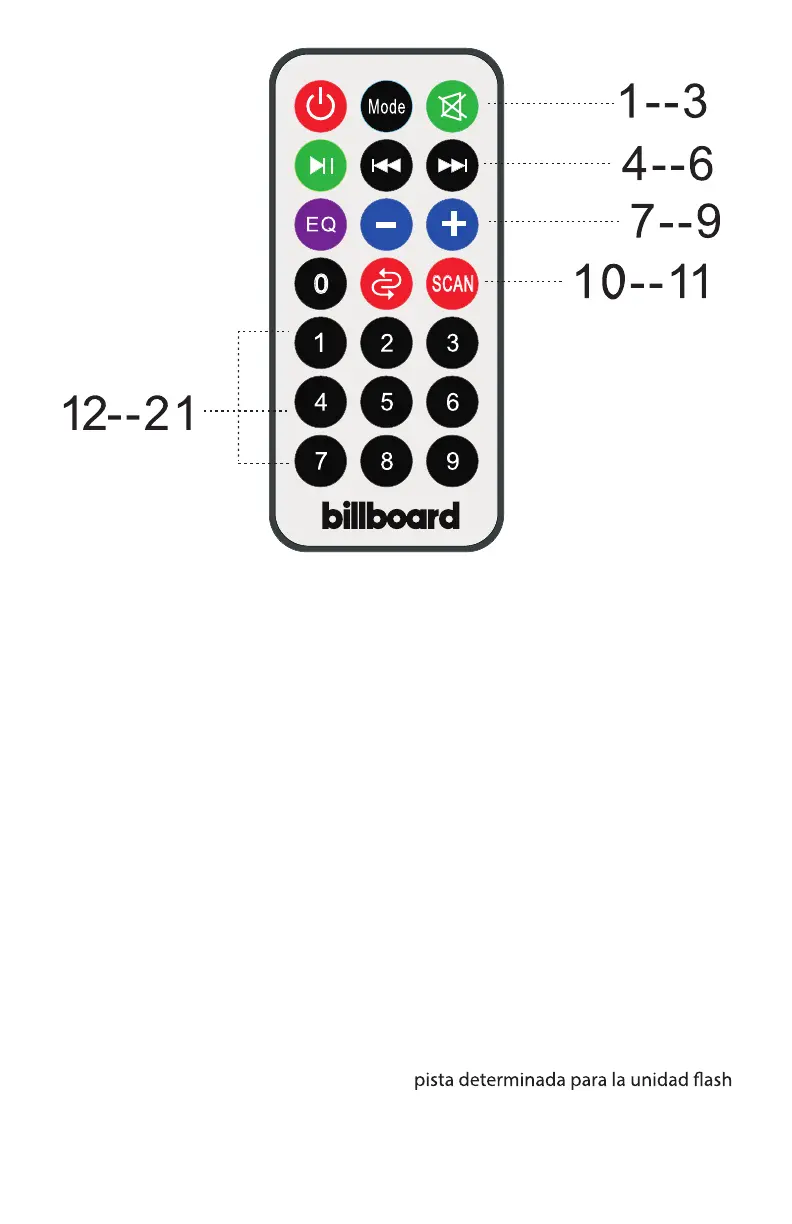
1. STANDBY: Will put the unit in stand
by mode.
2. Input Mode Button: Toggle between
USB,Micro-SD,FM,AUX,Bluetooth
3. Mute: Mute the track
4. PLAY/PAUSE
5. Previous Track: Select Previous
channel
6. Next Track:Select next channel.
7. EQ:Select EQ mode.
8. VOL-:Reduce the master volume
9. VOL+: Incerase the master volume
10. REP: Repeat the playing track.
11. Press to Scan Channel in FM Mode
12-21.KEY Number for selecting
the certain track for USB or Micro-SD.
REMOTE CONTROL
1. ESPERA: Hacer que la unidad sea el
modo de espera.
2. Botón de modo de entrada: Cam-
bia entre USB, Micro-SD, FM, AUX-In,
Bluetooth
3. Silencio: silencia la pista
4. PLAY / PAUSA
5. Pista anterior: Seleccionar el canal
permeable
6. Pista siguiente: Seleccionar el sigui-
ente canal.
7. EQ: Seleccionar el modo EQ.
8. VOL: Reducir el volumen maestro
9. VOL +: Incerase el volumen maestro
10 . REP: Repetir la pista de juego.
11. Presión larga para explorar el canal
en modo FM
12-21.KEY Número para seleccionar la
USB o tarjeta de Micro-SD.


 To Next Page