3
FM MODE
Press the mode button to get FM mode. Press the button for
automatic scanning. To go forward and back between stations.
The frequency channels will be within 87.5~108.0MHz.
BASIC OPERATION
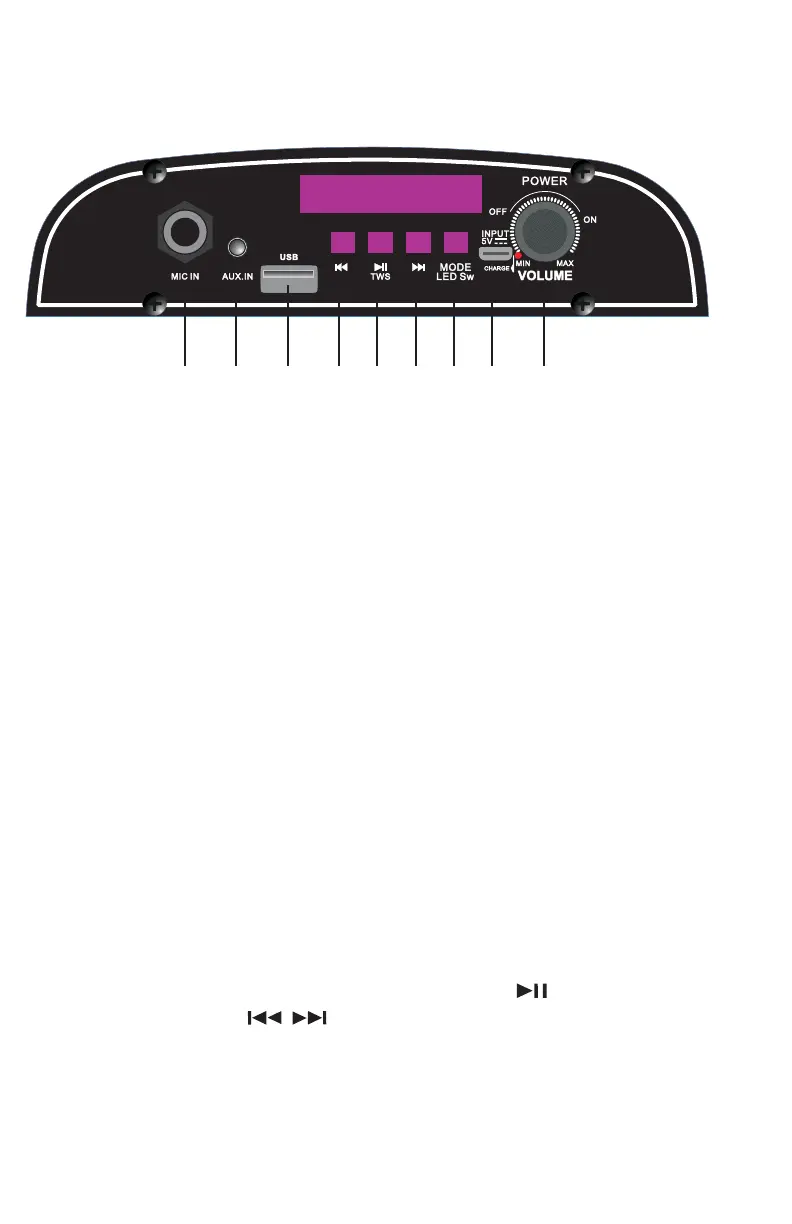
1. MICROPHONE INPUT
2. LINE IN: 3.5mm Audio Jack
3. USB
4. PREVIOUS: to switch the song and radio.
5. PLAY/PAUSE , TWS: To play or pause the music. Long hold for TWS Funtion
6. NEXT: to switch the song and radio.
7. MODE/LED LIGHT: Toggle between AUX, USB, FM, BT by Short Press
Long Press to turn on/ o the light.
8. POWER INPUT: DC 5V
9. POWER/VOLUME: Turn knob left and right to power on and adjust the
volume.
DISPLAY PANEL
1 2 3 4 5 6 7 8 9


 To Next Page