EasyManua.ls Logo

Bilstein iRC ridecontrol - Page 12

Bilstein iRC ridecontrol
16 pages
Print Icon
To Next Page IconTo Next Page
To Previous Page IconTo Previous Page
Loading...
E
E
M
e
S
e
d
J
g
n
t
N
p
n
s
K
D
g
d
C
A
t
D
g
z
s
R
E
d
d
B
S
r
F
S
r
d
r
d
a
u
n
E
N
i
m
E
u
u
d
a
d
n
D
p
F
E
4-WM5
E
INBAU
-
M
OUNTI
e
rstellt am:
14.0
8
S
obald die
e
rscheint a
u
d
ung, dass
J
etzt kann
g
anz normal
n
icht mehr i
n
t
et sein.
N
un erschei
n
p
feile, die d
a
n
igung in R
s
en anzeige
n
K
urve fahren
D
ie Darstell
u
g
rafik bedeu
t
d
ie BILSTEI
N
C
omfort-Mo
d
A
usfüllen d
e
t
ung in den
S
D
abei wird i
m
g
ung angez
e
z
eugs, in di
e
s
chleunigun
g
R
eset (der
E
rscheint Ih
n
d
er Kalibrier
u
d
urch Betäti
g
B
itte kontroll
S
itz Ihres S
m
r
ung.
F
alls sie au
s
S
TEIN iRC in
r
en wollen,
s
d
ie Schaltfl
ä
r
ungs Scre
d
adurch au
t
a
chsigen Be
t
u
nd können
n
utzen.
E
xpert Scr
e
N
ach der
K
RC erschein
e
m
atisch Op
t
E
instellung
d
u
nd Längs
b
u
nd longitud
d
ie Anteile
d
a
uf das Fahr
z
d
er Fahrzeu
g
n
ander darg
D
ies erlaubt
p
arameter
a
F
ahrerprofil.
-Y432A
0
-
UND B
E
NG INS
T
8
.13
Kalibrierun
g
u
f dem Dis
p
das Syste
m
das Smart
p
bewegt wer
n
Fahrtricht
u
n
en im Disp
a
s Erkennen
ichtung der
n
, wenn Sie
oder Abbre
m
u
ng der Pfei
l
t
et, dass da
s
N
ridecontr
o
d
us betreibt,
e
r Dreiecke
S
portmodus
s
m
mer die H
a
e
igt, d.h. di
e
e
z.Zt. die b
g
auftritt.
Kalibrieru
n
n
en die Anzei
u
ng fehlerh
a
g
en der Tast
e
ieren Sie di
e
m
artphone
u
s
dem 2D-M
den 1D-Mo
d
s
o
betätige
n
ä
che „Reset
en. Sie
b
t
omatisch
w
t
riebsmodu
s
es wie vor
h
e
en 2D-Mo
d
K
alibrierung
e
n im Exper
t
t
ionen für
d
er Assist W
e
b
eschleunigu
inal). Dies
b
d
er Beschle
u
z
eug wirken,
g
Längs- un
d
g
estellt und
eine noch f
e
a
uf das Fa
h
0
0
E
DIENU
N
T
RUCTI
O
g
beendet i
s
p
lay die M
e
m
kalibriert i
s
p
hone wie
d
den und mu
u
ng ausgeri
c
lay Richtun
g
der Beschl
e
Fahrzeuga
c
z.B. um ei
m
sen.
l
e in Rahm
e
s
BILSTEIN i
R
o
l Dämpfer
während d
die Umsch
a
s
ignalisiert.
a
uptachse d
e
e
Achsricht
u
etragsmäßi
g
n
g)
ge der Besc
a
ft, können
S
e
„Reset“ zu
e
Ausrichtu
n
u
nd wieder
h
odus des B
I
d
us zurückk
e
n
Sie ebenf
a
“ im Kalibr
i
b
efinden si
w
ieder im e
i
s
des Syste
m
h
er normal
b
d
us
des BILST
E
t
Screen au
t
die getren
n
e
rte der Qu
e
ngen (later
a
b
edeutet, da
u
nigungen,
d
in der Eben
d
Querachs
e
eingestellt
w
e
inere Einste
l
h
rzeug und
N
GSANL
O
N AND
M
E4-WM5-Y432A
s
t,
e
l-
s
t.
d
er
ss
c
h-
g
s-
e
u-
c
h-
n
e
e
n-
R
C
i
m
as
a
l-
e
r
Beschleu
n
ng des Fah
g
höchste B
e
h
leunigunge
S
ie die Kalib
r
rücksetzen.
n
g und den
h
olen die K
a
I
L-
e
h-
a
lls
i
e-
ch
i
n-
m
s
b
e-
E
IN
t
o-
n
te
e
r-
a
l-
ss
d
ie
e
e
getrennt v
o
w
erden kön
n
l
lung der Sc
h
das individ
u
EITUNG
M
ANUA
L
A
00_1 Seite
12 v
o
n
i-
r-
e
-
e
n nach
r
ierung
festen
a
librie-
o
nei-
nen.
h
alt-
u
elle
L
o
n
16
Do
y
calib
r
tion
b
Plea
s
tenin
brati
o
If yo
u
STEI
N
As soon
ished, y
o
display
smartph
o
and the
is no lon
g
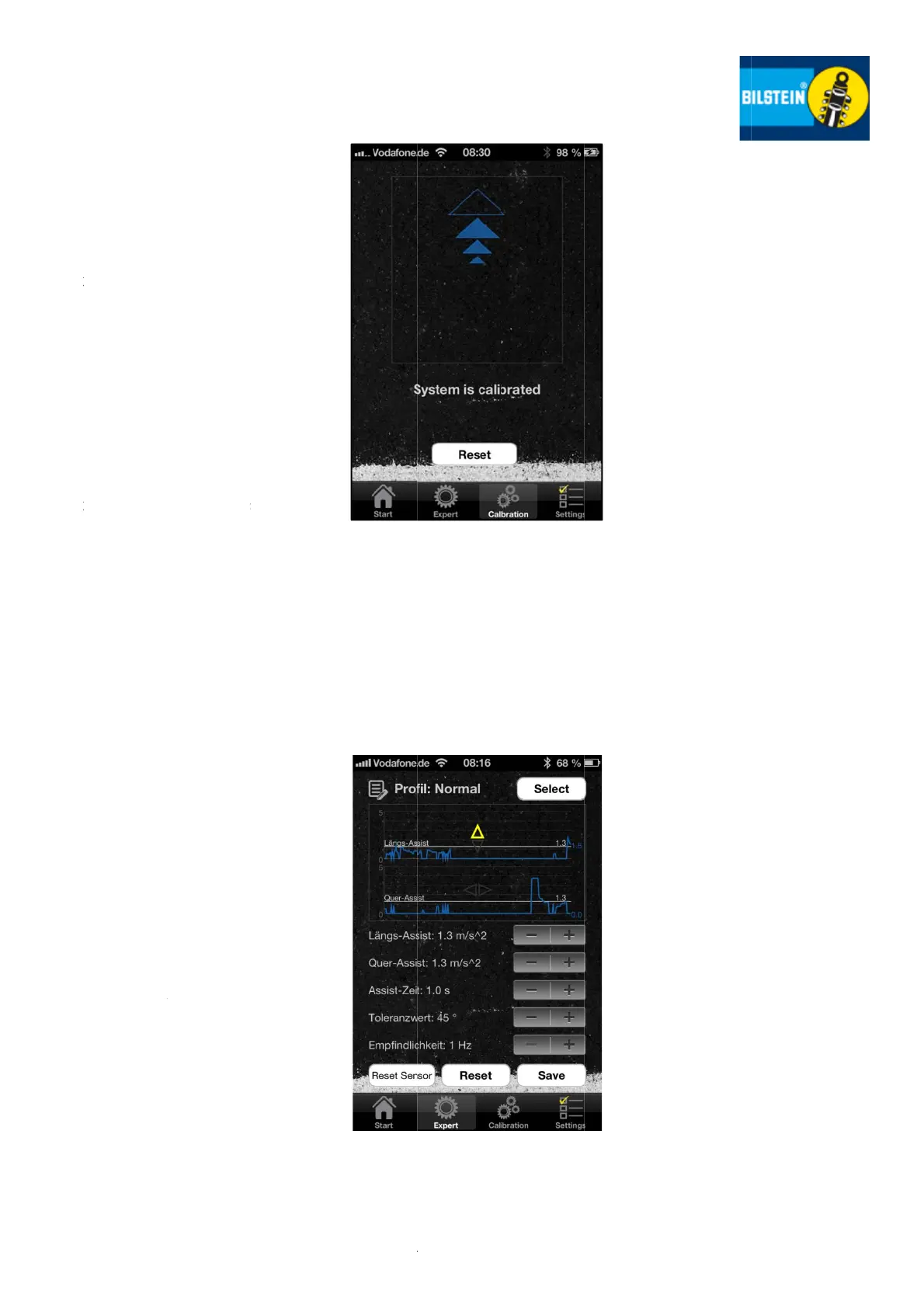
On the
d
cates th
e
rection
o
go aroun
Arrows
a
BILSTEI
N
ridecontr
mode, w
switchin
g
The mai
n
displaye
d
vehicle
w
arises at
ou feel the
r
ation is fau
b
y pressing t
s
e check th
e
g of your s
m
o
n.
u
want to re
t
N
iRC in the
1
set" butt
o
You are
uniaxial
m
tem and
After th
e
iRC on t
h
an auto
m
adjustm
e
lateral a
n
This me
a
tions act
i
of the v
e
axis is
d
other an
d
a much
f
ing para
m
individua
as the cali
b
o
u get that i
of your
o
ne can be
u
orientation i
g
er request
e
d
isplay the
e
detected
a
o
f the vehicl
n
d a curve or
a
s a frame
N
iRC oper
a
r
ol shock ab
s
w
hile a full fill
g
to sport m
o
n
axis of acc
d
; means th
e
w
here the hi
this time.
Rese
t
display of
a
lty, you can
t
he "Reset"
b
e
alignment
m
artphone a
turn from t
h
1D mode, al
s
o
n in the Cal
thereby a
u
m
ode of op
e
can use it a
s
Expert S
c
e
calibration
h
e Expert S
c
m
atic optio
n
e
nt of
the a
s
n
d longitudi
n
a
ns that the
ing on the v
e
hicle longi
t
d
epicted se
p
d
also can
b
f
iner adjust
m
m
eters on t
h
a
l driver profi
g
b
ration is be
e
nformation
o
smartphone
u
sed normal
n driving di
r
e
d.
arrow sight
s
a
cceleration
es axis wh
e
brake.
indicates th
a
tes the BI
L
s
orbers in c
o
ed arrow in
d
o
de.
eleration is
a
e
alignment
ghest accel
e
t
(of calibr
a
a
cceleration
s
reset the c
b
utton.
and a secu
r
n
d repeat th
e 2D mode
s
o press the
ibration Scr
e
tomatically
e
ration of th
s
normal bef
o
c
reen 2D-
M
of the BI
L
c
reen you c
a
n
for the se
s
sist values
al accelerati
o
share of ac
c
ehicle in the
t
udinal and
arately fro
m
b
e set. This
m
ent of the
s
h
e vehicle a
n
le.
ndert am:
e
n fin-
o
n the
. The
ly now
r
ection
s
indi-
in di-
e
n you
at the
L
STEIN
o
mfort
d
icates
a
lways
of the
e
ration
a
tion)
s
after
alibra-
r
e fas-
e cali-
of BIL
"Re
e
en.
in the
e sys-
o
re.
M
odus
L
STEIN
a
n see
parate
of the
o
ns.
c
elera-
plane
lateral
m
each
allows
s
witch-
n
d the