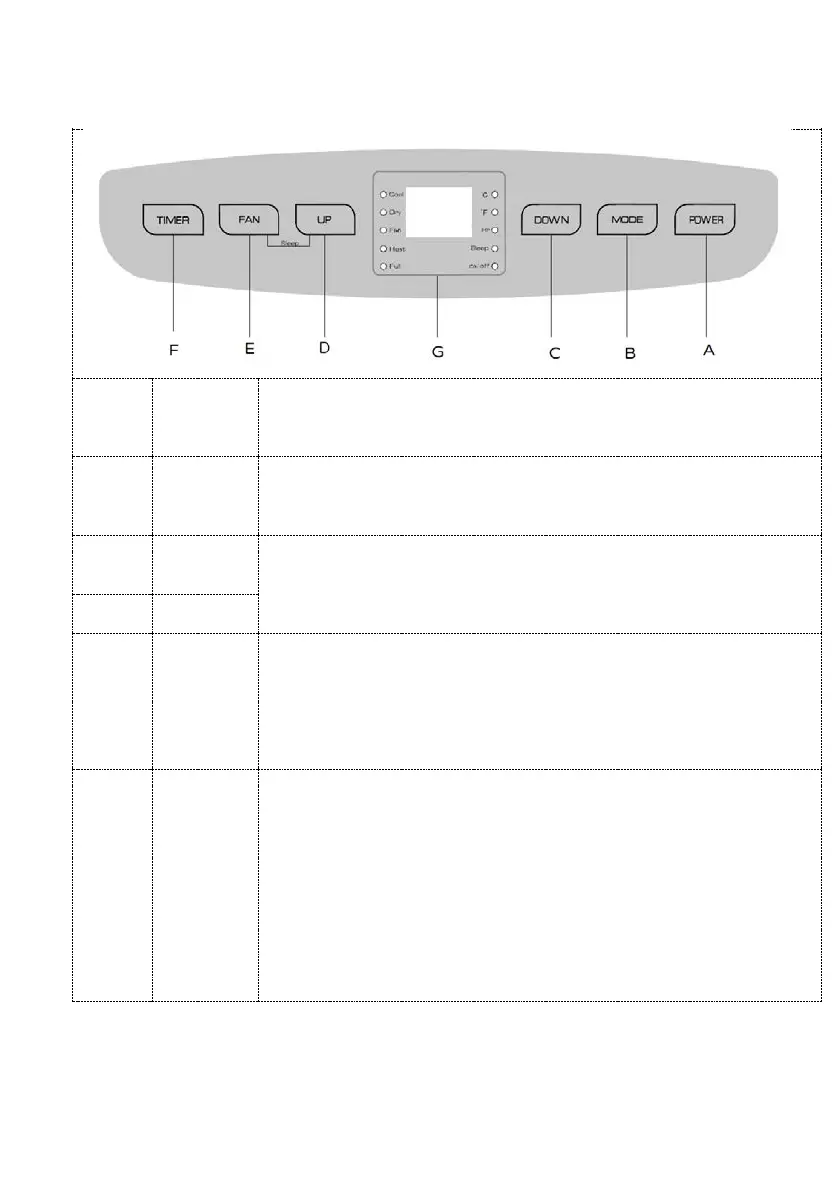
Control Panel
On/Off
Button
Turns on the appliance and puts on standby.
Mode
button
Selects: cool/heat/dry/fan: only active if the appliance is already on.
button
Adjusts the room temperature (16-31)°C for the heat and cool
programs, and sets the time; press button “D” to increase and button
“C” to decrease, varying the time by 1 for each pressure.
Selects operation of the fan: Hi/Med/Low, adjusting the speed at each
pressure on the button; F3: hi. F2: med. F1:low.
Press for about five seconds (a beep is heard) to reset the appliance for
wi-fi connection.
Button
Times operation or start-up of the appliance: to increase and decrease
by 1 hour, up to a maximum of 24 hours, press the respective buttons
“D” and “C” ; press the button again to cancel (no number appears on
the remote control display).
:
with the appliance in stand-by, press the button to
obtain the time required (1-24h). The time flashes for a few seconds,
and then after the set time the timer will start up the appliance in the
mode set previously.
start the appliance in stand-by, set the programs and
then select the timer and set the time required (1-24h). The time
flashes for a few seconds, and then after the set time the timer will
switch off the appliance.


 To Next Page