TOP
Tilt slide rail forward
Fasten from bottom hole
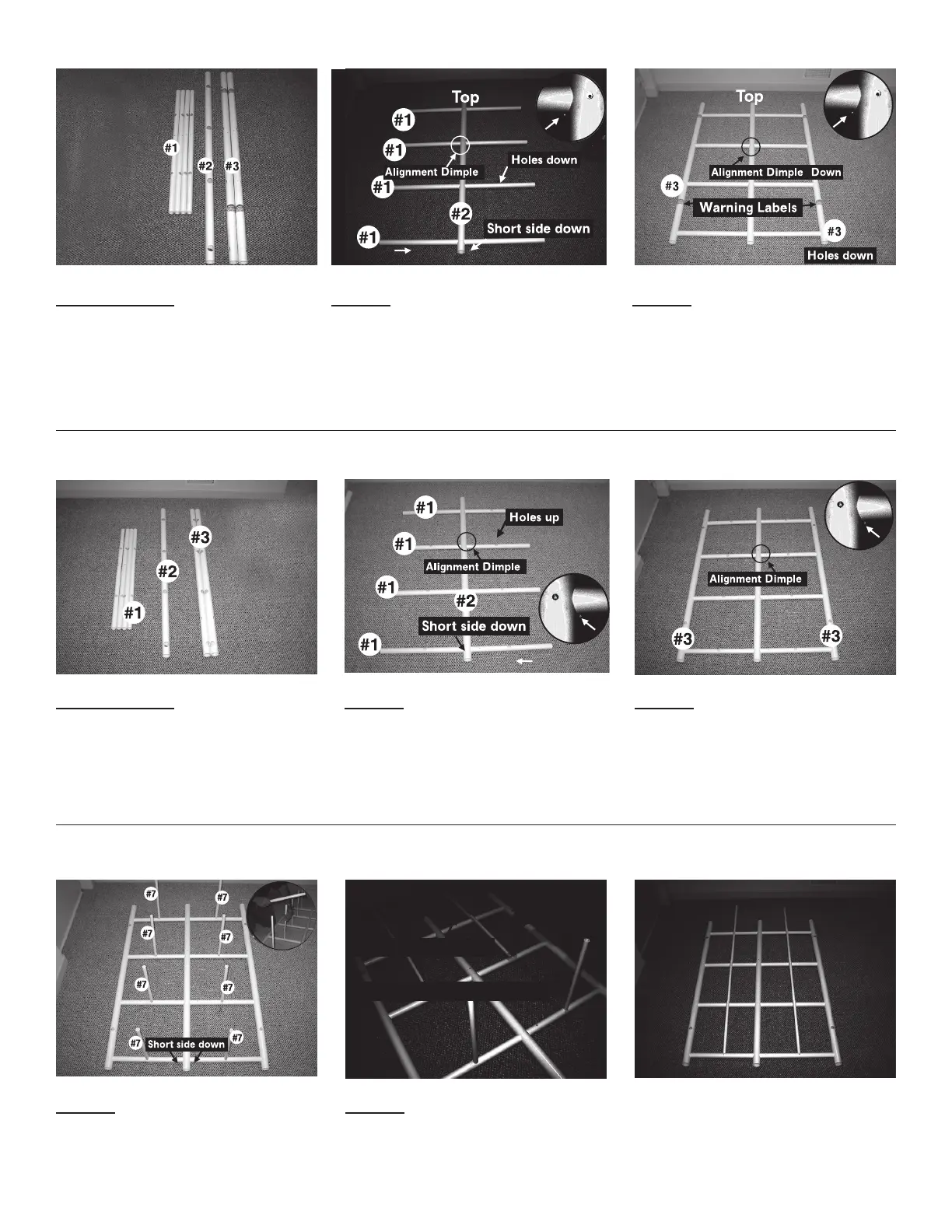
FRONT GRID ASSEMBLY
Parts needed:
4 of #1 2 of #3
1 of #2
STEP 1
4 Horizontal crossbars (#1) inserted through
1 center vertical (#2) Note: Slide horizontal
crossbar into left side of center vertical
following direction of arrow until alignment dimple
meets center vertical (see enlargement).
STEP 2
Two corner vertical (#3) inserted through
horizontal crossbars
REAR GRID ASSEMBLY
Parts needed:
4 of #1 1 of #2
2 of #3
STEP 1
4 Horizontal Crossbars (#1) inserted through
1 center vertical (#2) Note: Slide horizontal
crossbar into right side of center vertical following
direction of arrow until alignment dimple meets
center vertical.
STEP 2
2 Corner verticals (#3) placed on horizontal
crossbars.
SLIDE RAIL ASSEMBLY
STEP 1
8 Horizontal slide rails (#7) inserted in rear grid.
Tip: If necessary, tap horizontal slide rails to be
sure slide rails are fully inserted.
STEP 2
Fastening horizontal slide rails (#7) in rear grid
using 8 – #06 x ½” fastening screws (#1).
Note: Start at top row and work down.
Use only one fastener – bottom hole only.
All horizontal slide rails fastened to rear grid.
Note: Fastener in bottom hole only


 To Next Page