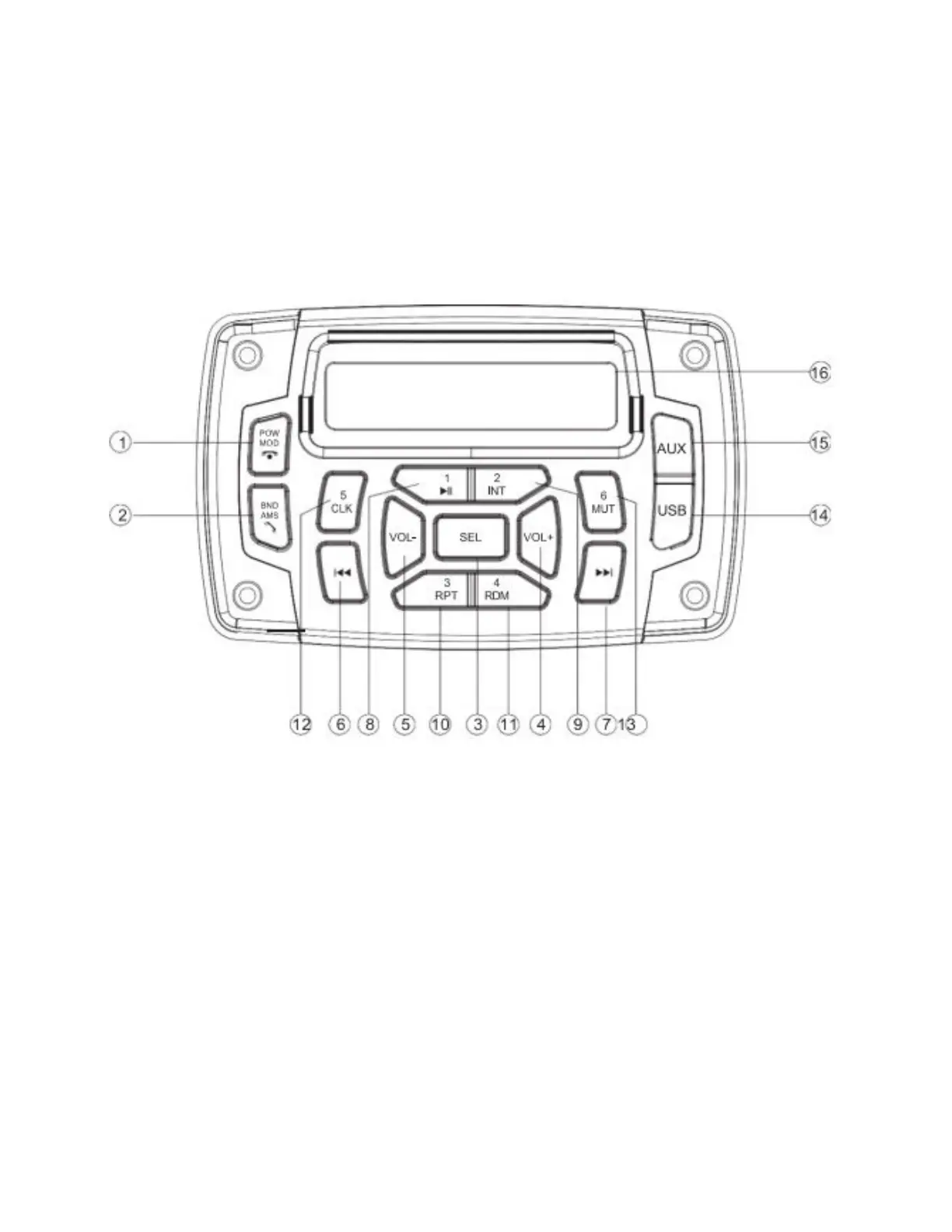
Radio
Instructions for Bluetooth: Turn on Bluetooth on the cellphone, search Bluetooth device name “BEYOND”
and press connect. If the connection has been successful the word “CONNECT'' will be displayed on the
radio screen. Once the pairing is complete, BT AUD mode will show in MOD function mode. In BT AUD
mode, you can play music from your phone and answer phone calls by pressing the Volume button and
hang up by pressing the BND button.
1. POW/MOD
Short press to turn on, long press to shut down. If you are using the USB port, each short
press will switch to another function: radio, USB, SD, AUX, or BT.
2. BND/AMS
Pressing this button will switch from FM1, FM2, and FM3, between the local radio
stations.
3. SEL
Press to select the functions: BAS//LOUD/RTC.OFF
BAS: Bass adjustment
LOUD: Bass enhancement
RTC. OFF: Switch for the clock display On/Off
4. Press to lower volume
5. Press to increase the volume
6. 7. TUNE/TRACK BUTTON
Short press to skip to the next track or go back to the previous track, long press to fast
forward or rewind



 To Next Page