11
Changing Pressure During Treatment
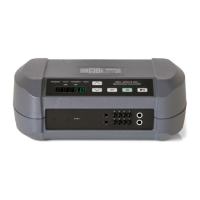
While the pump is running, press and hold the UP button for 5 seconds
until you see the word “HOld” - let go of UP button
Once the pump returns to its resting position “SEt” and “PrES” will
show in LED display, the blue LED will light up under “Pressure” and
the current pressure setting will show
At this point you can adjust the pressure up or down
When you have reached your desired pressure, hit the “SET” button,
the word “SEt” shows in the LED’s and the pump begins to operate
again
To See Treatment Compliance Meter (Hours of Use)
Begin with the device turned off
Press and hold the “Play/Pause” button for 5 seconds
“C” will appear followed by the hours of use since the last reset
Information will be displayed until “Play/Pause” is hit again
To Check Pressure Setting While Pump is Running
Hold the Down button until the pressure setting and the letter “P” show
To Reset Your Device to Factor Settings and Clear Compliance
Meter
Press and hold the Up, Down, and Set buttons together for 5 seconds
until the compliance meter hours show on the LED Display. Let go of
the buttons and then hit the “SET” button. You will see “CLr” in the
LED Display and the LED will shut off.
Cleaning
The pump, garment, and tubing can be wiped down using a damp (not wet)
soft cloth while unplugged – if more thorough pump cleaning or garment
disinfection is desired, use the following directions.
Pump and Tubing Cleaning
Unplug and wipe down using a damp (not wet) soft cloth with mild
antibacterial soap as needed
Do not use bleach



 To Next Page