Page 7
©2020 BioSmart Technologies
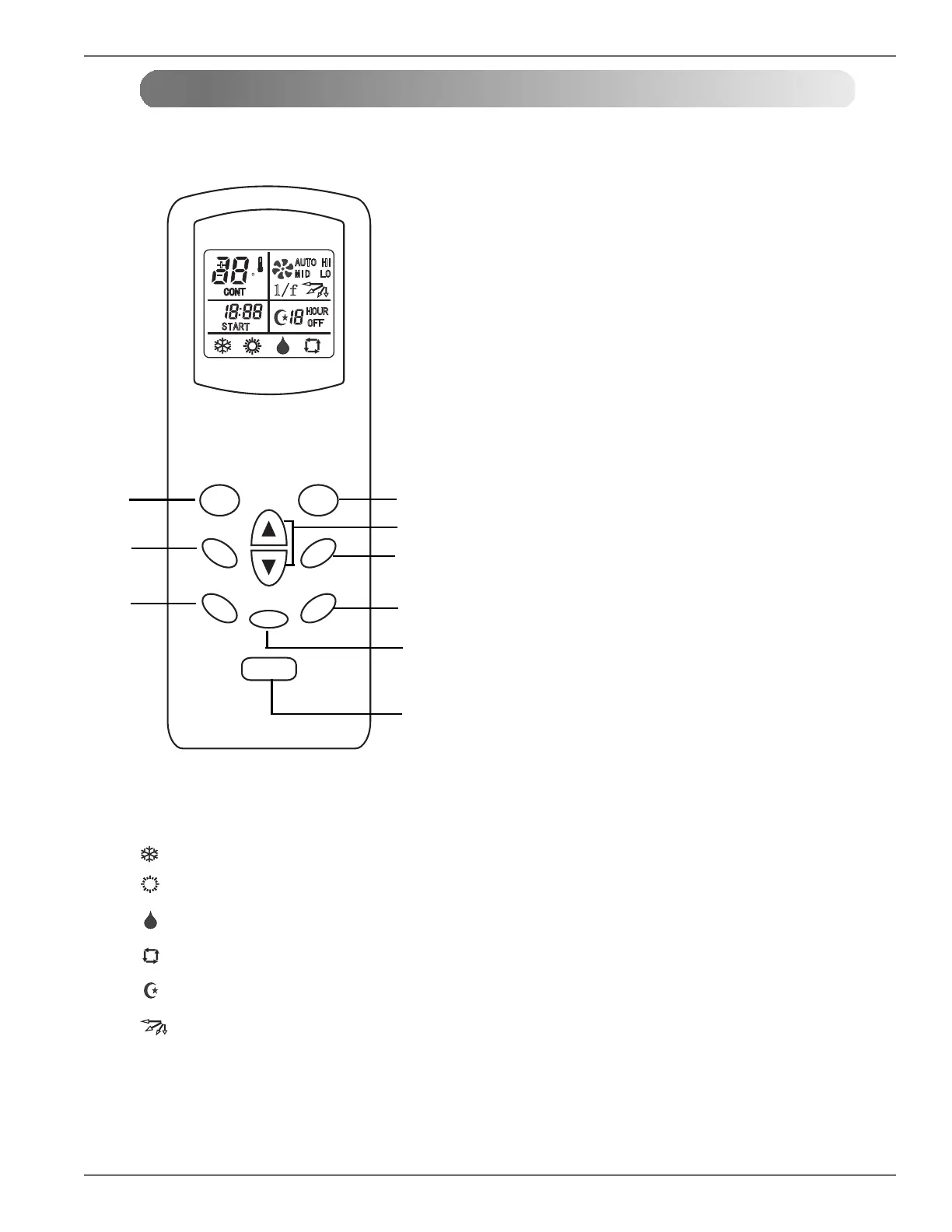
indicates moving flapper
indicates sleeping mode
9. SLEEP FUNCTION
Used to set the air flow direction
8. SWING BUTTON
7. MIN BUTTON
·Used to adjust the time .
6. HOUR BUTTON
5. TIMER BUTTONS
4. INDOOR FAN SPEED SELECTOR BUTTON
2. MODE BUTTON
ON-OFF BUTTON
The controls will look like the following.
Wireless Remote Cont r oller
1.
Used to turn off/on the unit.
Used to select the operation mode.
Used to set the time of starting operation.
Used to set sleep mode auto operation.
3. ROOM TEMPERATURE SETTING BUTTONS
Used to select the room temperature.
Used to select fan speed in four steps
low, medium, high and CHAOS.
C
1/f
AUTO HI
MID LO
CONT
AM
PM
START
HOUR
OFF
MODE
FAN
TIMER
SLEEP
HOUR
M I N
ON/OFF
SWING
1
2
3
4
5
6
7
8
9
·Used to adjust the time .
Please note:
indicates cooling mode
indicates heating mode
indicates dehumidifying mode
indicates fan mode


 To Next Page