EasyManua.ls Logo

BioLite SolarHome 620 - User Manual

BioLite SolarHome 620
13 pages
Print Icon
To Next Page IconTo Next Page
Loading...
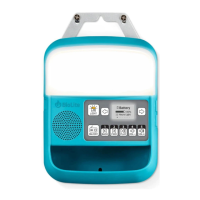
SolarHome 620
SHA1001.R6.IM
11 Hours Light
85%
Battery
Manual completo de instrucciones, tutoriales en video, preguntas frecuentes y más // Manuels d'instruction complets, tutoriels vidéos, questions courantes, et
bien plus // Volledige handleidingen, instructievideo's, veelgestelde vragen en nog veel meer // Vollständige Bedienungsanleitung, Tutorial-Videos, häufige
Fragen und mehr // 전체 사용 설명서, 튜토리얼 동영상, 일반 질문, 기타 // Manuali di istruzioni completi, video tutorial, domande
frequenti e altro ancora // 取扱説明書、チュートリアルビデオ、一般的な質問など // Täydet käyttöohjeet, ohjevideot, yleisiä
kysymyksiä ja enemmän // Komplett bruksanvisning, video, vanliga frågor, och mycket mer // Full bruksanvisning, opplæringsvideoer, vanlige spørsmål og
mere // 完整的说明书、视频教程、常见问题以及更多
For tips, troubleshooting, tutorial videos, FAQs and more
BioLiteEnergy.com/Instructions
Question and Answer IconNeed help?

Do you have a question about the BioLite SolarHome 620 and is the answer not in the manual?

Summary

Solar Panel Installation

Panel Placement and Angle

Place Solar Panel high on roof and at an angle for optimal cleaning and performance.

Shadow Avoidance

Avoid shadows from trees or buildings to maximize power generation.

Securing the Solar Panel

Use screws or wires to securely install the Solar Panel onto the roof.

Cord Routing to Control Box

Route the cord from the Solar Panel to the indoor location of the Control Box.

Control Box Installation

Using Control Box Light for Installation

Utilize the Control Box's built-in light to illuminate the installation area.

Recommended Mounting Height

Mount the Control Box 1.5 meters off the ground for child safety and accessibility.

Attaching the Control Box to the Wall

Install 3 screws or nails into the wall following the Control Box attachment points.

Securing and Removing the Control Box

Slide Control Box onto screws, leaving them slightly loose for easy future removal.

Hanging Light Installation

Light Components Overview

Overview of the included Hanging Lights and Security Light with their components.

Connecting Hanging Lights

Connect up to two lights directly to the Control Box and the third via an extension port.

Hanging Light Placement and Securing

Install lights high and centered, using hooks or cord clips to secure them and prevent cord damage.

Installing the Light Switch

Mount the light switch at an accessible height using screws or nails.

Security Light with Motion Sensor Installation

Motion Sensor Light Positioning

Angle the motion sensor light using the hook to detect motion in desired directions.

Securing the Security Light Switch

Attach the security light switch to the inside wall using two screws or nails.

Connecting Your System

Connecting Cords to Control Box

Disconnect the Control Box, connect light and solar panel cords to the rear ports.

Reattaching Control Box and Antenna Setup

Re-mount the Control Box and position the radio antenna securely.

Control Box Features and Operation

Control Box Components

Overview of ports and features: Light, Control Panel, Storage, Speaker, SD Slot, Inputs, Ports.

Control Box Screen Navigation

Guide to navigating the eight screens on the Control Box display using arrow buttons.

Control Box Button Functions

Detailed functions of each button on the Control Box interface.

Charging and Power Usage

Factors Affecting Power Supply

Understanding how weather, season, and time of day affect solar power supply.

Battery Level and Charging Time

Checking battery level and estimated 4-6 hour charging time.

Powering External Devices

Using the USB port to charge phones and other small electronics.

Controlling Your Lights

Light Brightness Settings

Adjusting light brightness (Low, Medium, High) using the light switch.

Light Run Time Estimates

Estimates for light run time based on brightness and number of lights used.

Security Light Motion Sensor

How the motion sensor activates the security light for 30 seconds.

System Settings and Usage

Setting Time and Date

Instructions for setting the system's time and date.

MP3 Player and Radio Operation

Using the MP3 player with an SD card and operating the radio.

Making Payments (PAYG Model)

Guidance on checking payment status and entering payment codes.

Summary

Solar Panel Installation

Panel Placement and Angle

Place Solar Panel high on roof and at an angle for optimal cleaning and performance.

Shadow Avoidance

Avoid shadows from trees or buildings to maximize power generation.

Securing the Solar Panel

Use screws or wires to securely install the Solar Panel onto the roof.

Cord Routing to Control Box

Route the cord from the Solar Panel to the indoor location of the Control Box.

Control Box Installation

Using Control Box Light for Installation

Utilize the Control Box's built-in light to illuminate the installation area.

Recommended Mounting Height

Mount the Control Box 1.5 meters off the ground for child safety and accessibility.

Attaching the Control Box to the Wall

Install 3 screws or nails into the wall following the Control Box attachment points.

Securing and Removing the Control Box

Slide Control Box onto screws, leaving them slightly loose for easy future removal.

Hanging Light Installation

Light Components Overview

Overview of the included Hanging Lights and Security Light with their components.

Connecting Hanging Lights

Connect up to two lights directly to the Control Box and the third via an extension port.

Hanging Light Placement and Securing

Install lights high and centered, using hooks or cord clips to secure them and prevent cord damage.

Installing the Light Switch

Mount the light switch at an accessible height using screws or nails.

Security Light with Motion Sensor Installation

Motion Sensor Light Positioning

Angle the motion sensor light using the hook to detect motion in desired directions.

Securing the Security Light Switch

Attach the security light switch to the inside wall using two screws or nails.

Connecting Your System

Connecting Cords to Control Box

Disconnect the Control Box, connect light and solar panel cords to the rear ports.

Reattaching Control Box and Antenna Setup

Re-mount the Control Box and position the radio antenna securely.

Control Box Features and Operation

Control Box Components

Overview of ports and features: Light, Control Panel, Storage, Speaker, SD Slot, Inputs, Ports.

Control Box Screen Navigation

Guide to navigating the eight screens on the Control Box display using arrow buttons.

Control Box Button Functions

Detailed functions of each button on the Control Box interface.

Charging and Power Usage

Factors Affecting Power Supply

Understanding how weather, season, and time of day affect solar power supply.

Battery Level and Charging Time

Checking battery level and estimated 4-6 hour charging time.

Powering External Devices

Using the USB port to charge phones and other small electronics.

Controlling Your Lights

Light Brightness Settings

Adjusting light brightness (Low, Medium, High) using the light switch.

Light Run Time Estimates

Estimates for light run time based on brightness and number of lights used.

Security Light Motion Sensor

How the motion sensor activates the security light for 30 seconds.

System Settings and Usage

Setting Time and Date

Instructions for setting the system's time and date.

MP3 Player and Radio Operation

Using the MP3 player with an SD card and operating the radio.

Making Payments (PAYG Model)

Guidance on checking payment status and entering payment codes.

BioLite SolarHome 620 Specifications

General IconGeneral
Power Output6W
Solar Panel TypeMonocrystalline
USB ChargingYes
RadioYes
Output Ports2 USB ports
Weather ResistanceIPX4 (weather resistant)
Weight1.41 kg (3.1 lbs)

Related product manuals