HOW TO REPLACE THE HEPA FILTER
It is recommended to replace the True HEPA lter
every 8-12 months.
1. The Filter Replacement Indicator light
( ) starts blinking when it is time to replace
the lter, turn the unit off and unplug the air
purier. Replace the HEPA lter with a new
one.
2. To replace:
3. Close and lock the cover. Place the air
purier on a at surface.
4. Plug the unit into a power socket. Reset the
Filter Replacement Indicator by pressing and
holding the On/Off ( ) and
Timer ( ) buttons simultaneously for 3
seconds until you hear a beep.
*Replacement lter (BAPF9921) can be
purchased through local service centre.
Gently place the air
purier on its side
to expose the lter
chamber cover. Push
the Button toward
arrow direction to
unlock and open the
cover.
Pull the used HEPA
lter out and insert a
new one.
2
H
4
H
8
H
ii
i
i
i
i
¨
2
H
4
H
8
H
ii
i
i
i
i
¨
PRODUCT SPECIFICATIONS
GETTING STARTED
1. Gently place the air purier on its side to
expose the lter chamber cover.
2. Open the cover following the instructions
on How to Replace the HEPA Filter. Pull the
lter out of the air purier and remove it from
its plastic bag.
3. Insert the lter back into the unit and close
the cover.
4. Your unit is equipped with a True HEPA lter
that will last for approximately 12 months.
OPERATING INSTRUCTIONS
1. Place the unit on a dry, stable and rm
surface. Make sure not to block the top air
vent and air intake grille.
2. Plug unit into appropriate electrical outlet.
3. Select your desired fan speed setting: III
(Hi), II (Medium) and I (Low) by pressing
the ON/OFF ( ) button to go through the
varying speeds until it reaches your desired
speed setting.
4. Note: For optimum air ltration, it is
recommended to operate the unit
continuously on speed II (Medium). Its
heavy-duty motor was designed to last for
many years.
5. Important: Always turn off and unplug the
unit when not in use.
MAINTENANCE AND PRODUCT CARE
Before cleaning the air purier, turn it off and
unplug it rst.
Clean the exterior surface with a clean, damp
cloth.
The top air vent can be cleaned of dust with a
small, soft brush.
If you would like to clean the inside of the lter
compartment, ONLY use a dry, soft cloth to wipe
it down.
WARNING: Do not allow moisture to come into
contact with the main housing of the air purier.
NEVER use detergents, gasoline, furniture
polish, paint thinner, or other household solvents
to clean any part of the appliance.
CADR
(Smoke)
165 m3/hr
Noise Level on
High Speed
55dB(A)
max
Fan Speeds 3
Power
Consumption
35W
3
CONTROL PANEL & FEATURES
ON/OFF BUTTON
A dual function button, turns unit on or off and
selects Fan Speed Settings.
FAN SPEED SETTINGS
• For optimum air ltration, it is recommended
to operate the air purier continuously on
speed II (Medium). Its durable motor has
been designed to last for many years.
• For less noise (such as in a bedroom),
select the lowest fan speed setting I (Low).
• When high levels of air pollution are present,
select speed III (High) to quickly circulate
and lter the air inside the room.
TIMER
For your convenience, you can set the air
ltration timer to either 2, 4, or 8 hours. Once
it reaches designated selection, the unit will
automatically turn off. If you want to cancel the
selected timer, simply press this button anytime.
NIGHTLIGHT
The ( ) illuminates when the nightlight feature
is activated.
FILTER REPLACEMENT INDICATOR
The ( ) starts blinking when it becomes time to
replace the lter.
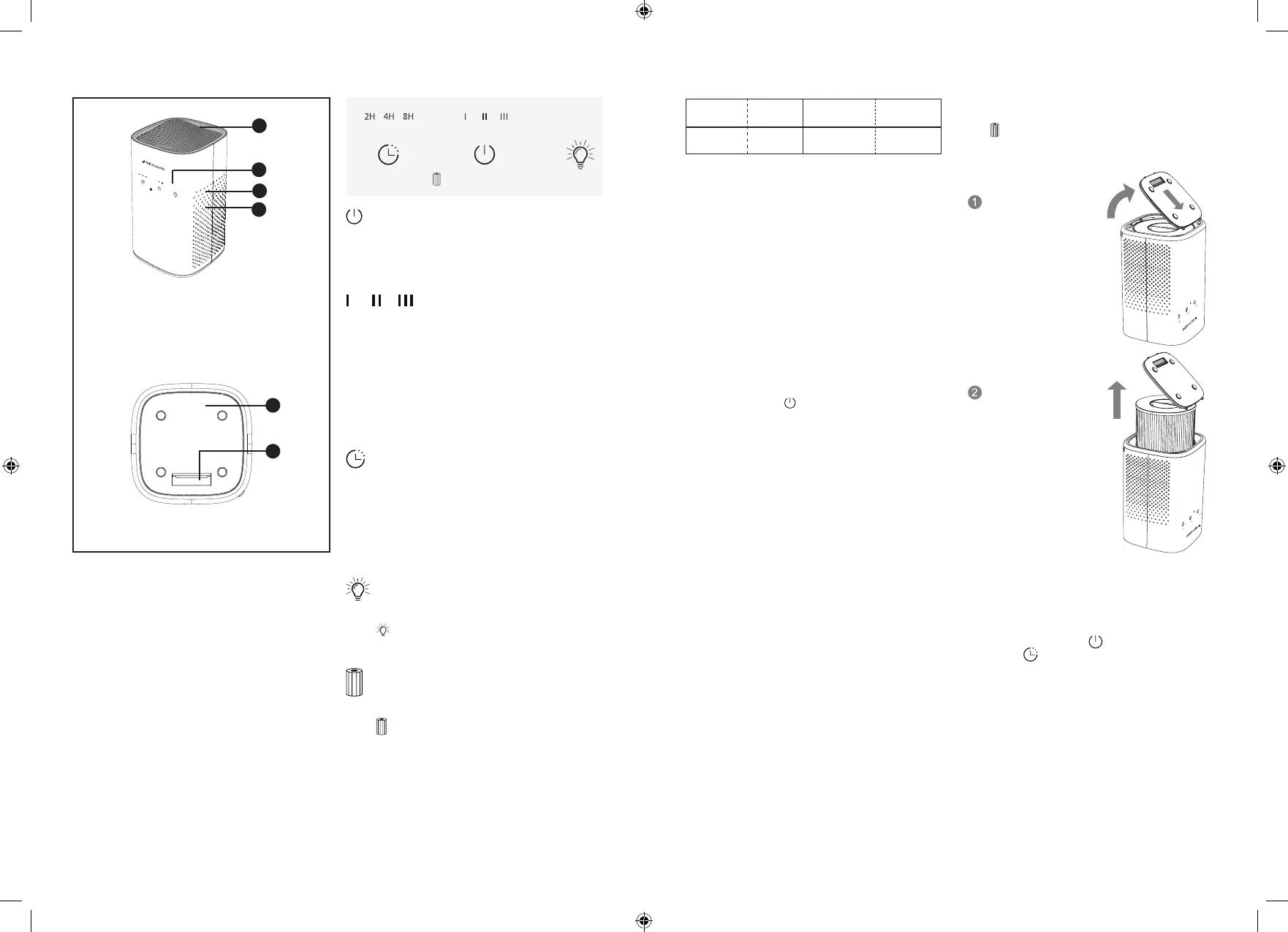
GET TO KNOW YOUR AIR PURIFIER
2
1
1
2
2
3
4
®
1. Top Air Vent
2. Control Panel
3. Nightlight
4. 360 Air Intake
1. True HEPA Filter Chamber Cover
2. Chamber Cover OPEN/CLOSE
Button
BOTTOM VIEW


 To Next Page
 Loading...