EasyManua.ls Logo

Bioneer Exicycler 96 - User Manual

Bioneer Exicycler 96
81 pages
Print Icon
To Next Page IconTo Next Page
Loading...
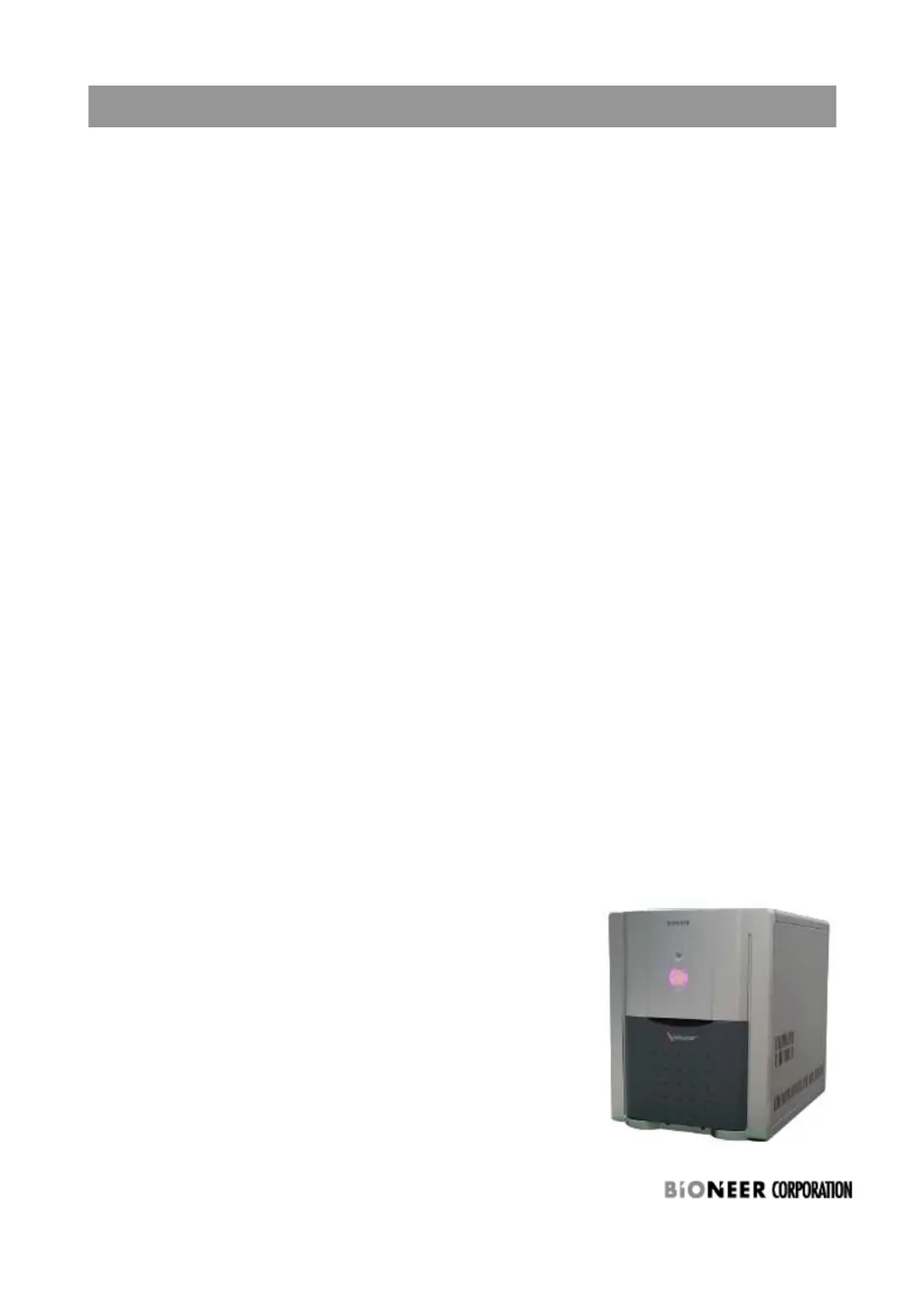
Exicycler™ 96 Real-Time Quantitative Thermal Block
Petunjuk Instalasi dan Kalibrasi
Exicycler™ 96 Real-Time Quantitative Thermal Block

Other manuals for Bioneer Exicycler 96

Questions and Answers

  • K
    Kenneth PerezAug 18, 2025
    What to do if the Bioneer Exicycler™ 96 Laboratory Equipment has stopped running?
    • A
      Andrew HansenAug 18, 2025
      If the Exicycler™ 96 laboratory equipment by Bioneer stops running, check the following: * Verify that electricity is properly supplied, using an AVR or UPS if necessary. * Disable Screen Saver and Monitor Power in the Control Panel. * Make sure you are using the USB cable provided with the Exicycler™ 96 to connect it to the computer. * Check if the USB driver is correctly installed, and reinstall if needed. * Avoid plugging in other USB cables while the Exicycler™ 96 is running to prevent interference.
  • M
    morsefrankAug 20, 2025
    How to fix no communication between computer and Bioneer Exicycler™ 96 Laboratory Equipment?
    • T
      Thomas WilliamsAug 20, 2025
      If the computer isn't communicating with the Bioneer Exicycler™ 96, check these items: 1. Make sure the USB cable is firmly connected to the computer. 2. Use the USB cable provided with the Exicycler™ 96 to connect the computer and the Exicycler™ 96. 3. Check if the Exicycler™ 96 is in the “Standby” position, with the POWER button blinking green. 4. If the POWER button blinks red, power off the Exicycler™ 96 and then power it back on.
  • M
    Michael VasquezAug 23, 2025
    What to do if Bioneer Exicycler™ 96 Laboratory Equipment does not start?
    • D
      Dustin LyonsAug 23, 2025
      If the Bioneer Exicycler™ 96 does not start, ensure the power cable is firmly connected to the wall circuit and switch on the power supply button at the rear of the unit. Also, check the fuse box near the power switch at the rear; replace the fuse if it has blown.
  • L
    Larry JonesAug 26, 2025
    Why is the POWER button or DOOR button not working on Bioneer Exicycler™ 96 Laboratory Equipment?
    • C
      Carmen AllenAug 26, 2025
      If the POWER or DOOR button on your Bioneer Exicycler™ 96 Laboratory Equipment isn't working, first, ensure the power cable is firmly connected to the wall circuit and the power supply button at the rear of the unit is switched on. If that doesn't work, the self-diagnosis may still be running; wait until it's complete and the POWER button blinks green.
  • H
    hayescristinaAug 28, 2025
    What causes abnormal software shutdowns with Bioneer Exicycler™ 96 Laboratory Equipment?
    • N
      Natalie WarrenAug 28, 2025
      If the software for the Bioneer Exicycler™ 96 shuts down unexpectedly, it might be due to an improperly installed USB driver. Try reinstalling the USB driver.
  • H
    hectorbaileyAug 30, 2025
    Why Bioneer Exicycler™ 96 Laboratory Equipment does not start thermal cycling?
    • M
      Megan ShafferAug 30, 2025
      If the Bioneer Exicycler™ 96 does not start thermal cycling, it might be in “Standby” mode to warm up the lamp, which takes about 10 minutes. The thermal cycling will begin automatically after the lamp warms up.
  • V
    vincent26Sep 2, 2025
    How to prevent PCR sample evaporation in Bioneer Exicycler™ 96 Laboratory Equipment?
    • T
      Tammy ChristensenSep 2, 2025
      If PCR sample evaporation occurs with the Bioneer Exicycler™ 96, check if the heating lid works and that sample tubes or plates are completely sealed. Ensure the heating lid option is correctly set up with the Hottop Check Box selected and the correct temperature set. Note that a small amount of evaporation is not critical. It is recommended to use Bioneer kits and reagents.
  • I
    imooreSep 4, 2025
    What to do if errors occur during self-diagnosis of Bioneer Exicycler™ 96 Laboratory Equipment?
    • A
      Andrew AlvarezSep 4, 2025
      If errors occur during or after the self-diagnosis of the Bioneer Exicycler™ 96 (POWER button in red), it could be that the lamp is still cooling down or the self-diagnosis is still in progress. If the POWER button doesn't turn green within 5 minutes, power the Exicycler™ 96 off and on again. For unexpected errors, power off the unit, then power it back on to cool the lamp and wait 3 minutes. Press the POWER button to restart self-diagnosis.
  • A
    Alexander HoganSep 7, 2025
    What causes low fluorescence signal in Bioneer Exicycler™ 96 Laboratory Equipment?
    • S
      Steven JonesSep 7, 2025
      If a low intensity fluorescence signal is detected with the Bioneer Exicycler™ 96, examine the fluorescence signal of the probe used for Real-Time PCR or use a new kit. The PCR product amplified may be too long or there may be non specific products. You can perform gel electrophoresis to determine the presence of amplification product or adjust an annealing temperature or Mg2+ concentration if needed. Also, perform the calibrations again to adjust the light intensity of the lamp.
  • D
    David AguirreSep 9, 2025
    How to adjust high fluorescence signal intensity in Bioneer Exicycler™ 96 Laboratory Equipment?
    • C
      Craig BakerSep 9, 2025
      If an excessively high intensity fluorescence signal is detected when using the Bioneer Exicycler™ 96, you can adjust the concentration of the probe used for Real-Time PCR. Also, ensure you are using an appropriate probe system, and adjust and optimize the PCR sample conditions.

Bioneer Exicycler 96 Specifications

General IconGeneral
TypeReal-Time PCR System
Number of Samples96
Capacity96-well plate
Temperature Accuracy±0.2°C
Temperature Uniformity±0.3°C
Detection MethodFluorescence detection
SoftwareExicycler Analysis Software
Well Volume10-100 µl
Excitation Light SourceLED
Excitation Wavelength Range450-650 nm
Emission Wavelength Range500-700 nm
Data InterfaceUSB
Temperature Range4°C - 99°C
Detection Channels4
Power Requirements100-240 V, 50/60 Hz
Sensitivity1 copy