Need help?
Do you have a question about the BioNote Vcheck V200 and is the answer not in the manual?
Step-by-step guide on connecting the analyzer and initial setup procedures.
Instructions for conducting standard and read-only tests on the analyzer.
Guide for performing tests using the Read Only mode for high-volume testing.
Guidelines for performing control tests to ensure system accuracy and technique.
Procedure for running calibration set tests to ensure optimal analyzer performance.
Details common error codes, their causes, and recommended solutions for troubleshooting.
 General
| Category | Medical Equipment |
|---|---|
| Type | Immunoassay analyzer |
| Sample Type | Whole Blood, Serum, Plasma |
| Power | AC 100-240V, 50/60Hz |
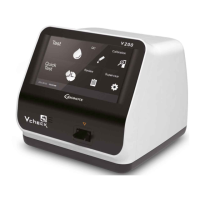
| Product Name | BioNote Vcheck V200 |
| Test Method | Fluorescence Immunoassay (FIA) |
| Display | LCD |
| Connectivity | USB |
| Storage Conditions | 10-30°C, 20-80% RH |

 To Next Page