3ETTINGTHE4IME$ATEAND9EAR
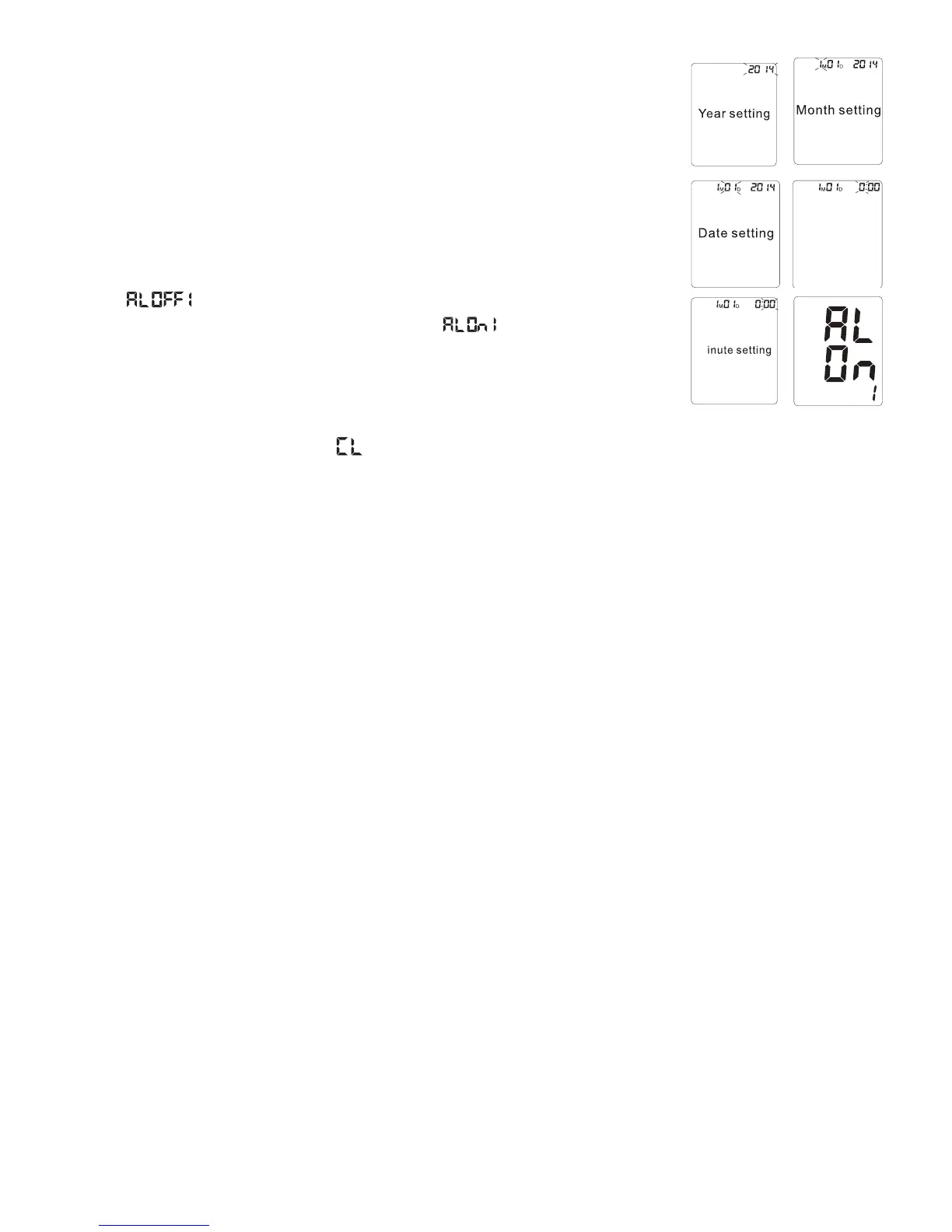
1. When the monitor is powered OFF, press the SET button 3 times, the YEAR will
mASH5SETHEh+” or “-” button to choose the year and press SET to store in
the memory.
2. Repeat the same process to set the MONTH by using the “+” or “-” button.
Press the SET button to store it in the memory.
4HESAMEPROCESSISREPEATEDTOSETTHE$!4%4HEDATEWILLmASHANDCANBE
changed with the “+” or “-vBUTTON!FTERWARDS(/523WILLBEGINTOmASH
4. TIME; hours, and then minutes can be set following the same procedure by using
the “+” or “-” buttons.
5. Next “ vWILLmASHPRESSTHEh+” or “-” buttons to switch between the
alarm being OFF or ON. To set the alarm, select “ ” and press the SET
BUTTON4HE(/523WILLBEGINTOmASHPRESSh+” or “-” buttons to change the
HOUR digits. Press the SET button to confirm.
.EXTTHE-).54%DIGITSWILLmASHFOLLOWTHESTEPSABOVETOSETTHEDIGITS/NCE
Alarm 1 is set you can also set Alarm 2 following the same steps. (See section 3.12)
7. After the minutes have been set, “ ” will appear on the display. Press the SET button to disregard. See
section 3.10 to clear the memory.
./4%)NORDERTOCHANGEANYSETTINGYOUMUSTREPEATTHEPROCESSANDCONlRMEACHSETTINGBY
pushing the SET button.
/BTAINING!CCURATE-EASUREMENTS
Your blood pressure can vary based on numerous factors, physiological conditions, and your surroundings.
Follow these guidelines to obtain accurate and error-free measurements of your blood pressure and pulse rate.
!"EFORE-EASURING
s !VOIDEATINGSMOKINGASWELLASALLFORMSOFEXERTIONDIRECTLYBEFORETHEMEASUREMENT!LLTHESEFACTORS
INmUENCETHEMEASUREMENTRESULT2ELAXBYSITTINGINANARMCHAIRORATATABLEINAQUIETATMOSPHEREFOR
about 5 minutes before the measurement.
s !LWAYSTAKEMEASUREMENTSONTHESAMEARMNORMALLYLEFTANDINTHESAMEPOSTURE$ONOTSWITCHBETWEEN
right and left arms while recording your blood pressure as there may be a difference of up to 10mmHg
pressure between the two arms.
s !TTEMPTTOCARRYOUTTHEMEASUREMENTSREGULARLYATTHESAMETIMEOFDAYSINCEBLOODPRESSURECHANGES
during the course of the day. The ideal time to measure your blood pressure is in the morning after you wake
up, before breakfast and physical activity, and in the absence of the urge to urinate.
s 2ESTFORMINUTESSITTINGQUIETLYANDRELEASEALLTHETENSIONINYOURBODYESPECIALLYTHEARMMUSCLESBEFORE
beginning with the measurement. Remain calm and quiet when the measurement is in process. Do not speak
or move your arm (as well as other body) muscles during the process.
s )DEALLYYOUWILLBESITTINGATATABLEWITHBOTHFEETONTHEmOORANDYOURARMRESTINGONTHETABLEWITHTHE
cuff at heart level.
3.3B Common Sources of Error
All efforts by the patient to support the arm can increase the blood pressure. Make sure you are in a
comfortable, relaxed position and do not activate any of the muscles in the measurement arm during the
measurement. Use a cushion for support if necessary.
Hour setting



 To Next Page