16975 Leslie Street Newmarket, ON L3Y 9A1 PHONE: 905.952.3731 • www.biosliving.com
OPERATION
1
2
3
4
5
8
6
7
9
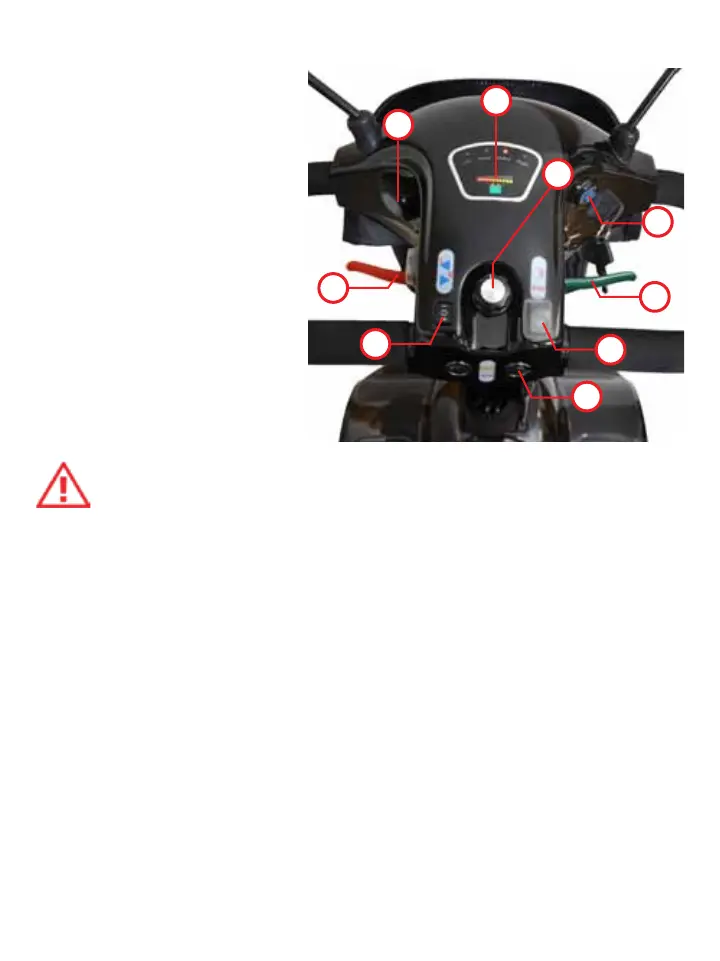
Control Panel
1. Horn
2. Lights
3. Directionals
4. Battery meter console
5. Electronic speed
control switch
6. Speed control lever
(forward)
7. Speed control lever
(reverse)
8. Power switch
9. Charger receptacle
Remove the protective plastic film covering the battery
indicator.
Power Switch
1. To turn the power on, place the key into the ignition.
2. Turn the key clockwise to ON. The battery indicator should light-
up (make sure the batteries are fully charged).
3. Turn the key counterclockwise to OFF to switch the power–off.
4. The BIOS Scooter is equipped with an automatic shut–off which
will automatically shut the scooter off when it is not in use for 20
minutes or more.
23


 To Next Page