0°
+ 1 … + 7°
– 1 … – 5°
5-10 cm
–
+
–
+
–
–
+
+
–
+
1m
2m
0m
0m
1m
2m
3m
4m
2.2 m
90°
1m
2m
0m
0m
1m
2m
3m
4m
2.2 m
1.
2.
*
A B C DA B C DA B C D A B C DA B C D
BBC Bircher Smart Access, BBC Bircher AG, Wiesengasse 20, CH-8222 Beringen, www.bircher.com 2 / 2
Initialisation
Remove all objects that do not form part of the usual door system environment from the
door area BEFORE switching on the power supply. Ensure that no people are in the door
area, otherwise correct startup will not be possible.
The alternate ashing shows the initialisation (teaching) of the detector. (Duration 20 - 25 seconds).
During startup, the rmware version FXXX is displayed.
Following initialisation, the red/green LED only illuminates when a detection has occurred.
The door system is now operational at this point. If any further settings are required, proceed as described in the following sections.
red LED green LED
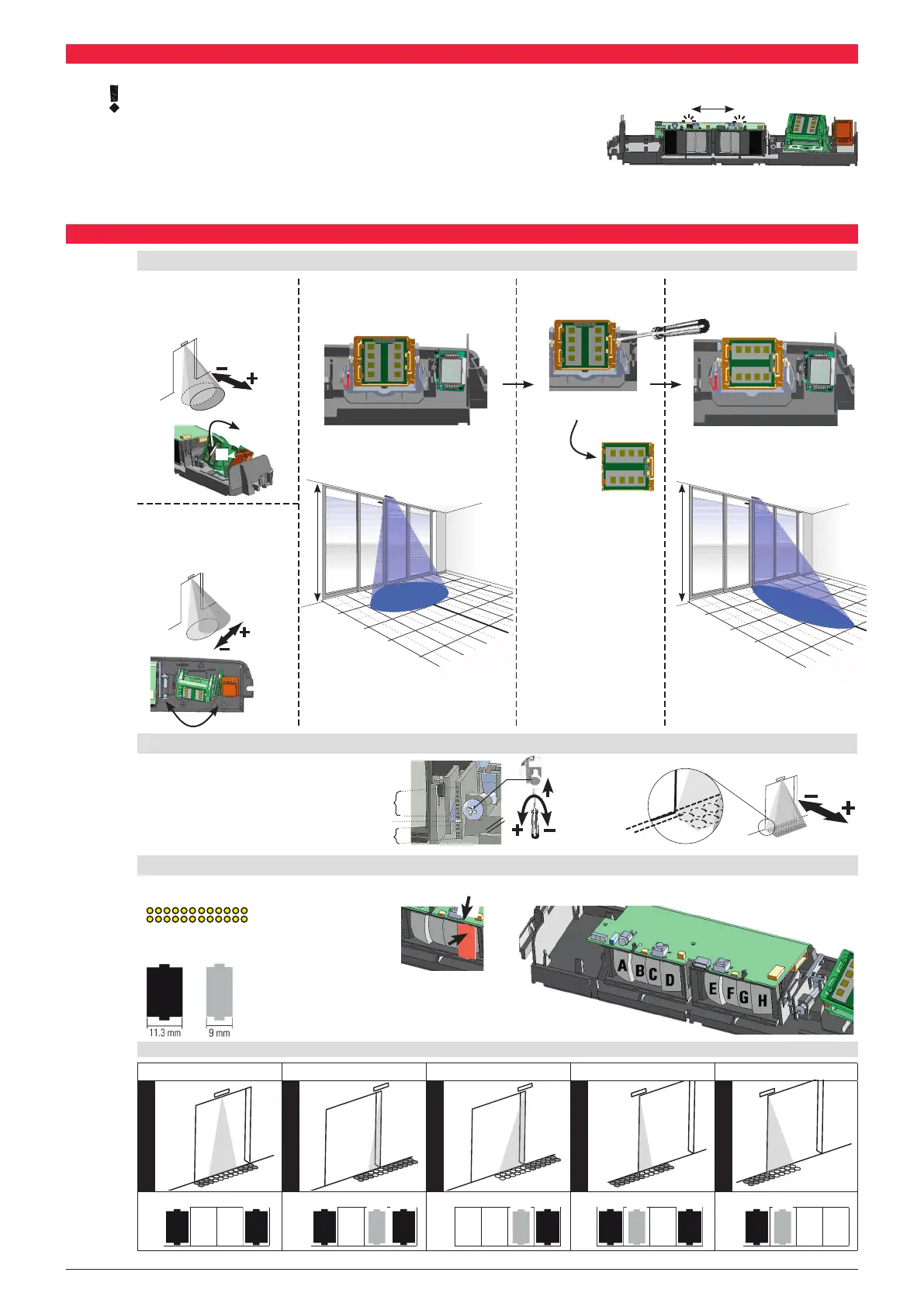
Mechanical ne tuning
AIR eld (PrimeTec / PrimeScan)
Settings of the inclination angle on the
adjustment screw:
Inclination:
– 5° ... +7° continuously adjustable
Radar eld (PrimeTec)
Manual settings of the
inclination angle
0° ... +90° in 5° steps
Manual settings of the
pivot angle
– 20° ... +20° in 5° steps
Wide radar eld turn 90° Narrow radar eld
Inclination angle: 35° Inclination angle: 35°
min. = 0.5 m x 0.25 m (WxD)
max. = 4 m x 2 m (WxD)
min. = 0.16 m x 0.8 m (WxD)
max. = 2 m x 4 m (WxD)
Setting the AIR eld width (PrimeTec / PrimeScan)
A, D covered A, C, D covered C, D covered A, B, D covered A, B covered
Field width: 1 x 0.2 m
Field width: 0.5 x 0.2 m
Field width: 1.2 x 0.2 m
Field width: 0.5 x 0.2 m
Field width: 1.2 x 0.2 m
The width of the AIR eld can be set using the click-in plastic cover in front of the detector’s lens.
1. Slide
2. Push & click!
Possible settings (Dimensions at 2.2 m mounting hight):
Detector without cover:
All light beams are active
Field width:
2.3 m x 0.2 m
at 2.2 m



 To Previous Page
 Loading...