
 Need help?
Do you have a question about the BirdBike VA00037 and is the answer not in the manual?
Read the manual carefully before use for important safety instructions.
Contact local dealer or retailer for support or warranty information.
Lists all tools and parts provided in the accessory box for assembly.
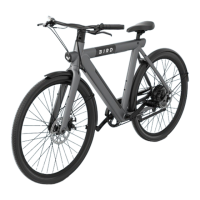
Labels major components of the Bird Bike for easy identification.
Steps to remove the display from the handlebar cavity before installation.
Instructions for installing the handlebar and tightening stem screws.
Reminder to remove the plastic front rotor protector before wheel installation.
Guides on aligning the axle and securing the wheel with cap nuts.
Attaching the fender to the fork legs using screws.
Securing the fender bracket to the back of the fork.
Locating and accessing the seat clamp screw for adjustment.
Adjusting seat post height and tightening the clamp screw.
Warning not to extend seat post beyond the minimum insertion line.
Instructions on screwing pedals into the crank, noting reverse thread.
Final tightening of pedals using a wrench for secure fit.
Reinstalling the display into the handlebar and securing it.
Connecting the display power cable to the frame power cable.
How to turn the BirdBike on and off using the power button.
Navigating the display to view speed, total, and trip distance.
Instructions for activating and using Walk Mode for assistance.
How to turn the headlights on and off.
Changing the motor's assist level from 0 to 5.
Interpreting the battery icon segments to check charge level.
Information on error codes and troubleshooting resources.
Method to enter the bike's settings menu.
Using buttons to navigate and save settings within the menu.
How to exit the settings menu.
Switching between MPH and KM/H display units.
Setting the maximum speed limit for the bike.
Adjusting wheel diameter for accurate speed readings.
Customizing the display brightness level.
Setting the duration for automatic power off.
Resetting the trip meter to zero.
Information on service reminders and how to clear them.
Recommended rider age and maximum load capacity.
Essential safety inspection points before each ride.
Guidelines for safe riding and hazard avoidance.
Conditions and situations where riding is unsafe or prohibited.
Warnings regarding moving parts, health, and water exposure.
Safety guidelines for washing the BirdBike.
Instructions for storing the bike and battery, including charging.
Checking handlebars, wheel nuts, and wheel rotation.
Inspecting the power circuit, lights, and cable connections.
Verifying brake lever distance and pad/disc contact.
Confirming battery installation and proper maintenance.
Setting the correct saddle height for rider comfort.
Checking and cleaning reflectors for visibility.
Verifying axle tightness, tire condition, and pedal rotation.
Ensuring charging ports are undamaged and clean.
Specifics on brake pads, calipers, and levers.
Details on tire models, sizes, and recommended PSI.
Identifies the specific motor model used in the BirdBike.
Explains warranty coverage for defects outside normal wear.
Warning that modifications void the warranty and introduce safety issues.
Requirement for proof of purchase for warranty claims.
Guidance on contacting dealers for warranty support.
States the two conditions for FCC rule compliance.
Confirms compliance with FCC radiation exposure limits.
Cautions about modifications and interference correction.
Notes that insurance policies may not cover scooter accidents.
Prohibits modifications affecting noise or emissions.
Declares Bird Bike models conform to EU directives.
Information about the conformity assessment testing facility.
Lists applicable EU harmonized standards for compliance.
Provides resources for questions and support.
 General
| Category | Electric Bicycle |
|---|---|
| Model | VA00037 |
| Battery Range | Up to 50 miles |
| Brakes | Mechanical Disc Brakes |
| Frame Material | Aluminum Alloy |
| Charging Time | 4-6 hours |
| Throttle | Yes |
| Foldable | No |
| Battery | Lithium-ion |
| Top Speed | 20 mph |
| Gears | 7-speed |
| Display | LCD Display |
| Lights | Integrated Front and Rear Lights |
| Pedal Assist | Yes |
| Max Load | 265 lbs |
| Suspension | Front Suspension |

 To Next Page
