EasyManua.ls Logo

Bissell MULTICLEAN WET + DRY - User Manual

Bissell MULTICLEAN WET + DRY
8 pages
Print Icon
To Next Page IconTo Next Page
Loading...
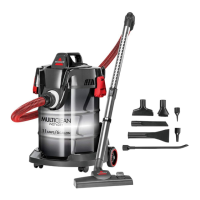
Product Overview
1. Air Flow Regulator
2. Handle
3. Extension Wand
4. Carry Handle
5. ON/OFF Switch
6. Blower Function Connection
7. Lid Clip
8. Hose Connector and Suction Inlet
Important Safety Information ............................ 2
What’s in the Box? ..................................................... 3
Getting Ready to Clean .......................................... 3
Cleaning Your Floors ................................................ 4
Emptying the Dirt Tank........................................... 5
Cleaning the Filters .................................................... 6
Protecting the Vacuum’s Motor .........................7
Troubleshooting ............................................................7
Warranty ............................................................................7
MULTICLEAN® WET + DRY
DRUM VACUUM
2035 SERIES
6
2
3
4
7
8
5
1
Meet your new BISSELL product!
Go to support.BISSELL.com for a comprehensive walkthrough
of your new purchase, including videos, tips, support, and more.
Want to get started right away? This guide has all the information
you need to set up your new product. Let’s take a look

Questions and Answers

  • C
    Casey FloydJul 30, 2025
    Why won't my Bissell Vacuum Cleaner pick up dirt?
    • S
      Seth SchmidtJul 30, 2025
      There are several reasons why your Bissell Vacuum Cleaner might not be picking up dirt. It could be due to a dirty filter; remove and rinse the filter, allowing 24 hours for it to dry completely before reinserting. Another cause might be that the main hose is not properly connected; reconnect it by pushing the hose connection to secure the latch. Also, inspect the hose for cracks or holes, and replace it if necessary. Check for clogs in the floor tool or suction inlet, removing any debris. Finally, ensure the black portion of the filter completely covers the top wall of the dirt tank.
  • O
    Oscar WilliamsAug 12, 2025
    What to do if dirt is escaping from my Bissell MULTICLEAN WET + DRY Vacuum Cleaner?
    • M
      Malik StewartAug 12, 2025
      If dirt is escaping from your Bissell Vacuum Cleaner, the dirt tank might be full, so empty it. Also, check to ensure the filter is in place and that the filter basket is sitting completely on the wall of the dirt tank all the way around.

Summary

Important Safety Instructions

General Safety Warnings

Essential safety precautions to reduce risk of fire, electric shock, or injury during use.

Grounding Instructions

Proper grounding procedures for safe operation and prevention of electrical shock.

Getting Ready to Clean

Initial Setup and Operation

Steps for attaching the hose, adjusting suction, connecting tools, and powering on the vacuum.

Cleaning Your Floors

Using Floor Cleaning Tools

Instructions for using the Multi-Surface and Wet Floor Tools for various cleaning tasks.

Emptying the Dirt Tank

Dirt Tank Maintenance

Step-by-step guide for safely removing and emptying the dirt tank.

Cleaning the Filters

Filter Maintenance

Detailed instructions for removing, washing, and drying the vacuum cleaner filters.

Protecting the Vacuums Motor

Motor Overheating Protection

Information on the internal thermal protector and actions to take if the motor stops due to overheating.

Troubleshooting

Common Issues and Solutions

Guidance for resolving common vacuum performance problems like poor suction or dirt escaping.

Warranty

Warranty Information

Details on the limited 2-year warranty and how to obtain service or information.

Bissell MULTICLEAN WET + DRY Specifications

General IconGeneral
TypeWet/Dry
Power SourceCorded
Surface RecommendationBare Floor, Carpet, Hardwood, Upholstery
Special FeatureBlower Function, Converts to a blower, Easy Empty Tank, Edge Cleaning
Amps6 A
Included ToolsCrevice Tool, Nozzle, Upholstery Tool

Related product manuals