This document describes the Bitmore Smartwatch SW300 (DZ09), a smartwatch designed to connect with Android smartphones via the SmartBlue application.
Function Description
The Bitmore Smartwatch SW300 offers a range of functionalities when connected to an Android smartphone. Its primary functions include:
- GSM Calls and Short Messages: The smartwatch supports making and receiving calls and sending/receiving short messages through a connected mobile network.
- Bluetooth Connectivity: It connects to a smartphone via Bluetooth for various features, including contact synchronization and call logs.
- Phone Reminders: The device provides push services for messages and notifications from the connected smartphone.
- Additional Functions: It includes features such as a pedometer for step counting, sleep monitoring, and sedentary reminders.
- Multimedia: The smartwatch supports music playback and data synchronization.
Important Technical Specifications
The Bitmore Smartwatch SW300 comes with the following key technical specifications:
- Screen: 1.54 inches, with a resolution of 240x240 pixels.
- Bluetooth: Embedded 3.0.
- Microphone: Yes.
- Speaker: Yes.
- Camera: 0.3 MP.
- Main Functions: Phone, messages, call logs, alarm, vibration, steps and sleep monitoring, calendar, music play, data synchronization.
- OS Compatibility: Android.
- Dimensions: 56x38.5x12.5 mm.
- Slots: Micro USB slot, SIM slot, Micro SD slot.
- Weight: 58g.
Usage Features
To fully utilize the Bitmore Smartwatch SW300, users need to connect it with an Android smartphone via the SmartBlue application.
Connection between Smartwatch and Smartphone:
- Download SmartBlue App: Download the SmartBlue application from your smartphone's app store (e.g., Google Play Store).
- QR Code Scan (Alternative): Alternatively, scan the provided QR code with your smartphone to download the app. Once installed, the app icon will appear on your smartphone screen.
- Bluetooth Connection: Ensure Bluetooth is connected between your smartwatch and smartphone.
- Activate Bluetooth Notification: Open the SmartBlue application, navigate to the Bluetooth notification settings interface, and activate "BTNotification" (Bluetooth Notification). This allows you to choose whether to receive notifications.
Product Features (Hardware):
- Speaker: For audio output.
- Microphone: For voice input during calls or recordings.
- Touch Screen LCD: The primary interface for interaction.
- Menu Button: For navigating menus.
- Camera: For capturing photos.
- USB Port: For charging and data transfer.
Battery, Micro SD, and SIM Card Installation:
- Open Battery Cover: Open the cover of the battery at the back of the smartwatch.
- Remove Battery: Remove the battery.
- Insert Micro SD Card: Insert the micro SD card into its designated slot.
- Insert Micro SIM Card: Insert the micro SIM card into its designated slot.
- Refit Battery and Cover: Refit the battery and the back cover of the smartwatch.
Function Operations:
- Home Button Use:
- Long Press: Open or close the smartwatch.
- Short Press: Return to the initial screen.
- When Smartwatch is Working: Short press the button to enter active standby clock (as shown in the picture), then short press again to close the screen.
- From Clock Screen: When you see the clock, press the touch screen and swipe left or right to enter the main menu.
Display and Operation of the Main Menu:
- Display Time and Date: The main menu displays the current time and date.
- Middle Icons: The middle icons on the screen represent call logs and contacts.
- Bottom Icons: The bottom icons on the screen represent menu and settings.
Smartwatch Settings:
- General Settings: You can set the date and time, language, input method, standby screen, flight mode, and brightness.
- Notification Settings: Configure how notifications are received.
- Call Settings: Adjust call-related preferences.
- Network Settings: Manage network connections.
- Security Settings: Configure security features.
- Restore Factory Settings: Reset the smartwatch to its original factory settings.
Bluetooth Settings:
- After opening Bluetooth, your smartwatch can be found by your smartphone. During the search, choose "Yes" when prompted to track it.
Multimedia Usage:
- To view pictures or listen to music, a micro SD card must be installed in the smartwatch.
- To use the SmartBlue application for these features, you must first register.
Maintenance Features
Important Notes and Safety Precautions:
- Disassembly: Do not dismantle the smartwatch.
- Battery Safety: Do not place the battery near high temperatures or throw it into fire to avoid explosions.
- Screen Protection: Do not hit the screen with sharp objects.
- Environmental Exposure: Do not expose the smartwatch to sun, dust, or smoke for long periods.
- Water Resistance: The product is not waterproof; keep it away from rain and water.
Disposal of Old Electrical and Electronic Equipment:
- The symbol on the product or its packaging indicates that the product should not be disposed of with household waste. Instead, it should be handed over to an applicable collection point for the recycling of electrical and electronic equipment. Improper disposal can have negative consequences for the environment and human health. For more information, contact your local city office, household waste disposal service, or the shop where you purchased the product.
Warranty Terms and Conditions:
- Warranty Period: Bitmore products are supported by a One (1) Year Guarantee of good operation. The warranty is valid for one year, starting from the date the product was purchased. Keep your receipt or invoice as proof of purchase.
- Warranty Validity: The warranty is valid if:
- The serial number and IMEI number are visible and not altered or torn apart.
- The product is transferred to an Info Quest Technologies service center accompanied by the receipt or invoice, clearly visible and with a short defect description.
- Other information that might be requested for the effective solution of the problem is provided.
- Warranty Exclusions: The warranty is NOT valid if:
- The device's serial number and IMEI number are worn or altered.
- The problem results from tweaking, bad connectivity, bad installation, or misuse.
- The problem is caused by accident, alterations of the power grid, liquid or fire, misuse, or neglect.
- Liquid has entered the product.
- Defects or damages are caused to the device or its accessories due to bad postage or transfer without proper packaging.
- There are clear marks of dropping or damaging the device, such as scratches, badly fastened screws, or cut cables.
- Warranty DOES NOT Cover:
- Normal wear of plastic parts due to normal use.
- Damage caused by customization or settings not according to the product's technical specifications.
- Periodical maintenance and repair of the device or other accessories due to natural wear.
- Transport expenses for onsite visits by a technician.
- Damages caused by accidents, lightning, water, fire, or bad ventilation.
- Installation of parts or equipment by third parties unauthorized by Info Quest Technologies to offer technical support.
Terms of Transfer and Charge:
- The transfer of Bitmore products to and from service labs for repair is the user's responsibility and expense.
- For product transfer, the original packaging should be used and maintained in good condition to avoid possible damage during transport. Info Quest Technologies is not liable for any damage during transport.
- If technical inspection determines that repair is not subject to the aforementioned terms, the user is charged with transfer and inspection fees.
- If the user wishes to repair a problem not covered by the warranty, repair fees are paid by the user.
Other Terms:
- Info Quest Technologies is not liable against the customer or third parties for any damage, including evading revenue, deposits, or other random or indirect damages that may happen due to usage or the incapability of using the product.
- The warranty is valid without prejudice to the aforementioned terms that the user is aware of and accepts.
- Any differences that may arise from these terms are subject to the courts of Athens and valid Greek Law.
Service Centers:
- Info Quest Technologies SA: 25, Al. Pantou str., 176 71 Kallithea, Athens, Greece.
- Additional Service Center: 42, Bichaki str., 182 33, Ag. I. Rentis, Athens, Greece.
Technical Support Line:
Declaration of Conformity:
- Info Quest Technologies declares that the Bitmore Smartwatch SW300 (DZ09) complies with the essential requirements and other relevant provisions of Directive 99/5. A copy of the Declaration of Conformity is available at www.bitmore.gr.

 Need help?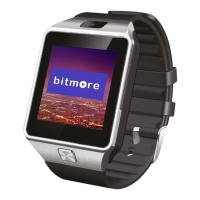

 To Next Page
 General