Need help?
Do you have a question about the Bits Limited Smart Strip ECG-7MVR and is the answer not in the manual?
Technical details of the Smart Strip Surge Protector, including electrical ratings and protection features.
Information on the warranty provided by BITS Limited, including details and limitations.
Details the function of the lighted switch, circuit breaker, and protection indicator light.
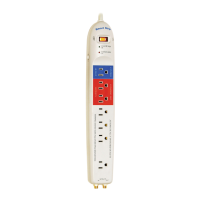
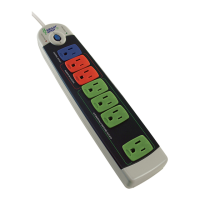
Explains the Control Outlet, Constant Hot Outlets, and Automatically Switched Outlets.
Step-by-step instructions for calibrating the sensitivity for switched outlets.
Critical usage tips, including calibration, sleep modes, and electrical safety warnings.
The Smart Strip Advanced Power Strip, Model ECG-7MVR, is an energy-saving surge protector designed to reduce "Phantom Current" draw and save energy by automatically switching off connected devices when not in use. This device is an advanced power strip that combines surge protection with intelligent power management, making it suitable for both home entertainment setups and computer workstations.
The core functionality of the Smart Strip revolves around its "Control Outlet," "Always On Outlets," and "Automatically Switched Outlets." This tiered system allows users to designate a primary device that dictates the power state of other connected accessories. When the device plugged into the Control Outlet is active, the Automatically Switched Outlets receive power. Conversely, when the Control Outlet device enters a low-power state (such as sleep mode or being turned off), the Smart Strip electronically "unplugs" the devices in the Automatically Switched Outlets, effectively cutting off their power supply and eliminating standby power consumption. This intelligent switching mechanism is the primary way the Smart Strip helps users save energy and reduce their electricity bills.
For usage, the Smart Strip is straightforward to set up. Users should plug their primary control device, such as a TV or computer, into the "Control Outlet." This device will then govern the power to the "Automatically Switched Outlets." Into these switched outlets, users should plug all other accessories that they wish to turn on and off in conjunction with the control device. Examples include monitors, speakers, printers, or gaming consoles. The "Always On Outlets" are designed for devices that require continuous power, regardless of the control device's state. These typically include cable boxes, satellite receivers, DVRs, fax machines, or cable modems, which often need to remain powered for recording, updates, or constant connectivity. These "Always On Outlets" will only lose power if the main power switch on the Smart Strip is turned off.
The Smart Strip also features a lighted power switch that doubles as a 15-amp circuit breaker. This switch should typically remain on. If it's not lit, users should check if it's turned on, reset it, or try a different wall outlet. Additionally, a "Ground & Surge Indicator" light provides visual confirmation that the connected equipment is protected. If this light is off, it could indicate a problem with the ground connection (suggesting trying another outlet) or a failure of the surge protection, in which case users are advised to consult the manufacturer's FAQ or contact support.
One of the key usage features is the "Sensitivity Adjustment" dial, which allows users to calibrate the Smart Strip to their specific control device. This adjustment is crucial to ensure that the Automatically Switched Outlets turn on and off correctly with the control device. Calibration involves plugging a control device and a switched device into their respective outlets. Users then turn the control device on and off to test the Smart Strip's response. If the switched outlets do not turn on when the control device is active, the user should slowly turn the dial clockwise until they do. If the switched outlets do not turn off when the control device is in a low-power state, the user should slowly turn the dial counterclockwise until they turn off. This fine-tuning ensures optimal energy-saving performance tailored to the power consumption characteristics of the control device. The adjustment dial is a 1½ turn dial, and users are cautioned not to force it.
The Smart Strip is compatible with a wide range of devices. It works effectively with most computers and home entertainment equipment, light-duty workshop equipment, and incandescent lamps of 15 watts or greater, as well as fluorescent lamps of 5 watts or greater. However, users should be aware of certain nuances. Some computers may take a few minutes to enter sleep or hibernate mode, which can affect the calibration process. When a computer does enter sleep or hibernate, all devices in the SWITCHED OUTLETS should power down. For notebook computers, if the battery is still charging while the computer is in sleep mode, devices in the switched outlets might not turn off until the charging cycle is complete.
For maintenance, the Smart Strip is designed to be largely self-sufficient. The built-in 15-amp circuit breaker provides protection against overloads, automatically tripping to prevent damage. If the circuit breaker trips, users can reset it by turning the power switch off and then back on after addressing the cause of the overload. The surge protection feature is also a critical maintenance aspect, safeguarding connected electronics from power surges. While the surge protection is designed to be robust, the indicator light serves as a warning if it has failed, prompting users to seek support or replace the unit to maintain protection. The device is not intended to be user-serviceable beyond these basic checks and adjustments. Users are also warned against plugging the Smart Strip into another relocatable power tap, as this can create a fire hazard and compromise surge protection.
In summary, the Smart Strip Advanced Power Strip is an intelligent and user-friendly device focused on energy conservation and surge protection. Its tiered outlet system and adjustable sensitivity allow for customized power management, helping users reduce standby power consumption and contribute to a greener environment. Regular checks of the power switch and surge indicator light ensure its proper functioning and continued protection of valuable electronics.
 General
| Outlets | 7 |
|---|---|
| Master Outlet | 1 |
| Controlled Outlets | 3 |
| Always-On Outlets | 3 |
| Surge Protection | Yes |
| Model | ECG-7MVR |
| Brand | Bits Limited |
| USB Ports | 0 |
| Joules Rating | 1080 joules |
| Cord Length | 6 feet |

 To Next Page