Options
Operating instructions GLP
5 -- 28
6.562.98.5.01.18
5.5.8 Status messages on the list printer
If one of the following status messages appears in connection with a list printer,
the cause may be eliminated as described in the following:
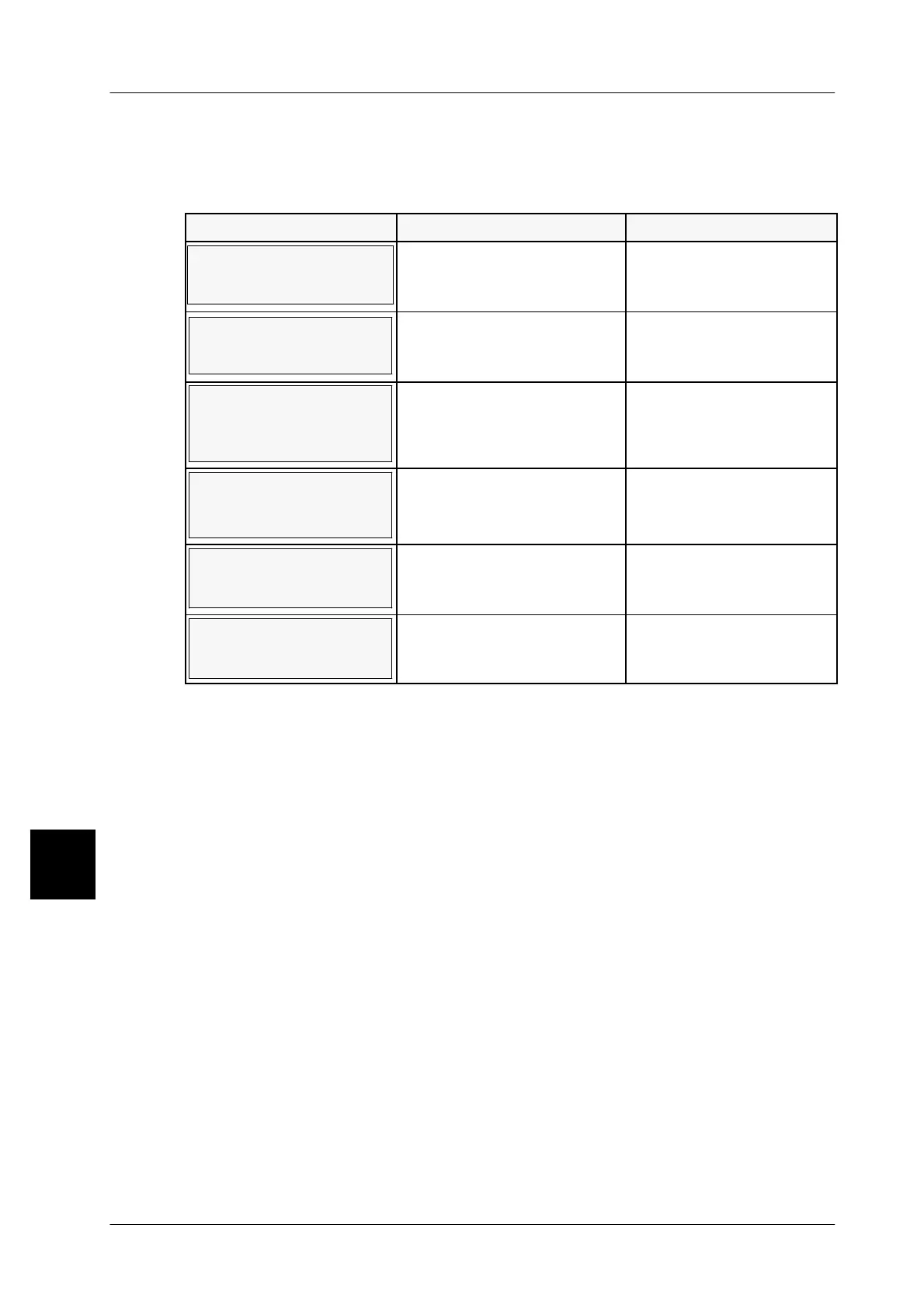
MESSAGE CAUSE REMEDIAL ACTION
List printer OFF-LINE,
out of paper, or switched
off.
Printer not switched on,
not switched to ONLINE or
no paper inserted.
Switch on printer, switch
to ONLINE or insert pa-
per.
Internal list buffer
is printed out
After startup or switching
to ONLINE, a print buffer is
printed first.
Commence labeling
only when the status
message has erased.
tains data! Check prin-
ter and print data!
List printer still switched to
OFFLINE after startup of
unit.
Switch printer to ON-
LINE and print out con-
tents of list buffer.
Int. list buffer runs out of
stor. cap.! Please check
printer!
The list buffer still contains
unprinted data.
Check printer and paper
supply. If in order, data
will be printed.
Internal list buffer
FULL!
Print buffer full. Data of last
package is lost for list prin-
tout.
Make list printer ready to
operate and print data.
List not
created!
A not yet existing list num-
ber has been entered.
Reenter existing list
number.
5



 To Next Page