EasyManua.ls Logo

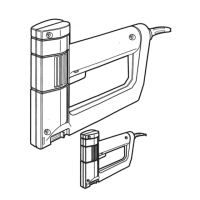
Black & Decker 9701 - Safety Rules for Staplers; Double-Insulation Explanation; Controlled Power Feature; Stapling Technique

Black & Decker 9701
2 pages
Print Icon
To Previous Page IconTo Previous Page
Loading...
Safety
Rules
for
Staplers
1.
DO
NOT
ATTEMPTTO
DRIVE
STAPLES
WITHOUT
FIRMLY
ENGAGING
THE
WORK
SURFACE.
2.
UNLOAD
STAPLES
BEFORE
STORAGE.
CAUTION:
When
stapling
into
walls,
floors
or
wherever
"live"
electrical
wires
may
be
encountered,
DO
NOT
TOUCH
ANY
METAL
PARTS
OF
THE
TOOL!
Hold
the
tool
only
by
the
plastic
handle
to
prevent
electrical
shock
if
you
staple
into
a
"live"
wire.
Double-Insulation
Your
Stapler
is
DOUBLE-INSULATED
to
give
you
added
safety.
This
means
that
it
is
constructed
throughout
with
TWO
separate
"layers"
of
electrical
insulation
or
one
DOUBLE
thickness
of
insulation
between
you
and
the
tool's
electrical
system.
Tools
built
with
this
improved
insulation
system
are
not
intended
to
be
grounded.
As
a
result,
your
tool
is
equipped
with
a
two-pronged
plug
which
permits
you
to
use
any
conventional
120
volt
electrical
outlet
without
concern
for
maintaining
a
ground
connection.
NOTE:
DOUBLE-INSULATION
does
not
take
the
place
of
normal
safety
precautions
when
operating
this
tool.
The
improved
insulation
system
is
for
added
protection
against
injury
resulting
from
a
possible
electrical
insulation
failure
within
the
tool.
CAUTION:
When
servicing
Double-
Insulated
Tools,
USE
ONLY
IDENTICAL
REPLACEMENT
PARTS.
Replace
or
repair
damaged
cords.
Controlled
Power
Your
stapler
has
been
engineered
to
deliver
the
optimum
power
for
each
stroke
in
practically
any
material.
What
this
means
is
that
when
you're
working
with
hard
materials,
the
tool
has
plenty
of
power
to
drive
most
staples
flush
to
the
surface.
When
you're
working
with
soft
fabric
or
plastic
foam,
the
stapler
will
drive
staples
flush
to
the
surface
but
no
deeper.
Material
is
held
firmly
but
not
torn
through.
Stapling
Hold
the
stapler
as
shown
in
Figure
4
with
one
hand
holding
the
handle
and
the
other
hand
pressing
firmly
down
on
the
top
of
the
tool
to
hold
the
base
against
the
material
being
stapled.
If
you
find
that
the
tool
is
not
driving
the
staples
fully
into
the
wood,
use
a
shorter
length
staple.
Generally
speaking,
the
optimum
staple
length
is
the
longest
that
the
stapler
will
fully
seat.
.
Power
Supply
Make
sure
that
your
power
supply
agrees
with
the
nameplate
marking
on
your
stapler.
Your
stapler
was
designed
to
operate
on
120
Volts
AC
Only.
This
means
standard
120
volt
household
power.
All
Black
&
Decker
tools
are
factory
tested,
if
this
tool
does
not
operate,
check
the
power
supply.
Extension
Cords
Double-Insulated
tools
have
2
wire
cords,
and
can
be
used
with
2
wire
or
3
wire
extension
cords.
Only
round
jacketed
extension
cords
should
be
used,
and
we
recommend
that
they
be
listed
by
Underwriters'
Laboratories
(U.L).
If
the
extension
will
be
used
outside,
the
cord
must
be
suitable
for
outdoor
use.
Any
cord
marked
as
outdoor
{the
letters
"WA"
on
the
cord
jacket
indicate
a
cord
recommended
for
outdoor
use)
can
also
be
used
for
indoor
work.
An
extension
cord
must
have
adequate
wire
size
(AWG
or
American
Wire
Gauge)
for
safety,
and
to
prevent
loss
of
power
and
overheating.
The
smaller
the
gauge
number
of
the
wire
the
greater
the
capacity
of
the
cable,
that
is
16
gauge
has
more
capacity
than
18
gauge.
When
using
more
than
one
extension
cord
to
make
up
the
total
length,
be
sure
each
individual
extension
contains
at
least
the
minimum
wire
size.
MINIMUM
WIRE
GAUGE
REQUIREMENTS
FOR
THIS
STAPLER:
UP
TO
25
FEET
—16
GAUGE
UP
TO
50
FEET
—14
GAUGE
Before
using
an
extension
cord
inspect
it
for
loose
or
exposed
wires,
damaged
insulation,
and
defective
fittings.
Make
any
needed
repairs
or
replace
the
cord
if
necessary.
Black
&
Decker
has
extension
cords
available
that
are
U.L
listed
for
outdoor
use.
1
|
I
Loading
Staples
(UNPLUG
Stapler
From
Power
Supply)
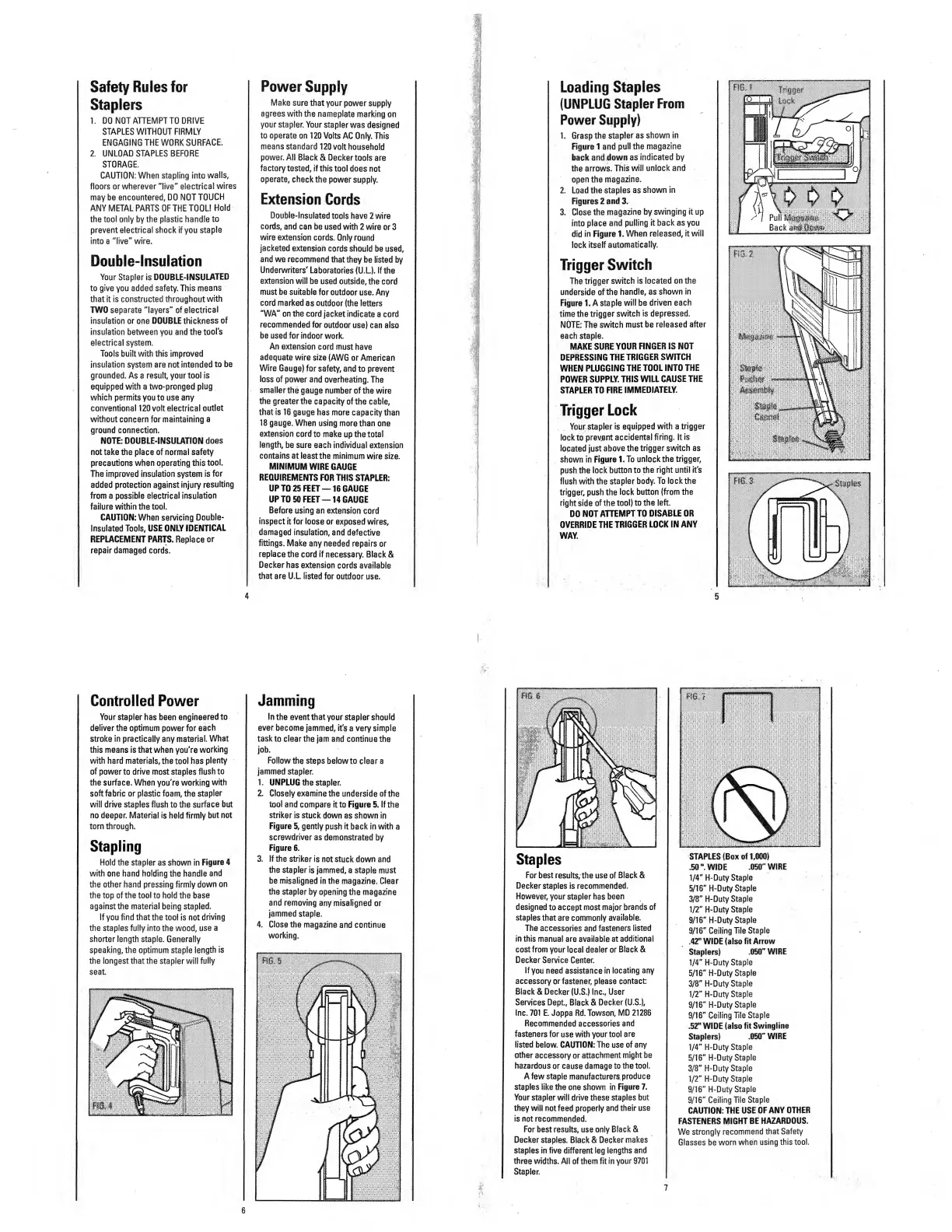
1.
Grasp
the
stapler
as
shown
in
Figure
1
and
puli
the
magazine
back
and
down
as
indicated
by
the
arrows.
This
will
unlock
and
open
the
magazine.
2.
Load
the
staples
as
shown
in
Figures
2
and
3.
3.
Close
the
magazine
by
swinging
it
up
into
place
and
pulling
it
back
as
you
did
in
Figure
1.
When
released,
it
will
lock
itself
automatically.
Trigger
Switch
The
trigger
switch
is
located
on
the
underside
of
the
handle,
as
shown
in
Figure
1.
A
staple
will
be
driven
each
time
the
trigger
switch
is
depressed.
NOTE:
The
switch
must
be
released
after
each
staple.
MAKE
SURE
YOUR
FINGER
IS
NOT
DEPRESSING
THE
TRIGGER
SWITCH
WHEN
PLUGGING
THE
TOOL
INTO
THE
POWER
SUPPLY.
THIS
WILL
CAUSE
THE
STAPLER
TO
FIRE
IMMEDIATELY.
Trigger
Lock
Your
stapler
is
equipped
with
a
trigger
lock
to
prevent
accidental
firing.
It
is
located
just
above
the
trigger
switch
as
shown
in
Figure
I.To
unlock
the
trigger,
push
the
lock
button
to
the
right
until
it's
flush
with
the
stapler
body.
To
lock
the
trigger,
push
the
lock
button
(from
the
right
side
of
the
tool)
to
the
left.
DO
NOT
ATTEMPT
TO
DISABLE
OR
OVERRIDE
THE
TRIGGER
LOCK
IN
ANY
WAY.
Jamming
In
the
event
that
your
stapler
should
ever
become
jammed,
it's
a
very
simple
task
to
clear
the
jam
and
continue
the
job.
Follow
the
steps
below
to
clear
a
jammed
stapler.
1.
UNPLUG
the
stapler.
2.
Closely
examine
the
underside
of
the
tool
and
compare
it
to
Figure
5.
If
the
striker
is
stuck
down
as
shown
in
Figure
5,
gently
push
it
back
in
with
a
screwdriver
as
demonstrated
by
Figure
6.
3.
If
the
striker
is
not
stuck
down
and
the
stapler
is
jammed,
a
staple
must
be
misaligned
in
the
magazine.
Clear
the
stapler
by
opening
the
magazine
and
removing
any
misaligned
or
jammed
staple.
4.
Close
the
magazine
and
continue
working.
Staples
For
best
results,
the
use
of
Black
&
Decker
staples
is
recommended.
However,
your
stapler
has
been
designed
to
accept
most
major
brands
of
staples
that
are
commonly
available.
The
accessories
and
fasteners
listed
in
this
manual
are
available
at
additional
cost
from
your
local
dealer
or
Black
&
Decker
Service
Center.
If
you
need
assistance
in
locating
any
accessory
or
fastener,
please
contact
Black
&
Decker
(U.S.)
Inc.,
User
Services
Dept,
Black
&
Decker
(U.S.),
Inc.
701
E.
Joppa
Rd.
Towson,
MD
21286
Recommended
accessories
and
fasteners
for
use
with
your
tool
are
listed
below.
CAUTION:
The
use
of
any
other
accessory
or
attachment
might
be
hazardous
or
cause
damage
to
the
tool.
A
few
staple
manufacturers
produce
staples
like
the
one
shown
in
Figure
7,
Your
stapler
will
drive
these
staples
but
they
will
not
feed
properly
and
their
use
is
not
recommended.
For
best
results,
use
only
Black
&
Decker
staples.
Black
&
Decker
makes
staples
in
five
different
leg
lengths
and
three
widths.
All
of
them
fit
in
your
9701
Stapler.
STAPLES
(Box
of
1,(MW)
,50
"WIDE
.050"
WIRE
1/4"
H-Duty
Staple
5/16"
H-Duty
Staple
3/8"
H-Duty
Staple
1/2"
H-Duty
Staple
9/16"
H-Duty
Staple
9/16"
Ceiling
Tile
Staple
.42"
WIDE
(also
fit
Arrow
Staplers)
.050"
WIRE
1/4"
H-Duty
Staple
5/16”
H-Duty
Staple
3/8"
H-Duty
Staple
1/2"
H-Duty
Staple
9/16"
H-Duty
Staple
9/16"
Ceiling
Tile
Staple
.52"
WIDE
(also
fit
Swingline
Staplers)
.050"
WIRE
1/4"
H-Duty
Staple
5/16"
H-Duty
Staple
3/8"
H-Duty
Staple
1/2"
H-Duty
Staple
9/16"
H-Duty
Staple
9/16"
Ceiling
Tile
Staple
CAUTION:
THE
USE
OF
ANY
OTHER
FASTENERS
MIGHT
BE
HAZARDOUS.
We
strongly
recommend
that
Safety
Glasses
be
worn
when
using
this
tool.
7

Related product manuals