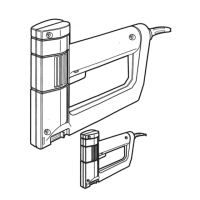
This document describes the Black & Decker 9701 Electric Flush Stapler, a double-insulated heavy-duty stapler designed for various fastening tasks.
Function Description
The Black & Decker 9701 Electric Flush Stapler is a powerful tool engineered to drive staples flush to the surface in a wide range of materials, from hard woods to soft fabrics and plastic foam. Its primary function is to provide controlled power for each stroke, ensuring optimal staple seating without tearing or damaging the material. The flush-stapling feature allows for precise and secure fastening, making it suitable for upholstery, insulation, ceiling tile installation, and other applications requiring a neat, flush finish. The tool is designed for ease of use, with features like a trigger switch for staple deployment and a trigger lock for safety, preventing accidental firing.
Important Technical Specifications
- Model: 9701 Electric Flush Stapler
- Power Supply: Operates on 120 Volts AC Only. It is designed for standard 120-volt household power.
- Insulation: Double-insulated construction, eliminating the need for grounding and featuring a two-pronged plug. This system provides enhanced safety against electrical shock from insulation failure.
- Staple Compatibility:
- Black & Decker Staples (Recommended):
- 0.50" Wide, 0.050" Wire: 1/4", 5/16", 3/8", 1/2", 9/16" H-Duty Staple, 9/16" Ceiling Tile Staple.
- 0.42" Wide (also fits Arrow Staplers), 0.050" Wire: 1/4", 5/16", 3/8", 1/2", 9/16" H-Duty Staple, 9/16" Ceiling Tile Staple.
- 0.52" Wide (also fits Swingline Staplers), 0.050" Wire: 1/4", 5/16", 3/8", 1/2", 9/16" H-Duty Staple, 9/16" Ceiling Tile Staple.
- Other Major Brands: Designed to accept most major brands of staples commonly available, though Black & Decker staples are recommended for best results. Staples that do not feed properly (e.g., certain types with a specific shape) are not recommended.
- Extension Cord Requirements:
- Type: Round jacketed extension cords, U.L. listed. For outdoor use, the cord must be suitable for outdoor use (marked "WA").
- Minimum Wire Gauge (AWG):
- Up to 25 feet: 16 Gauge
- Up to 50 feet: 14 Gauge
- Safety Features: Double-insulation, trigger lock to prevent accidental firing, and a warning against touching metal parts when stapling near live electrical wires.
Usage Features
- Controlled Power: The stapler delivers optimum power for each stroke, ensuring staples are driven flush to the surface in various materials without over-penetration or tearing. This means that in hard materials, staples will be driven flush, and in soft materials like fabric or plastic foam, they will also be driven flush but not deeper, holding the material firmly without damage.
- Staple Loading:
- Grasp the stapler and pull the magazine back and down to unlock and open it.
- Load staples into the magazine.
- Close the magazine by swinging it up and pushing it back until it locks automatically.
- Trigger Switch: Located on the underside of the handle, a staple is driven each time the switch is depressed. The switch must be released after each staple.
- Trigger Lock: Positioned just above the trigger switch, the lock button can be pushed to the right to unlock (flush with the stapler body) and to the left to lock the trigger. This prevents accidental firing. Users are cautioned not to attempt to disable or override the trigger lock.
- Stapling Technique: Hold the stapler with one hand on the handle and the other hand pressing firmly down on the top of the tool to ensure the base is held against the material being stapled. If staples are not fully driven into wood, a shorter staple length should be used. The optimum staple length is generally the longest that the stapler will fully seat.
- Safety Precautions:
- Always firmly engage the work surface before driving staples.
- Unload staples before storage.
- When stapling into walls, floors, or near "live" electrical wires, hold the tool only by the plastic handle to avoid electrical shock.
- Wear safety glasses when using the tool.
- Do not operate the tool in explosive atmospheres.
- Keep children and bystanders away while operating.
- Store idle tools out of reach of children.
- Use the right tool for the job.
- Dress properly; avoid loose clothing or jewelry.
- Secure work with clamps or a vise.
- Maintain tools with care; keep them sharp and clean.
- Disconnect tools before servicing or changing accessories.
- Avoid unintentional starting; ensure the switch is off before plugging in.
- Check for damaged parts; do not use a tool with a damaged switch, cord, or other parts.
- Do not force the tool.
- Do not overreach.
- Stay alert.
- Do not use in damp or wet locations.
- Keep work area clean and well lit.
- Avoid body contact with grounded surfaces.
- Never carry the tool by the cord or yank it to disconnect.
- Keep handles dry, clean, and free from oil and grease.
Maintenance Features
- Jam Clearing: If the stapler jams:
- Unplug the stapler.
- Examine the underside of the tool. If the striker is stuck down, gently push it back in with a screwdriver.
- If the striker is not stuck, a staple may be misaligned in the magazine. Open the magazine and remove any misaligned or jammed staples.
- Close the magazine and resume working.
- Cord Maintenance: Before using an extension cord, inspect it for loose or exposed wires, damaged insulation, and defective fittings. Make any needed repairs or replace the cord if necessary. Black & Decker offers U.L. listed outdoor extension cords.
- Servicing Double-Insulated Tools: When servicing double-insulated tools, use only identical replacement parts. Replace or repair damaged cords promptly.
- General Maintenance: Keep tools sharp and clean for better and safer performance. Follow instructions for lubricating and changing accessories. Inspect tool cords periodically and, if damaged, have them repaired by an authorized service facility. Keep handles dry, clean, and free from oil and grease.
- Authorized Service: If the tool is damaged or requires repair, it should be serviced by an authorized service center. Do not use a tool with a damaged switch, cord, or other parts, as this could result in electric shock or injury. Black & Decker service centers are available for assistance.

 Need help?
 General




 To Next Page