EasyManua.ls Logo

Black & Decker BXAC40008GB - User Manual

Black & Decker BXAC40008GB
16 pages
Print Icon
To Next Page IconTo Next Page
Loading...
BXAC40008GBwww.blackanddecker.co.uk
Question and Answer IconNeed help?

Do you have a question about the Black & Decker BXAC40008GB and is the answer not in the manual?

Summary

Control Panel Overview

Control Panel Buttons and Indicators

Detailed descriptions of the On/Off, Speed, Timer, Sleep Mode, and Mode selection buttons, along with indicators for compressor operation, tank status, and ventilation levels.

Safety Instructions

General Safety Precautions

Essential safety warnings covering reading the manual, intended use, accessory use, cable handling, and general operational safety for household use.

Safety of Others

Guidelines for supervision when children are present, safe use by children and persons with reduced capabilities, and care around pets.

Additional Safety for Air Conditioners and Fans

Specific safety advice for operating air conditioners and fans, including placement, surface stability, liquid immersion, voltage, open windows, and heavy objects.

Refrigerant Safety (R290)

Safety information regarding the use of flammable R290 refrigerant, including handling, storage, and room size requirements for safe operation.

Electrical Safety

Critical safety measures related to electrical connections, earthing, plug compatibility, and avoiding immersion in water to prevent electric shock.

Product Operation and Setup

Intended Use

Specifies the appliance's design for cooling small and medium indoor household spaces.

Using Your Appliance

Guidance on initial operation, voltage checks, child safety, cable management, and proper use of accessories.

After Use Procedures

Instructions for cleaning, unit maintenance, unplugging, and proper storage when the appliance is not in use.

Inspections and Repairs

Guidance on product inspection and the procedure for repairs, emphasizing authorized service agents and original spare parts.

Remote Control Operation

Details on the remote control functions, including On/Off, Speed, Timer, Sleep, and Mode selection buttons.

Installing Batteries

Step-by-step instructions for installing AAA batteries into the remote control, including safety warnings about battery handling.

Assembling the Air Conditioner

Instructions for assembling the 3-in-1 air conditioner, emphasizing switching off and unplugging before any assembly or maintenance.

Installing the Window Hose

Guidance on correctly installing the window hose for hot air exhaust and mounting it to the unit, avoiding kinks.

Installing the Carbon Filter

Procedure for installing the active carbon filter into the unit, including frame removal and refitting.

Controlling Air Flow and Temperature

Instructions on manually adjusting louvers for air flow direction and setting desired temperature levels using control panel buttons.

Selecting Operating Functions

Details on selecting modes such as Auto, Cooling, Fan, and Dehumidifying, and the Sleep mode function.

Timer Function

Explanation of how to set the 24-hour programmable timer for operation or delay start times.

Draining the Unit

Instructions on how to drain the water tank manually or using the drain tube, including self-diagnosis error codes.

Maintenance and Technical Information

Cleaning and Maintenance

Guidelines for cleaning the housing and filter, emphasizing safety precautions and regular maintenance for optimal performance.

Mains Plug Replacement

Instructions for authorized service centers on replacing the mains plug, including wiring and fuse replacement.

Environmental Protection

Information on proper disposal of products and batteries, promoting recycling and environmental responsibility.

Technical Data

Specifications including voltage, cooling capacity, power input, air volume, refrigerant type, and product dimensions.

Product Guarantee and Support

Product Guarantee Details

Information on the 2-year guarantee, conditions of validity, and coverage for defects.

Customer Service Information

Contact details for customer service inquiries, including postal address, email, and telephone number for the UK and Republic of Ireland.

Overview

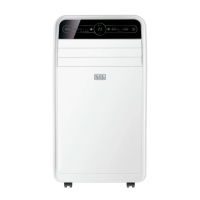
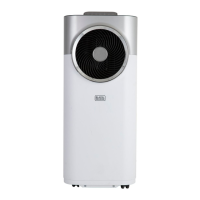
This document describes the Black+Decker BXAC40008GB Portable 12,000 BTU 3-in-1 Air Conditioner, designed for cooling small and medium indoor spaces. It functions as an air conditioner, fan, and dehumidifier, offering a versatile solution for climate control within a household setting.

Function Description

The BXAC40008GB is a 3-in-1 appliance, meaning it can operate in three distinct modes:

  • Cooling Mode: This is the primary function, where the unit blows out cold air to decrease the ambient temperature of the room. Users can manually adjust the temperature levels within a range of 18 to 32 degrees Celsius, with increments of 1 degree.
  • Fan Mode: In this mode, the unit circulates natural air to provide a cooling effect without actively lowering the temperature. Temperature levels cannot be manually controlled or changed in fan mode.
  • Dehumidifying Mode: The appliance is equipped with a dehumidifying function that removes moisture from the air, thereby purifying it. When this function is selected, the unit may vibrate briefly as the compressor engages, which is considered normal operation and not a malfunction.

The unit also features an Automatic Mode, which is its default working mode. In this mode, the unit automatically detects the ambient room temperature and selects the appropriate function. If the temperature is above 23 degrees Celsius, it will automatically start in cooling mode. If the temperature is 23 degrees Celsius or below, it will automatically switch to ventilation (fan) mode. In Automatic mode, temperature levels cannot be manually controlled or changed.

A Sleep Mode is available for overnight operation. When activated, the unit operates at a low speed, and its temperature will gradually adjust by 1 degree over the first two hours (increasing in cooling mode, decreasing in fan mode). After this initial adjustment, it maintains a constant temperature until it automatically turns off after 12 hours of continuous operation.

The appliance includes a 24-hour programmable timer. This timer can be used to set the unit to operate for a desired duration (from 1 to 24 hours) or as a delay timer, allowing the unit to begin operation after a set period of time.

Usage Features

The air conditioner can be controlled via a remote control or directly through the control panel on the unit. Both interfaces offer similar functionalities for ease of use.

  • Power On/Off: The unit can be turned on or off using the respective buttons on the remote control or control panel.
  • Speed Selection: Users can choose between High, Medium, and Low fan speeds to adjust the intensity of the airflow. The selected speed is indicated by a corresponding light on the unit's body.
  • Temperature Adjustment: In cooling mode, the temperature can be manually increased or decreased using the Up/Down buttons on the remote or the +/- buttons on the control panel.
  • Mode Selection: The Mode button allows users to cycle through Auto, Cooling, Fan, and Dehumidifying modes until the desired function is selected.
  • Air Flow Control: The unit features inner and outer louvers at the front, which can be manually positioned to direct the airflow. The outer louvers can be pushed upwards or downwards, while the inner louvers can be pushed sideways (left or right) to re-direct the air flow.
  • Window Hose Installation: For optimal performance, the window hose must be installed to release hot air to an outside, open-air area. The hose can be fed through a window or a wall (requiring a 152mm diameter hole) and secured with a threaded adaptor. It is recommended to keep the hose length as short as possible (maximum 30cm) and to avoid bends or kinks to prevent clogging and potential malfunction. When not in use, the hole should be plugged with the provided cover.
  • Carbon Filter Installation: The active carbon filter needs to be installed by first removing its frame from the unit, inserting the filter from its plastic bag into the back of the unit, and then refitting the frame.
  • Water Drainage: The unit extracts water from the air into a built-in water tank. When the tank is full, the unit will emit a buzzing sound, and the 'Water' and 'Comp' indicators will flash, signaling that it needs to be drained. The water tank can be emptied manually by removing the drain plug and plug cap and allowing the water to drain into a container. This process should be repeated until the tank is empty. Alternatively, the unit can be continuously drained by connecting a drain tube to the water outlet and directing it to a drain, ensuring the drain is at or below the outlet level. The drainage tube can be extended with a similar diameter tube (18mm) and an appropriate connector.

Maintenance Features

Regular maintenance is crucial for optimal performance and longevity of the appliance.

  • Cleaning the Housing: The unit's housing should be wiped down with a soft, damp cloth. Aggressive chemicals, gasoline, detergents, chemically treated cloths, or other cleaning solutions should not be used, as they can damage the components.
  • Cleaning the Filter: The filter should be cleaned regularly by lightly tapping it or using a vacuum cleaner to remove dust and dirt. After removing loose debris, rinse the filter thoroughly under running water (no more than 40 degrees Celsius) and dry it completely before placing it back into the unit. The unit should never be operated without the filters.
  • Storage: Before storing the unit, any water inside the tank should be drained. The unit should then be operated in ventilation-only mode for a few hours to thoroughly dry the interior. The filter should be cleaned or changed. Finally, the power cord should be unplugged and stored, and the unit placed back into its original box in a dry place, out of reach of children.
  • Self-Diagnosis: The unit is equipped with a self-diagnosis feature that warns of errors or malfunctions by displaying 'E1' or 'E2' on the display panel. In case of a malfunction, users are advised to contact a specialized technician or customer support.
  • Mains Plug Replacement: This task should only be performed by authorised service centre personnel. If a new mains plug is needed, the old one must be safely disposed of. The brown lead connects to the live terminal, the blue lead to the neutral terminal, and for class I (earthed) products, the green/yellow lead connects to the earth terminal. For class II double insulated products (only 2 wires), no earth connection is made. Any replacement fuse must have the same rating as the original.
  • General Safety: Always unplug the unit from the mains before cleaning or performing any maintenance. Do not use a wet cloth or water on any part of the unit during cleaning to avoid short circuits or electrical shocks. Keep ventilation openings clear of obstruction and regularly check all inlets and outlets for accumulated dust. The appliance should be stored in a well-ventilated area corresponding to the specified room size for operation.

Black & Decker BXAC40008GB Specifications

General IconGeneral
BrandBlack & Decker
ModelBXAC40008GB
TypePortable Air Conditioner
RefrigerantR290
Energy Efficiency ClassA
Voltage220-240 V
Frequency50 Hz
Operating Temperature16-35°C
Remote ControlYes
Air Flow380 m³/h
Energy Efficiency Ratio (EER)2.6
FunctionsCooling, Fan, Dehumidifying
Fan Speed3 speeds
Timer24 hours

Related product manuals