EasyManua.ls Logo

Black & Decker LAM125FH - User Manual

Black & Decker LAM125FH
30 pages
Print Icon
To Next Page IconTo Next Page
Loading...
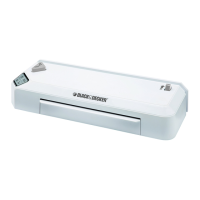
FLASH SERIES THERMAL LAMINATORS
ENGLISH
Catalog Numbers LAM95, LAM95FH, LAM125FH
Thank you for choosing Black & Decker!
Go to BlackandDecker.com/NewOwner
to register your new product.
PLEASE READ BEFORE RETURNING THIS
PRODUCT FOR ANY REASON:
If you have a question or experience a problem with your Black & Decker purchase,
call 1 (800) 343-9329 from 8 a.m. to 5 p.m. EST Monday - Friday to speak with an agent.
Please have the catalog number available when you call.
Want to discover a world of endless laminating possibilities? Get free printables for the
home, office and classroom at: Laminating.BlackandDecker.com
SAVE THIS MANUAL FOR FUTURE REFERENCE
1
Model No: LAM95 Model No: LAM95FH Model No: LAM125FH
COLD
REV
3 mil
5 mil
COLD
3mil
5mil
COLD
REV
3 mil
5 mil
Question and Answer IconNeed help?

Do you have a question about the Black & Decker LAM125FH and is the answer not in the manual?

Summary

Important Safeguards

Safety Guidelines Definitions

Defines safety symbols (DANGER, WARNING, CAUTION) and terms for user recognition.

Injury Risk Reduction

Lists crucial safety precautions and instructions to minimize potential injury during operation.

Lamination Preparation and Tips

Before You Begin Laminating

Outlines preparation steps: stable surface, out-feed table, and power connection.

Cold Laminating Procedure

Cold Mode Operation

Step-by-step guide to turn on the laminator and select cold mode for use.

Thermal Laminating Procedure

Thermal Mode Settings

Explains how to select the correct thermal setting based on pouch thickness and document type.

Shutting Down the Laminator

Care and Maintenance

Troubleshooting Common Issues

Lamination Bubbling Solutions

Addresses causes and solutions for bubbling, such as incorrect thermal mode or pouch thickness.

White Spots or Hazy Areas

Provides remedies for white spots or hazy areas, like re-running or adjusting thickness.

Troubleshooting Jammed Laminator

Document Jammed Inside

Details causes and solutions for document jams, including misfeeds and improper feeding.

2 Year Limited Warranty

Black & Decker LAM125FH Specifications

General IconGeneral
ModelLAM125FH
TypeLaminator
Warm-up Time5 minutes
Number of Rollers2
Cold LaminationYes
Heating Time5 minutes
Power Consumption365 W

Related product manuals