EasyManua.ls Logo

Black & Decker MD-TC6006W - User Manual

Black & Decker MD-TC6006W
28 pages
Print Icon
To Next Page IconTo Next Page
Loading...
TM
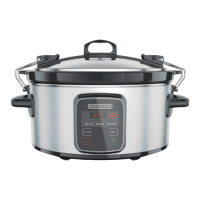
WI-FI ENABLED 6 QUART SLOW COOKER
OLA DE COCCIÓN LENTA DE 6 CUARTOS
ACTIVADA POR WI-FI
use and care manual
manual de uso y cuidado
SCW3000S

Questions and Answers

  • D
    Dale BrownAug 12, 2025
    What to do if the Black & Decker slow cooker won’t connect to the router?
    • K
      kaylamurrayAug 12, 2025
      If your slow cooker won't connect to the router, first check if your home network Wi-Fi is working. Ensure you are connecting to the 2.4GHz signal, not the 5GHz signal if you have a dual-band router. You may need to start the initial setup from the beginning, ensuring your smart device is connected to your home wireless network. Press the “Stop” and “Start” buttons at the same time until the Wi-Fi icon on the control panel starts to blink, indicating it's searching for a Wi-Fi connection. Also, verify that your mobile device is connected to the same home network after setting up the Wi-Fi slow cooker with your router settings, following each screen carefully.
  • D
    daniellemarquezAug 16, 2025
    What to do if Black & Decker MD-TC6006W Slow Cooker won’t connect to router?
    • K
      Kaitlyn EdwardsAug 16, 2025
      If your Black & Decker Slow Cooker isn't connecting to your router, try these steps: * Ensure your home network Wi-Fi is working. * Confirm you're connecting to the 2.4GHz signal, not the 5GHz signal if you have a dual-band router. * Restart the initial setup, ensuring your smart device is connected to your home wireless network. * Press the “Stop” and “Start” buttons simultaneously until the Wi-Fi icon on the control panel blinks, indicating it's searching for a connection. * After setting up the Wi-Fi slow cooker with your router settings, verify that your home mobile device is connected to the same home network. Follow each screen during setup carefully.
  • R
    Rachel SmithAug 20, 2025
    What to do if food is undercooked in my Black & Decker MD-TC6006W?
    • P
      petercurtisAug 20, 2025
      If your food is undercooked, several factors could be the cause. First, ensure you're using the correct setting for your recipe. Second, if there was a power interruption of unknown duration, discard the food. Also, make sure the lid is placed evenly on the stoneware pot and avoid removing the lid too often, as each removal adds 15–20 minutes to the cooking time.
  • N
    Nathaniel CharlesAug 25, 2025
    Why is my food overcooked in the Black & Decker MD-TC6006W?
    • D
      Denise HornAug 25, 2025
      The reason your food is overcooked may be due to differences between your recipe and the slow cooker's operation. As you use your slow cooker, take note of any necessary time adjustments for your favorite recipes. Also, remember that not all slow cookers cook exactly the same.
  • D
    danielle20Aug 27, 2025
    How to prevent undercooked vegetables in my Black & Decker Slow Cooker?
    • K
      Katherine CombsAug 27, 2025
      To avoid undercooked vegetables, place the vegetables on the bottom and sides of the stoneware pot, and then place the meat on top of the vegetables and in the center of the stoneware pot.
  • K
    Kathy HubbardAug 31, 2025
    Why is food undercooked in my Black & Decker Slow Cooker?
    • H
      Holly PowersAug 31, 2025
      Several factors can cause undercooked food in your Black & Decker Slow Cooker: * A power interruption may have occurred. If you don't know how long the power was out, discard the food. * The lid may not be correctly placed on the stoneware pot. Ensure it's evenly placed. * The lid may have been removed too often during cooking. Keep the lid closed, as each removal adds 15–20 minutes to the cooking time. * Ensure you are using the correct setting for your recipe.
  • R
    Richard WilliamsSep 4, 2025
    Why is food overcooked in my Black & Decker MD-TC6006W?
    • P
      Paula MillerSep 4, 2025
      If your food is consistently overcooked in your Black & Decker Slow Cooker, it could be due to differences between your recipe and how the slow cooker operates. Keep track of any needed time adjustments as you use the slow cooker. Also, remember that not all slow cookers cook exactly the same, so the settings might cook slightly differently than slow cookers you've used before.
  • K
    Karen ClarkSep 8, 2025
    What to do if meat is done but vegetables are under-cooked in Black & Decker Slow Cooker?
    • L
      Lacey WareSep 8, 2025
      If you find that the meat is done but the vegetables are undercooked in your Black & Decker Slow Cooker, it may be because the food was improperly placed in the slow cooker. Place the vegetables on the bottom and sides of the stoneware pot, and then place the meat on top of the vegetables and in the center of the stoneware pot.

Black & Decker MD-TC6006W Specifications

General IconGeneral
BrandBlack & Decker
ModelMD-TC6006W
CategorySlow Cooker
LanguageEnglish

Related product manuals