(Original instructions)
Features
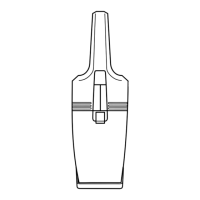
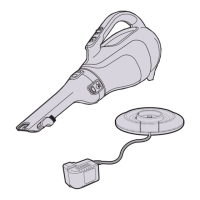
This tool includes some or all of the following features.
1. On/Off button
2. Handle
3. Handle reset button
4. Nozzle
5. Charging indicator
6. Dust collector cover
7. Cover release button
8. Charging base
Use
u Before rst use, the battery must be charged for at
least 24 hours.
u Place the appliance on the charging base whenever it
is not in use.
Charging the battery (Fig. A)
u Place the appliance on the charging base (8)
u Plug in the charger. Switch on at the mains. The
charging indicator (5) will be lit.
u Leave the appliance to charge for at least 16 hours.
While charging, the charger may become warm. This is
normal and does not indicate a problem. The appliance
can be left connected to the charger indenitely. The
charging indicator (5) will be lit as long as the appliance is
connected to the plugged-in charger.
Warning! Do not charge the battery at ambient tempera-
tures below 10 °C or above 40 °C.
To open the appliance (g. B)
u Lift the handle (2) until it clicks into place.
The nozzle (4) will automatically lift at the same time.
To close the appliance (Reset the handle and
nozzle) (g. B)
u Press the handle release button (3).
The nozzle (4) and the handle (2) will fall together.
Switching on and off (g. C)
u To switch the appliance on, press and hold the power
button (1).
u To switch the appliance off, release the power button
(1).
Note: The handle must be in the open position or the
appliance will not turn on.
Optimising the suction force
In order to keep the suction force optimised, the lters
must be cleared regularly during use.
Emptying the appliance (g. D)
u Hold the appliance so that the dust collector cover (6)
is facing upwards.
u Press the cover release button (7) the dust collector
cover (6) will open.
u While holding the appliance over a bin or sink, lift out
the lter (12) and empty the contents of the appliance.
u Replace the lter.
u Close the dust collector cover (6).
Note: The lters are re-usable and should be cleaned
regularly.




 To Next Page