724-746-5500 | blackbox.com
Page 21
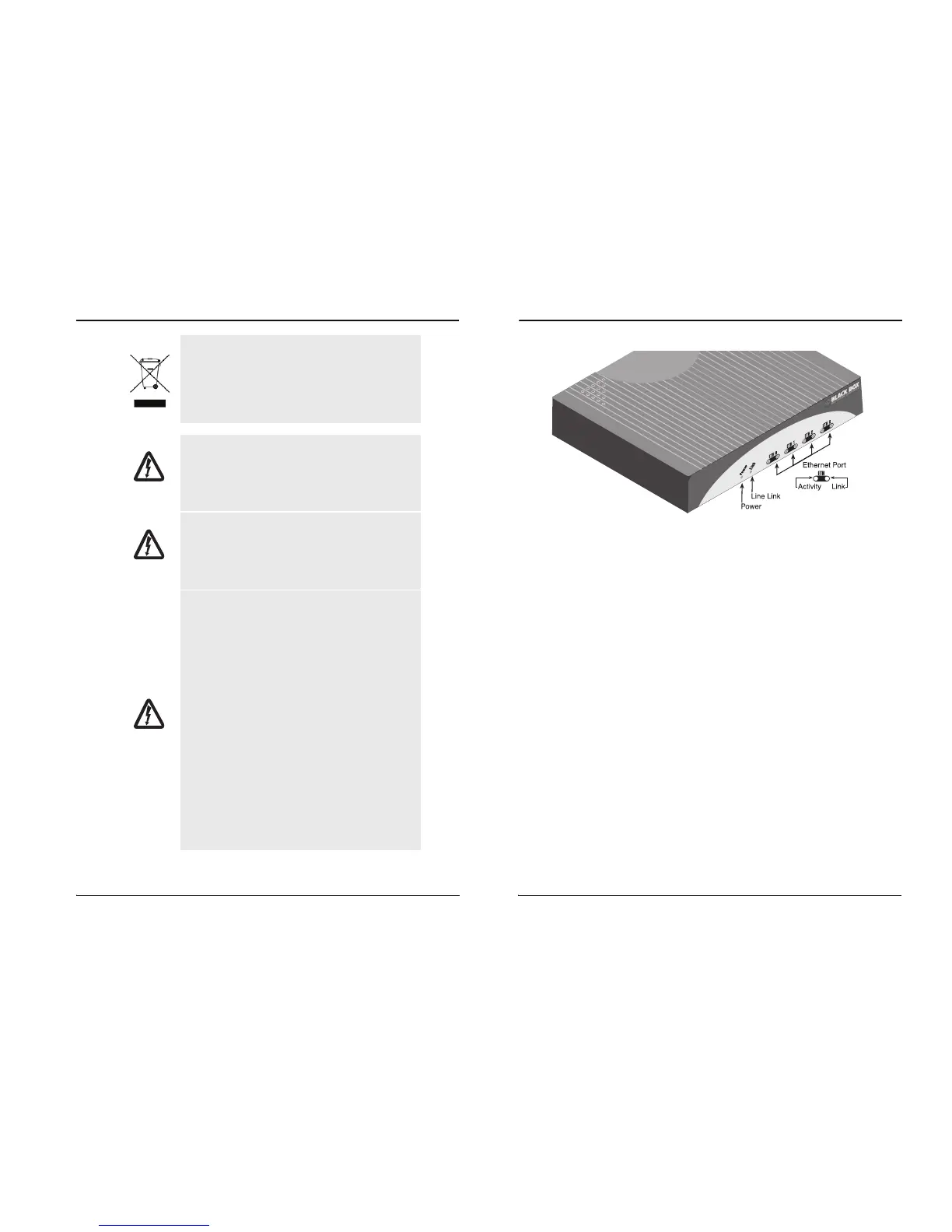
Figure 6.
LB510A-R2 front panel
4.2.1 Power (Green)
The Power LED glows solid during normal operation. At startup, during the POST, the
L
ED blinks once every second. If the POST fails, the unit does not enter normal opera-
tion, and the LED blinks once every 0.4 seconds.
4.2.2 Link (Green)
The Link LED glows solid while a link is established. While the link is training, it blinks
on
ce every second.
4.2.3 ETH Activity (Green)
The Ethernet Activity LED shows that there is data being transferred via that Ethernet
p
ort. During a software upgrade procedure, if the Activity LED is on for an unusually
long time, there is a problem with the upgrade, and the device should be restarted. The
TFTP server should be checked (normal upgrades take about 10 seconds on a
100mbit link).
4.2.4 ETH Link (Green)
The Ethernet Link LED shows that there is an active physical connection to the con-
sole, or an active physical connection to an Ethernet device.
724-746-5500 | blackbox.com
Page 8
Black Box Long Range Ethernet Extender
In accordance with the requirements of council
directive 2002/96/EC on Waste of Electrical and
Electronic Equipment (WEEE), ensure that at
end-of-life you separate this product from other
waste and scrap and deliver to the WEEE col-
lection system in your country for recycling.
This device contains no user serviceable parts.
This device can only be repaired by qualified
service personnel.
This device is NOT intended nor approved for
connection to the PSTN. It is intended only for
connection to customer premise equipment.
Electrostatic Discharge (ESD) can damage
equipment and impair electrical circuitry. It
occurs when electronic printed circuit cards are
improperly handled and can result in complete
or intermittent failures. Do the following to pre-
vent ESD:
• Always follow ESD prevention procedures
when removing and replacing cards.
• Wear an ESD-preventive wrist strap, ensuring
that it makes good skin contact. Connect the
clip to an unpainted surface of the chassis
frame to safely channel unwanted ESD voltages
to ground.
• To properly guard against ESD damage and
shocks, the wrist strap and cord must operate
effectively. If no wrist strap is available, ground
yourself by touching the metal part of the chas-
sis.
WARNING
WARNING
WARNING













 To Next Page