ENGLISH
BLACKSTONEPRODUCTS.COM/SUPPORT
OWNER’S MANUAL | ASSEMBLY GUIDE MODEL:
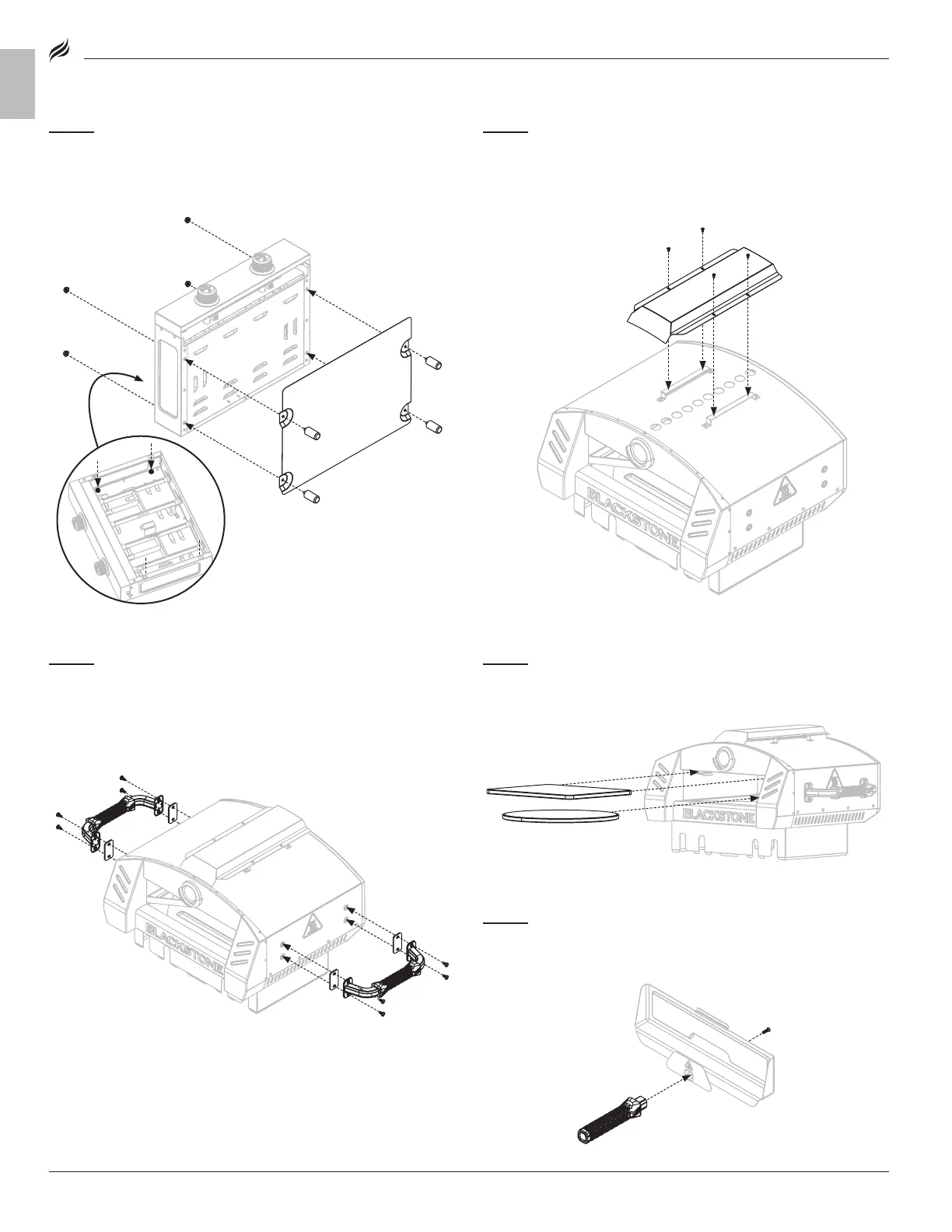
STEP 02
Place the oven base on its back. Remove the four (4) M8
flange nuts from the four (4) oven feet.
Use the four (4) M8 flange nuts to attach the heat shield and four (4)
oven feet to the bottom of the oven base.
STEP 03
Remove the oven body from its packaging and place it on a
smooth flat surface.
Remove the four (4) tapping screws from the upper brackets.
Use the four (4) tapping screws to attach the vent cover to the
upper brackets.
STEP 04
Remove the eight (8) M6x12 screws from the oven body
side panels.
Use four (4) M6x12 screws to install one (1) side handle and two (2)
mica sheets to the oven body left side panel.
Repeat with the oven body right side panel.
STEP 05
Slide the square stone into the upper oven chamber
brackets.
Center the round stone on the floor of the oven chamber.
STEP 06
Remove the one (1) M5 screw from the door handle. Use
the one (1) M5 screw to attach the door handle to the front of the
oven door.


 To Next Page