Setting Up Your BlackBerry 8703e 4
Setting Up Your BlackBerry 8703e
Insert the Battery
For more information on purchasing RIM approved batteries and accessories,
please see “Where can I buy accessories for my BlackBerry 8703e?” on page 39.
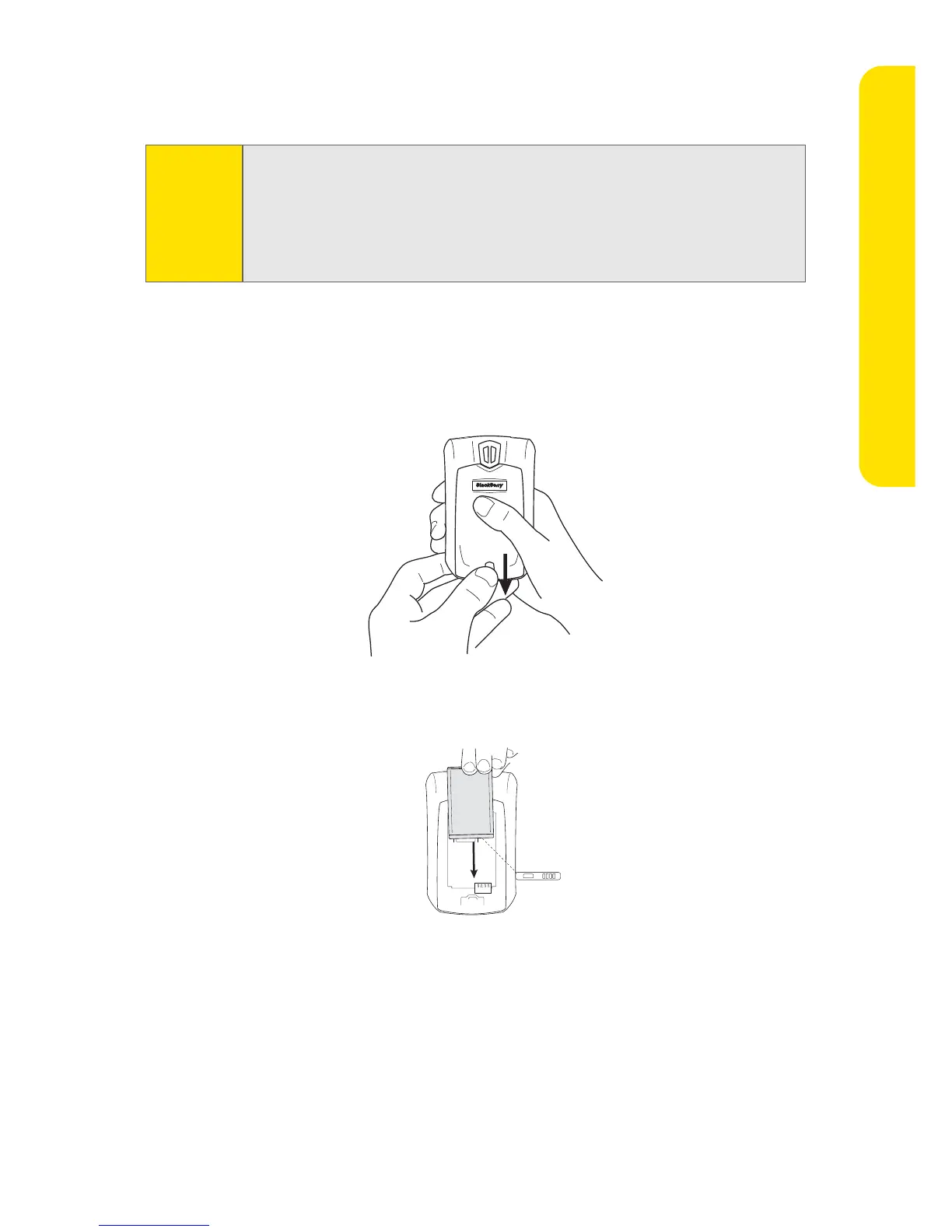
To insert the battery:
1. Press the battery cover release button.
2. Slide off the battery cover.
3. Insert the battery so that the connectors on the battery align with the
connectors on your BlackBerry 8703e.
4. Replace the battery cover.
If the battery is charged, your BlackBerry 8703e turns on and the confirm date
and time dialog box appears.
䡲 If the date and time are incorrect, click Edit. (See “Set the Date and
Time” on page 6 for more information.)
䡲 If the date and time are correct, click OK.
WARNING
Use only those accessories approved by RIM. Using any accessories not
approved by RIM for use with your BlackBerry 8703e may invalidate any
approval or warranty applicable to your BlackBerry 8703e and may be
dangerous. See the Safety and Product Information booklet that was
packaged with your device for more information about safe battery
usage.










 To Next Page