
 Need help?
Do you have a question about the Blackbox EMERALD EMD5004-R and is the answer not in the manual?
Configure TCP/IP network settings for proper communication.
Configure system settings for application and workflow.
Define connections using IP address for RDP, PCoIP, H.254/5 streams.
Configure connection templates for screen layouts.
Configure monitor layout, up to 16 active connections.
Configure additional users and access control.
Overview of KVM over IP, Emerald DESKVUE capabilities, and user benefits.
Details the capabilities and benefits of the Emerald DESKVUE receiver.
Lists the components included with the Emerald DESKVUE KVM Receiver.
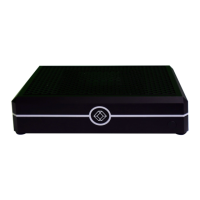
Illustrations of the Emerald DESKVUE KVM Receiver's front and back views.
Visual representation of the Emerald DESKVUE system architecture and connections.
Detailed technical specifications for the Emerald DESKVUE KVM Receiver.
Describes the initial login screen and how to proceed to login.
Details the screen for entering username and password for system access.
Explains the fields and options available on the Username and Password screen.
Introduction to the On-Screen Display interface after logging in.
Details the Boxilla Operation Mode and User status displayed on the OSD.
Describes the purpose of each tab available in the OSD interface.
Details on configuring network settings for the DESKVUE unit.
Explanation of DHCP, IP address, subnet mask, gateway, and DNS settings.
Configuration screen for connected monitors, including resolution and refresh rate.
Details on identifying, detecting, and configuring display properties.
Allows configuration of system-wide settings like hotkeys, audio, and volume.
Manages and lists all configured connections to remote systems.
Explains search, filtering, and adding new connections.
Configuration screen for creating a new connection to a remote system.
Details fields for defining connection name, type, mode, and credentials.
Manages predefined screen layout templates for workspaces.
Details the template for displaying a single connection fullscreen on one display.
Describes the template for dividing a display into four equal connection tiles.
Template with one large tile and three smaller PiP tiles on the right.
Template with one large tile and three smaller PiP tiles on the left.
Template for dividing a display into eight equal connection tiles.
Interface for creating and managing user workspaces and layouts.
Explains searching and adding new workspaces.
Configuration screen for defining a new workspace with name and description.
Details fields for naming, describing, and selecting templates for a workspace.
Options for managing existing workspaces, connecting, and terminating.
Options for controlling individual display tiles, such as locking, resizing, and audio.
Interface for managing user accounts and their access levels.
Screen for creating new user accounts with specified roles and permissions.
Details fields for creating user accounts: name, description, password, and type.
Options available when interacting with a user entry in the User List.
Allows editing of user details, assigned connections, and workspaces.
Explains how to modify user passwords, types, and assign connections/workspaces.
Configuration for setting a workspace to launch automatically on user login.
Customizing user-specific settings like screen savers and hot keys.
Access to system management functions like updates, backup, and diagnostics.
Details system update, backup/restore, diagnostics, and factory reset functions.
FCC compliance statement for Class B digital devices.
CE compliance statement regarding potential radio interference.
Statement regarding compliance with the TSCA Toxic Substances Control Act.
Statement confirming RoHS compliance.
Statement regarding compliance with Reach / SCIP Regulations.
Safety and operation instructions in Spanish for electrical apparatus.
Liability disclaimer for errors in product information and specifications.
Lists registered trademarks and acknowledges others used in the manual.

 To Next Page
 General