5
4. DESCRIPCIÓN Y FUNCIONES DEL PRODUCTO/DESCRIÇÃO E
FUNÇÕES DO PRODUTO/PRODUCT & FUNCTIONS DESCRIPTION
5. PRIMER USO Y CARGA/PRIMEIRA UTILIZAÇÃO E CARREGAMENTO/
FIRST USE AND CHARGING
5.1. PRIMER USO/PRIMEIRA UTILIZAÇÃO/FIRST USE
• Antes de utilizar el producto por primera vez, le recomendamos que lo cargue completamente tal y como se especifica
en el punto siguiente. Asegúrese de que contiene todos los accesorios del producto antes de usarlo.
• Antes de utilizar o produto pela primeira vez, recomendamos que o carregue totalmente conforme especificado no
ponto seguinte. Certifique-se de que contém todos os acessórios do produto antes de o utilizar.
• Before using the product for the first time, we recommend that you fully charge it as specified in the following point.
Make sure that you have all the accessories of the product before using it.
5.2. CARGA/CARREGAMENTO/CHARGING
• Para cargar la batería interna de los auriculares, utilice el cable USB-C a USB-A suministrado con el producto. Conecte
el extremo USB-C al puerto “USB-C” del auricular y el otro extremo a un puerto USB-A de un cargador de corriente USB
o del dispositivo donde vaya a utilizarlo. Al iniciar la carga, el LED indicador del auricular se iluminará y parpadeará en
ROJO. Al terminar la carga, el LED indicador se apagará. Tenga en cuenta que mientras haya un cable conectado al puerto
USB-C, los auriculares se apagarán automáticamente y deberá encenderlo nuevamente.
• Para carregar a bateria interna dos auscultadores, utilize o cabo USB-C para USB-A fornecido com o produto. Ligue a
extremidade USB-C à porta “USB-C” do auricular e a outra extremidade a uma porta USB-A num carregador USB ou ao
dispositivo no qual pretende utilizá-lo. Quando o carregamento começar, o LED indicador no auricular acenderá e
piscará a VERMELHO. Quando o carregamento estiver concluído, o indicador LED apagar-se-á. Note que enquanto um
cabo estiver ligado à porta USB-C, os auscultadores serão desligados automaticamente e terá de os ligar novamente.
• To charge the internal battery of the earphones, use the USB-C to USB-A cable supplied with the product. Connect the
USB-C end to the “USB-C” port on the earphone and the other end to a USB-A port on a USB power charger or the device
you will be using the earphone on. When charging starts, the indicator LED on the earphone will light up and flash RED.
When charging is complete, the indicator LED will turn off. Please note that as long as a cable is connected to the USB-C
port, the earphones will automatically turn off and you will need to turn it on again.
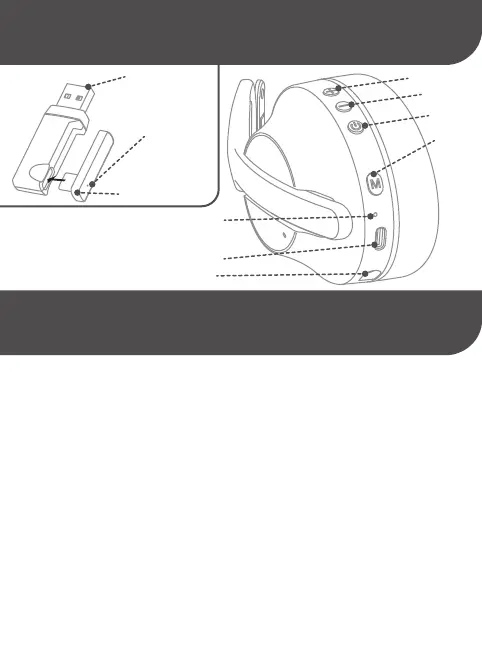
LED INDICADOR DEL AURICULAR/
LED INDICADOR DE AUSCULTADORES/
HEADSET LED INDICATOR
PUERTO “USB-C”/PORTA “USB-C”/“USB-C” PORT
CONECTOR MICRÓFONO “MIC”/”MIC” CONNECTOR
“VOL +”
“MUTE”
“VOL -”
“POWER”
AURICULARES/
AUSCULTADORES/HEADSET
LED INDICADOR DEL RECEPTOR/
LED INDICADOR DO RECEPTOR/
RECEIVER LED INDICATOR
RECEPTOR USB-A/
USB-A RECEIVER
MINI-RECEPTOR USB-C/
USB-C MINI-RECEIVER
RECEPTOR USB/
USB RECEIVER


 To Next Page
 Loading...