6
2.4G
7. MODO 2.4G (RECEPTOR)/2.4G MODE (RECEIVER)
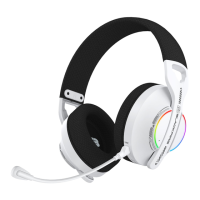
• Al encender el auricular con el botón POWER (oirá ”POWER ON”), pulse 2 veces “MUTE” hasta oír ”ADAPTER MODE” para
activar el MODO 2.4G. El LED parpadeará en AZUL/ROJO esperando la conexión; simplemente conecte el receptor USB-A a
un puerto USB-A de su dispositivo para que el auricular se enlace automáticamente al receptor (los LED del receptor y
el auricular se quedarán fijos en AZUL). Asegúrese de que el mini-receptor USB-C está conectado al receptor USB-A. Si
su dispositivo solo dispone de puerto USB-C, puede extraer el mini-receptor y conectarlo al puerto USB-C del dispositivo.
Cuando se establezca la conexión, oirá “CONNECTED” y entonces ya podrá utilizar los auriculares como salida de audio en
su dispositivo. Algunas funciones y ajustes de audio dependerán del dispositivo/software/juego utilizados. Consulte el
manual de instrucciones de su dispositivo y/o del juego o software utilizado.
• Quando ligar o auricular com o botão POWER (irá ouvir “POWER ON”), pressione “MUTE” 2 vezes até ouvir “ADAPTER MODE”
para ativar o MODO 2.4G. O LED piscará a AZUL/VERMELHO aguardando ligação; Basta ligar o recetor USB-A a uma porta
USB-A do seu dispositivo e o auricular irá ligar-se automaticamente ao recetor (os LEDs no recetor e no auricular ficarão
AZUIS sólidos). Certifique-se de que o minirreceptor USB-C está ligado ao recetor USB-A. Se o seu dispositivo tiver apenas
uma porta USB-C, pode remover o minirreceptor e ligá-lo à porta USB-C do dispositivo. Quando a ligação for
estabelecida, ouvirá “CONNECTED” e poderá utilizar os auscultadores como saída de áudio no seu dispositivo. Algumas
funções e definições de áudio dependerão do dispositivo/software/jogo utilizado. Consulte o manual de instruções do
seu dispositivo e/ou do jogo ou software utilizado.
• When you turn on the headset with the POWER button (you will hear “POWER ON”), press “MUTE” twice until you hear
“ADAPTER MODE” to activate 2.4G MODE. The LED will flash BLUE/RED waiting for connection, simply plug the USB-A
receiver into a USB-A port on your device and the headset will automatically pair with the receiver (the LEDs on the
receiver and headset will turn solid BLUE). Make sure the USB-C mini-receiver is connected to the USB-A receiver. If your
device only has a USB-C port, you can remove the mini-receiver and plug it into the USB-C port on your device. When the
connection is established, you will hear “CONNECTED” and you can then use the headset as an audio output on your
device. Some audio functions and settings will depend on the device/software/game used. Please refer to the
instruction manual of your device and/or the game or software used.
6. FUNCIONES GENERALES/FUNÇÕES GERAIS/GENERAL FUNCTIONS
6.1. ENCENDIDO Y APAGADO/LIGAÇÃO E DESLIGAÇÃO/POWER ON AND OFF
• Para encender el auricular, pulse y mantenga el botón “POWER” hasta encenderse (oirá ”POWER ON”) y el LED indicador
parpadeará en AZUL/ROJO esperando la conexión. Pulse “POWER” de nuevo para apagarlo (oirá “POWER OFF”).
• Para ligar o auricular, pressione e mantenha o botão “POWER” até que se ligue (irá ouvir “POWER ON”) e o LED indicador
piscará a AZUL/VERMELHO aguardando a ligação. Prima novamente “POWER” para o desligar (irá ouvir “POWER OFF”).
• To turn on the headset, press and hold the “POWER” button until it turns on (you will hear “POWER ON”) and the LED
indicator will flash BLUE/RED waiting for connection. Press “POWER” again to turn it off (you will hear “POWER OFF”).
6.2 ILUMINACIÓN LED RGB/ILUMINAÇÃO LED RGB/RGB LED LIGHTING
• Para apagar/encender la iluminación LED RGB del auricular, pulse y mantenga “MUTE” durante unos segundos.
• Para ligar/desligar a iluminação LED RGB do auricular, mantenha premido “MUTE” durante alguns segundos.
• To turn off/on the RGB LED lighting of the headset, press and hold “MUTE” for a few seconds.
6.3. OTRAS FUNCIONES/OUTRAS FUNÇÕES/OTHER FUNCTIONS
• En MODO 2.4G/MODO BLUETOOTH (no MODO CABLE): Botón “MUTE” > apaga/enciende el micrófono (oirá “MIC MUTE/MIC
ON”). Botones “VOL+” y “VOL-” > subir y bajar el volumen del auricular. NOTA: Cuando la batería del auricular empieza a
agotarse, el LED indicador parpadeará en ROJO para indicar que debe cargarlo tal y como se indica en el paso 5.2.
• No MODO 2.4G/MODO BLUETOOTH (não no MODO CABLE): botão “MUTE” > ligar/desligar o microfone (irá ouvir “MIC
MUTE/MIC ON”). Os botões “VOL+” e “VOL-”> aumentam e diminuem o volume do auricular. NOTA: Quando a bateria do
auricular começa a ficar fraca, o LED indicador piscará a VERMELHO; precisa de carregar conforme as passo 5.2.
• In 2.4G MODE/BLUETOOTH MODE (not WIRED MODE): “MUTE” button > turn the microphone on/off (you will hear “MIC
MUTE/MIC ON”). “VOL+” and “VOL-” buttons > turn the headset volume up and down. NOTE: When the headset battery starts
to run low, the indicator LED will flash RED to indicate that you need to charge it as instructed in step 5.2.


 To Next Page
 Loading...