7
8.1. MODO BLUETOOTH/BLUETOOTH MODE
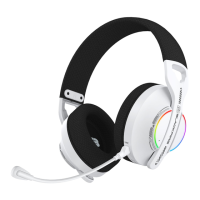
• Al encender el auricular con el botón POWER (oirá ”POWER ON”), pulse 2 veces “MUTE” hasta oír ”BLUETOOTH MODE” para
activar el MODO BLUETOOTH en el auricular. El LED parpadeará en AZUL/ROJO esperando la conexión; simplemente
acceda a los ajustes de conexión de su dispositivo con BLUETOOTH (consulte el manual de instrucciones en la sección
de ajustes y enlazado BLUETOOTH) y busque en su dispositivo el auricular llamado “BFX-W100PRO” para enlazarlo a través
de la conexión Bluetooth. El LED indicador del auricular se apagará y oirá “CONNECTED”. Si desactiva el BLUETOOTH de su
dispositivo, el auricular se desconectará y oirá “DISCONNECTED”. Cuando vuelva a conectar el BLUETOOTH en su
dispositivo, el enlace con el auricular (mientras esté encendido y en MODO BLUETOOTH) se hará automáticamente. Si
desea conectar el auricular a otro dispositivo BLUETOOTH, elimine el auricular del listado de enlaces en su dispositivo, ya
que se queda guardada la conexión con el dispositivo anterior. Algunas funciones y ajustes de audio dependerán del
dispositivo/software/juego utilizados. Consulte el manual de su dispositivo/juego/software utilizado.
• Ao ligar o auricular com o botão POWER (irá ouvir “POWER ON”), pressione “MUTE” 2 vezes até ouvir “BLUETOOTH MODE”
para ativar o MODO BLUETOOTH no auricular. O LED piscará a AZUL/VERMELHO aguardando ligação; Basta aceder às
definições de ligação do seu dispositivo BLUETOOTH (consulte o manual de instruções na secção Definições e
emparelhamento do BLUETOOTH) e procurar no seu dispositivo o auricular denominado “BFX-W100PRO” para o
emparelhar através da ligação Bluetooth. O LED indicador do auscultador apagará e ouvirá “CONNECTED”. Se desligar o
BLUETOOTH no seu dispositivo, o auricular será desligado e ouvirá “DESLIGADO”. Ao voltar a ligar o BLUETOOTH ao seu
dispositivo, o emparelhamento com o auricular (enquanto este estiver ligado e em MODO BLUETOOTH) será feito
automaticamente. Se desejar ligar o auricular a outro dispositivo BLUETOOTH, remova o auricular da lista de ligações do
seu dispositivo, uma vez que a ligação ao dispositivo anterior será guardada. Algumas funções e definições de áudio
dependerão do dispositivo/software/jogo utilizado. Consulte o manual do seu dispositivo/jogo/software utilizado.
• When you turn on the headset using the POWER button (you will hear “POWER ON”), press “MUTE” twice until you hear
“BLUETOOTH MODE” to activate the headset in BLUETOOTH MODE. The LED will flash BLUE/RED waiting for connection,
simply go to the connection settings of your BLUETOOTH enabled device (see instruction manual in BLUETOOTH settings
and pairing section) and search for the headset named “BFX-W100PRO” on your device to pair it via Bluetooth connection.
The LED indicator on the headset will turn off and you will hear “CONNECTED”. If you turn off BLUETOOTH on your device,
the headset will be disconnected and you will hear “DISCONNECTED”. When you reconnect BLUETOOTH on your device, the
pairing with the headset (while it is on and in BLUETOOTH MODE) will be done automatically. If you want to connect the
headset to another BLUETOOTH device, delete the headset from the pairing list on your device, as the connection with
the previous device is saved. Some audio functions and settings will depend on the device/software/game used. Please
refer to the instruction manual of your device and/or the game or software used.
8.2. CONTROL MULTIMEDIA + LLAMADAS/CHAMADAS/CALLS
• En el MODO BLUETOOTH, una vez enlazado con su dispositivo, puede hacer uso de las siguientes funciones:
• No MODO BLUETOOTH, uma vez emparelhado com o seu dispositivo, pode utilizar as seguintes funções:
• In BLUETOOTH MODE, once paired with your device, you can use the following functions:
GENERAL:
Subir volumen/Aumentar o volume/Volume up:
Bajar volumen/Diminuir o volume/Volume down:
Micrófono/Microfone/Mic ON-OFF:
MULTIMEDIA:
Siguiente/Próxima/Skip forward:
Anterior/Skip backwards:
Play / Pause:
LLAMADAS/CHAMADAS/CALLS:
Aceptar llamada/Aceitar chamada/Answer call:
Rechazar llamada/Rejeitar chamada/Reject call:
Colgar/Desligar/Hang up:
Botón/Botão/Button “VOL +” (1 click).
Botón/Botão/Button “VOL -” (1 click).
Botón/Botão/Button “MUTE” (1 click).
Botón/Botão/Button “VOL +” (+2 segs).
Botón/Botão/Button “VOL -” (+2 segs).
Botón/Botão/Button “POWER” (1 click).
Botón/Botão/Button “POWER” (1 click).
Botón/Botão/Button “POWER” (+2 segs).
Botón/Botão/Button “POWER” (4 clicks).


 To Next Page
 Loading...