
 Need help?
Do you have a question about the Blackmagic 2110 IP Converter 3x3G and is the answer not in the manual?
Connect the converter to a power source using an IEC cable and select the language.
Connect HD sources to the 3G-SDI inputs on the unit.
Connect two converters directly using a Cat 6 Ethernet cable.
Select the SDI output stream using the front panel menu on the second converter.
Use a managed 10G network switch supporting IGMP version 3 snooping.
Connect a Precision Time Protocol grandmaster for accurate timing and synchronization.
Use NMOS specifications to direct traffic flow and manage endpoint communications.
Port for updates and configuration via Blackmagic Converters Setup utility.
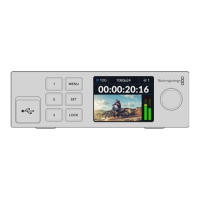
Select inputs/outputs and switch modes by double-pressing numbered buttons.
Use menu/set buttons and dial for settings; lock buttons by holding the lock button.
Shows the home preview screen with status icons and the LCD menu.
Icons above video preview indicate status like network and video standard.
Shows '10G' for connected or 'N/C' for not connected via Ethernet.
Lists SD and HD video standards supported by the converter.
Displays current input/output; switch modes by double-pressing numbered buttons.
Displays audio levels for embedded channels, selectable as PPM or VU meters.
Access menu settings by pressing the 'menu' button on the front panel.
Route incoming ST 2110 sources to SDI outputs via the menu.
Select audio meter display type (PPM or VU) and reference levels.
Configure settings like language, date/time, network, and multicasting.
Supports 13 languages; select preferred language via menu.
Shows the current software version of the converter.
Set front panel LCD to 'light' or 'dark' mode for visibility.
Set date/time for network synchronization and conflict prevention.
Set NTP server for automatic date/time or enter manually.
Manually set day, month, year, hours, and minutes.
Configure IP address, subnet mask, and gateway manually or via DHCP.
Displays assigned multicast addresses for each ST 2110 stream output.
Set the timing reference output standard (SD or HD) for connected devices.
Restore the converter to factory settings by selecting 'factory reset' in the menu.
Label connected SDI inputs using the software utility for easy identification.
Label SDI outputs for routing via NMOS controller or selection tab.
Save or load label sets using the cog icon in the utility.
Change converter name, network settings, software version, and multicast addresses.
Enter name and language for the converter within the utility.
Set network location name based on identification name for registry display.
Choose between DHCP and Static IP for network connection.
Converter is set to DHCP by default for automatic IP assignment.
Manually enter network details (IP, subnet, gateway) for static IP.
Limit setting changes to USB connection for security.
Displays assigned multicast addresses for each ST 2110 stream output.
Set converter as PTP follower to prevent timing conflicts in a network.
Change the reference output for the ref out BNC connector.
Restore converter to factory settings by clicking 'reset'.
Lists items included in the Universal Rack Shelf Kit.
Instructions on removing feet, aligning, and securing the unit to the rack shelf.
How to attach the 1/6 blanking panel to fill unused shelf space.
How to attach the 1/3 width blanking panels to the sides of the rack shelf.
Find support via online pages, forums, or contacting support.
How to check the installed Blackmagic Converters Setup software version.
Visit support center for latest updates; advise caution during projects.
Instructions for proper disposal of electrical and electronic equipment in the EU.
Equipment complies with FCC rules for Class A digital devices.
Equipment complies with Canadian standards for Class A digital apparatus.
Guidelines for electrical safety, ventilation, and operating temperature.
Statement regarding chemicals in plastic parts and potential health effects.
Address for Blackmagic Design B.V in Amsterdam.
Warning to disconnect power before servicing and caution about fuses.
Details 12-month warranty, repair/replacement policy, and exclusions.
 General
| 2110 IP Video | 3 x 10G Ethernet |
|---|---|
| Compression | Uncompressed |
| Power | 12V DC |
| Operating Temperature | 0° to 40° C (32° to 104° F) |
| Video Input | 3G-SDI, HD-SDI, SDI |
| Video Output | 3G-SDI, HD-SDI, SDI |
| IP Video Standards | SMPTE 2110 |
| Audio Input | 16 Channels embedded audio per input |
| Audio Output | 16 Channels embedded audio per output |
| Ethernet | 3 x 10G Ethernet |
| Storage Temperature | -20°C to 60°C |

 To Next Page