16 April 2017 • Blackmagic Special Report
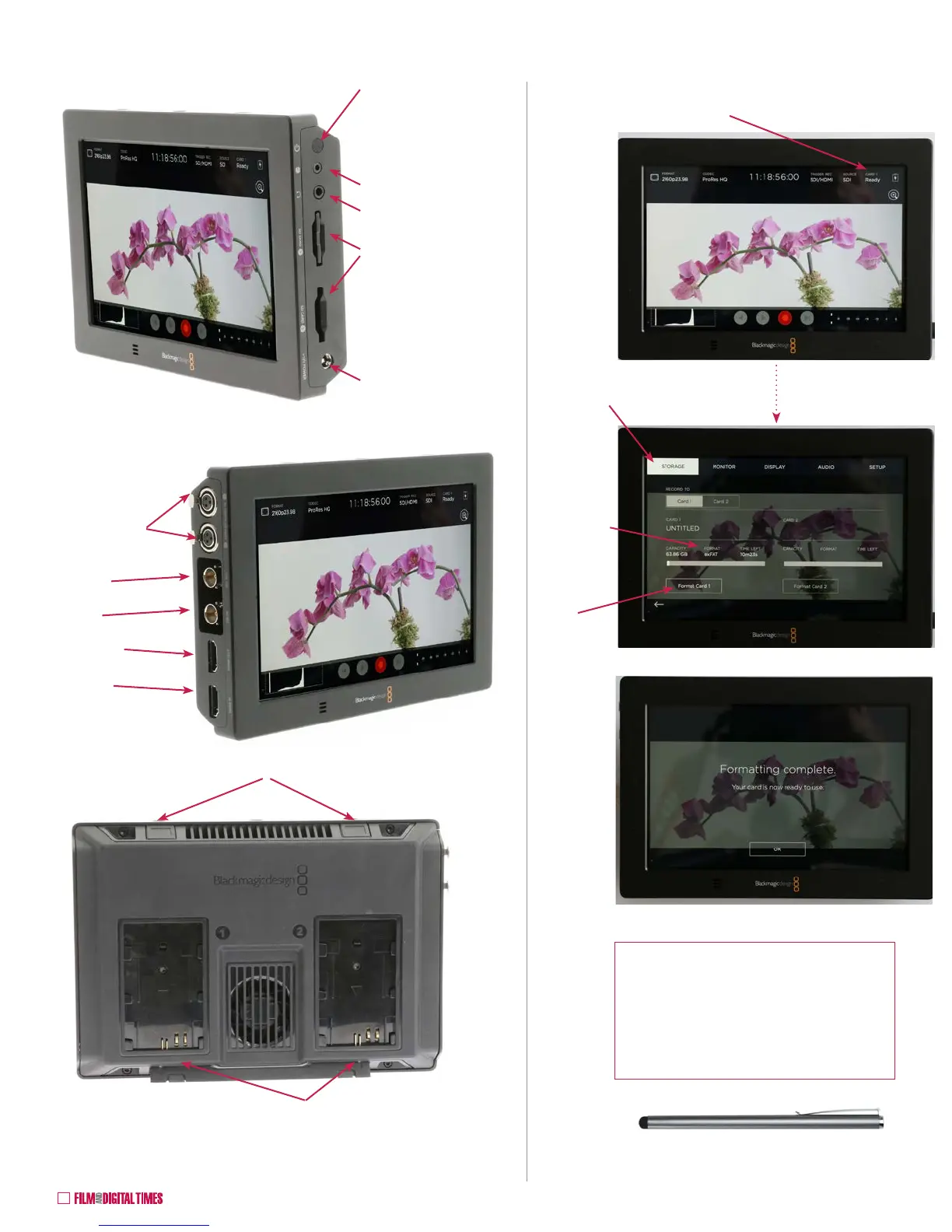
Blackmagic Video Assist 4K
Two LP-E6 Canon
style 7.2 V DC onboard
battery holders
Battery release buttons
Two SD Card slots
ON / OFF microswitch
under rubber cover:
push on, hold 3 seconds
to turn off.
External 12 V DC input
Headphones
LANC
Two Analog
Audio Inputs:
3-pin mini XLR
SDI IN
SDI OUT
HDMI IN
HDMI OUT
Format SD Cards
1. To format SD Cards, tap here
2. Select STORAGE
3. FORMAT:
Choose
HFS+ for
Mac or
exFAT for
Windows
and Mac
4. Format
Card 1
and/or
Card 2
Tip: to avoid a smudgy screen after
helping yourself to a sticky donut at
Craft Services, or in cold weather with
heavy gloves, attach an iPhone-style
touchscreen Stylus to the top of the
Video Assist 4K with Velcro.










 To Next Page