CLEANING AND MAINTENANCE
WARNING: Be sure to unplug from the electrical supply source before cleaning
or changing the filter.
Do not use liquids to clean the air purifier.
Do not attempt to disassemble the air purifier for cleaning.
• Wipe the exterior of the air purifier with a soft, dry cloth. Make sure the particle
sensor does not become clogged with dust.
•
If necessary, wipe only the exterior housing with a damp cloth, then immediately
dry.
• You can vacuum the inside of the air purifier.
STORAGE
NOTE:
If you are not going to use the air purifier for a long time make sure it is clean and
dry. Wrap the filter in plastic. Store in a cool dry place.
After replacing the filter, press the REPLACE FILTER indicator light for 3
seconds until the control panel lights illuminate and the unit does not make
any beeping sound in order to reset it.
FILTER INSTALLATION
REPLACEMENT FILTER
Your air purifier comes with a 3-stage (Pre-filter + HEPA+ Activated Carbon) Filter.
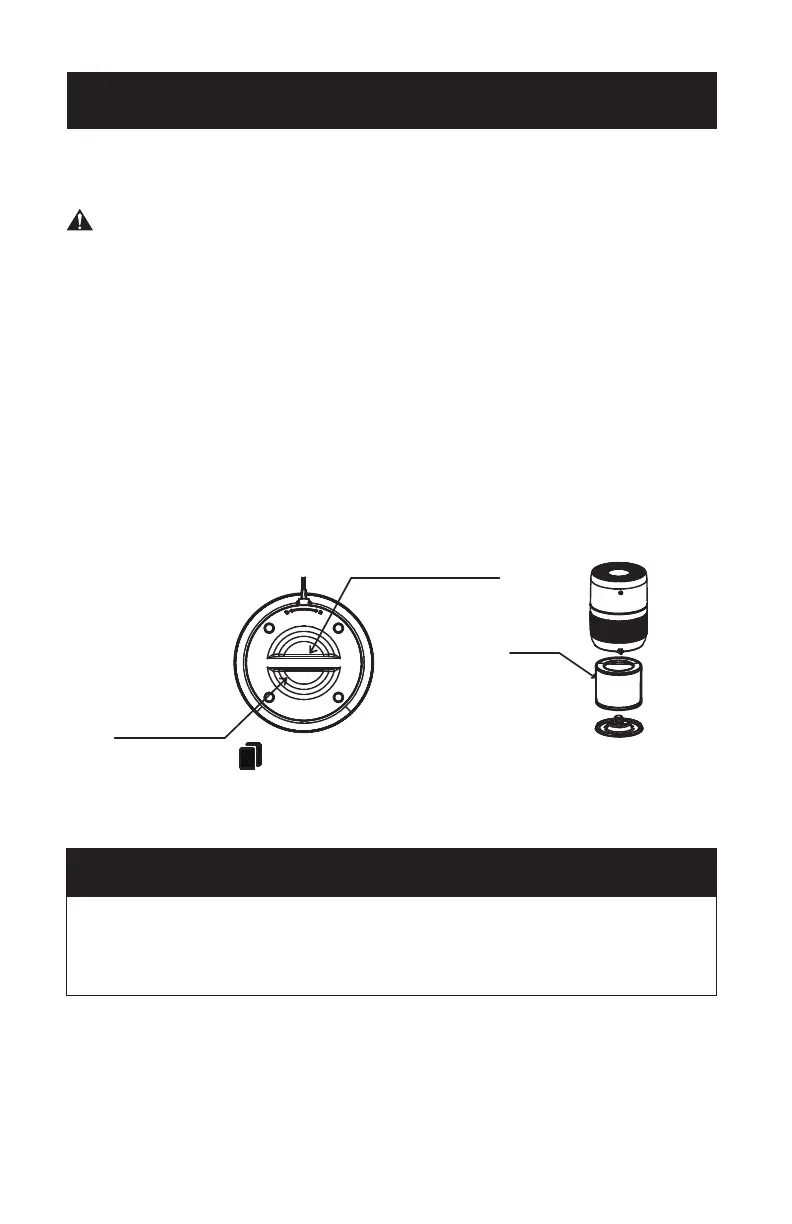
To access the filter, turn the bottom filter cover by the handle counterclockwise (towards
the unlock symbol) to remove it. Lift the filter out of the air purifier. Remove the
plastic bag and reinstall the filter.
Replace the filter cover by turning it clockwise (towards the lock symbol) until it
locks in place.
Use Replacement Filter Model AF1. To purchase a replacement filter, it is
recommended that you check with the retailer where you purchased your air purifier,
or major online retailers. You can also contact the BLACK+DECKER Customer
Satisfaction Center at 844-299-0879 or service@equitybrands.com.
The REPLACE FILTER indicator light will illuminate after 2,000 hours of use.
You may need to replace the filter sooner if you are using the air purifier in an environment
with poor air quality. If you notice that the filter does not appear visibly clean, or air
purification seems to have decreased, the filter should be replaced.
SET UP & USE
Bottom cover rotating handle
bottom cover handle
Filter
Page 11


 To Next Page