15
Starting the system for the rst time
1. Turn the temperature knob clockwise for the heater to activate and display outlet temperature.
2. With the water running through the unit, turn the knob to adjust the temperature.
Freezing Temperatures
If the ambient temperature falls below 32°F (0°C), protect the heater from potential damage. Power
o the unit using the dedicated circuit breaker on the main electrical panel. Open a faucet slightly
to cause water to ow continuously through the device at a very low rate, without heating. Restore
power to the unit when temperature condition is normal.
If the water inside the heater freezes, it can cause damage that is not covered by warranty. If
you suspect water has frozen within the unit, do not turn it on until you are sure the frozen water
has melted, and there are no leaks in the unit. It is recommended to contact a qualied electrician
or the manufacturer for service in this situation.
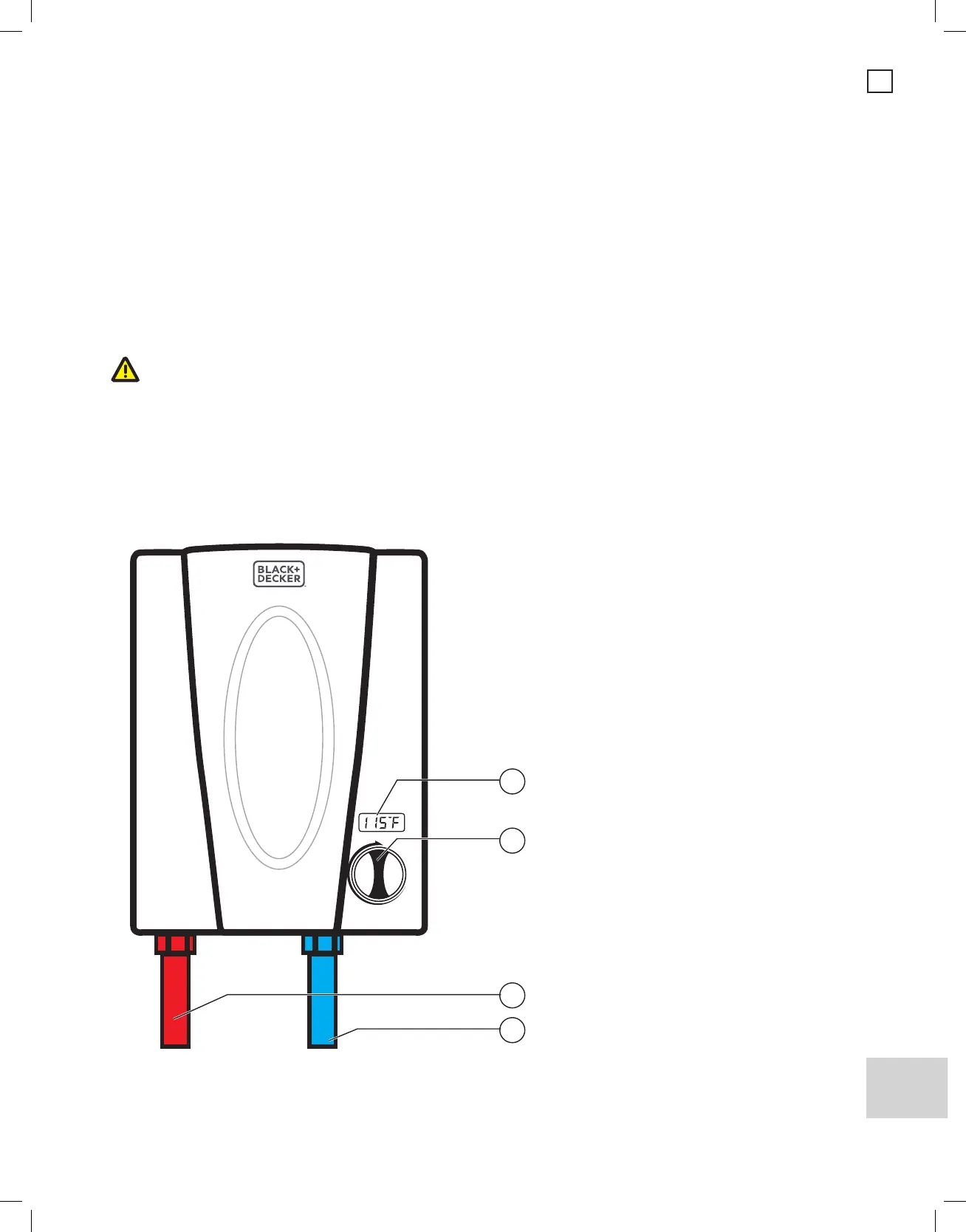
1. Digital temperature display
2. Temperature setting knob
3. Hot water outlet (to be connected
to the main hot water pipe)
4. Cold water inlet
1
2
3
4


 To Next Page