Need help?
Do you have a question about the Black+Decker BDPC912 and is the answer not in the manual?
Essential safety guidelines to follow before operating the insect zapper.
Details on the power cord and its connection requirements for safe operation.
Guidance on selecting the optimal placement for effective insect attraction and capture.
Step-by-step instructions for operating the bug zapper after setup.
Procedures for emptying and cleaning the insect collection tray.
Instructions for cleaning the electrified grid to maintain zapper effectiveness.
Detailed steps for safely replacing the UV bulb.
Common issues and solutions for problems encountered with the device.
Preliminary checks to perform before contacting support for assistance.
Information on how to reach customer support for inquiries or issues.
Specific conditions and circumstances not covered by the product warranty.
Instructions on how to request warranty service or repairs for the product.
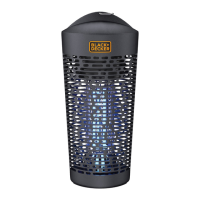
This document is an instruction manual for the BLACK+DECKER™ Bug Zapper, model BDPC912. It provides comprehensive information on the device's function, setup, use, maintenance, troubleshooting, and warranty. The primary function of this device is to attract and eliminate flying insects using UV light and an electrified grid.
The BLACK+DECKER Bug Zapper is designed to reduce flying insect populations in outdoor areas. It utilizes UV lights to attract insects, which are then zapped upon contact with an internal electrified grid. The device operates on a 2,400V grid voltage, ensuring effective elimination of insects. It is intended for household use and is suitable for outdoor environments, designed to withstand moderate rain. The bug zapper aims to provide a more comfortable outdoor experience by minimizing the presence of bothersome insects.
To ensure optimal performance, proper setup and placement are crucial. The manual advises selecting a location away from human activity, ideally within the insect's natural habitat, such as near bushes, low trees, and ground coverage like ivy. For best results, the device should be placed between 6-7 feet above the ground using the included chain, hanging from a tree, mounting pole, or other free-standing object.
When first using the bug zapper, especially in areas with aggressive flying insects, it is recommended to stay away from the unit for a few days with only the zapper's light on. This strategy helps to lure and eliminate a significant portion of the insect population before human presence. Depending on the insect density, two weeks or more may be necessary to achieve a noticeable reduction in population.
The device is activated by plugging it into a compatible power outlet. If an extension cord is needed, it must be an outdoor-rated cord marked with suffix letters "W-A" and stating "Suitable for use with outdoor appliances." Connections between the power supply cord and extension cord should be kept off the ground and dry. The manual emphasizes using only extension cords with plugs and receptacles that match the product's plug and replacing any damaged cords. The electrical rating of the extension cord must be equal to or greater than that of the product.
The bug zapper is designed for continuous use from early spring until late fall for best results. However, it should be unplugged and stored indoors during severe weather conditions or when not in use. The manual also warns against placing the unit in areas where it could fall into water or near flammable materials. Direct viewing of the UV light should be avoided to prevent skin or eye damage.
Regular maintenance is essential for the bug zapper's efficiency and longevity. The manual details two primary maintenance tasks: cleaning the bottom tray and cleaning the electric grid.
The bug zapper includes a removable bottom tray designed to collect dead insects. For convenience, if the unit is placed in a yard, the bottom tray can be removed permanently, allowing zapped insects to fall directly onto the ground. This eliminates the need for frequent tray emptying.
If the bottom tray is used to contain dead insects, it should be emptied frequently. Users are advised to exercise caution and wear gloves when opening the tray, as some dead insects may fall out upon removal. To remove the tray, it simply slides out from the unit's base.
Over time, dead insects may accumulate on the electrified grid, which can impair the device's function. Periodic cleaning of the grid is necessary to maintain effective operation.
Important Safety Precaution: Always unplug the bug zapper before cleaning the electric grid to avoid electric shock. After unplugging, allow the unit to sit for three hours to ensure all electricity has dissipated.
To clean the grid, access it through the open slots in the grill. Use only the included cleaning brush to gently brush away dead insects, allowing them to fall into the lower tray for removal. The manual explicitly states not to use water or any other liquids to clean the unit, as this can damage the electronics. Care should be taken not to move the metal electric grid during cleaning. The frequency of cleaning depends on the insect population in the area. After cleaning, the unit can be returned to its hanging position and plugged back in.
The UV lamps in the bug zapper are user-replaceable. The manual provides detailed instructions for bulb replacement.
If the device fails to light after bulb replacement, the user should unplug it, re-check the bulb installation, and re-assemble the unit. The manual also notes that the bulb contains mercury and should be disposed of properly.
The exterior housing of the BDPC912 Electronic Bug Zapper does not require cleaning, as periodic rainfall will clean it. Users should not attempt to clean the housing with water, spray, or other liquids.
For any questions, troubleshooting, or to order replacement bulbs, customers are directed to contact BLACK+DECKER customer service via phone or email, rather than returning the product to the store.
 General
| Weight | 4.2 pounds |
|---|---|
| Power Source | Electric |
| Bulb Type | UV Light Bulb |
| Bulb Wattage | 15 Watts |
| Mounting Type | Hanging |

 To Next Page