Page 22 Page 23
ENGLISH ENGLISH
SET UP & USE
SET UP & USE
Step 4: Select your desired cycle and options
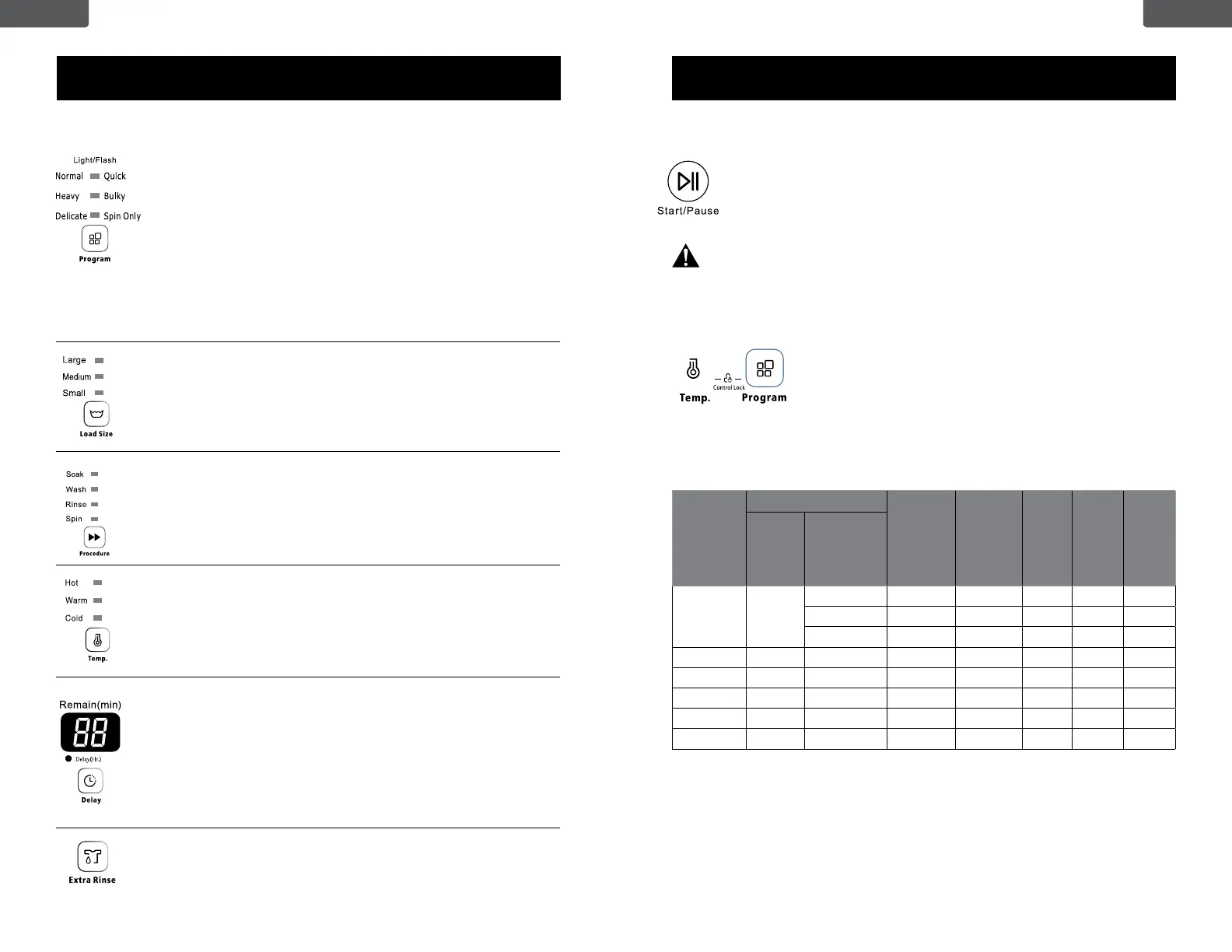
RINSE & SPIN CYCLE GUIDE
Normal/Eco is the recommended wash cycle to wash up to a full load of normally soiled cotton
or linen clothing. The cycle (Normal/Eco on large load size and cold water temperature) has a
much longer spin time (44 minutes) than other cycles, which removes more water from your
clothes than other cycles, providing you with energy savings when drying your clothes in your
dryer. Hot and warm water temperatures are the same when using Normal/Eco. If you need a
higher temperature wash, use a different program.
Program
Load Size
Soak
time
(approx.)
Wash
Time
(ap-
prox.)
Rinse
Times
Final
Spin
Time
Total
Time
Default Scope
Normal Large
Sm – 15 min 1 7 min 32 min
Med – 15 min 1 12 min 37 min
Lg – 15 min 1 12 min 37 min
Heavy Large Sm, Med, Lg – 15 min 2 7 min 44 min
Delicate Large Sm, Med, Lg – 12 min 2 3 min 37 min
Quick Large Sm, Med, Lg – 3 min 1 3 min 15 min
Bulky Large Sm, Med, Lg 15 min 15 min 2 7 min 59 min
Spin Only – – – – – 24 min 25 min
Program
Wash
Rinse
Spin
min/times
Load Size
pres et
Remain
(min)
1----smal l
2----medium
3----larg e
Wash
Rinse
min/times
Load Size
pres et
Remain
(min)
1----smal l
2----medium
3----larg e
Wash
Spin
min/times
Load Size
pres et
Remain
(min)
1----smal l
2----medium
3----larg e
Rinse
Spin
min/times
Load Size
pres et
Remain
(min)
1----smal l
2----medium
3----larg e
Wash
Rinse
Spin
Step 5: Start the cycle
Press the START/PAUSE button to start the washing cycle. When the
washing cycle begins, the Estimated Time in minutes for the cycle to
complete will show and count down in the digital display. Or, if Delay Start
is set, the display will count down the hours until the cycle begins, and then
change to a minute countdown for the cycle.
When the washer is running, you should pause the program and wait for the
tub to stop completely before you open the lid.
Control Lock
Press and hold the TEMP and PROGRAM buttons
simultaneously to activate this function. When Control Lock
is activated, the indicator light will turn on. The control panel
buttons will not function except for POWER and the ability to
deactivate Control Lock by pressing and holding the TEMP
and PROGRAM buttons again.
Select your desired wash program by pressing the program button
repeatedly. The indicator light will illuminate as shown next to the
selected cycle below. If Normal is selected there will be a steady
light. If Quick is selected the light will ash.
Normal (steady light) Quick (Flashing light)
Heavy (steady light) Bulky (Flashing ligh)
Delicate (steady light) Spin Only (Flashing light)
The Spin Only cycle can help remove some moisture from clothing
to reduce drying time.
You can refer to the rinse and spin cycle guide on page 23.
Press the Load Size button to choose the water level setting based
on a Small, Medium or Large sized load.
Select your desired wash cycles by repeatedly pressing the
Procedure button to choose the cycle or combination of cycles:
Wash /Rinse /Spin (default setting), Spin, Wash, Wash/Rinse,
Rinse/Spin, Soak/Wash/Rinse/Spin
A steady light will indicate the selected cycle(s)
Press the temperature button to select cold, warm or hot water for
the wash cycle.
Note: The temperature setting is for the wash cycle only. The rinse
cycle is cold water.
To delay the start of your washer up to 24 hours press the Delay
button to activate. The number shown on the digital display will
indicate when the wash cycle will start. 1 hour will be added to the
start time each time you press the Delay button up until 24 hours.
Pressing the delay button to exceed 24 hours will deactivate the
delay function and the display will turn off.
To cancel the Delay Start function after it has started, power off the
unit to reset all functions before restarting the washer.
Press the extra rinse button to add one more rinse.


 To Next Page
 Loading...